How do I use the High Fashion Magazine Editorial template?
Choose the primary action to open PicX Studio with the available template settings. Review the model and format, personalize the creative direction, and generate when ready.
A sophisticated prompt for a premium fashion magazine cover that preserves facial identity while creating an avant-garde editorial look.
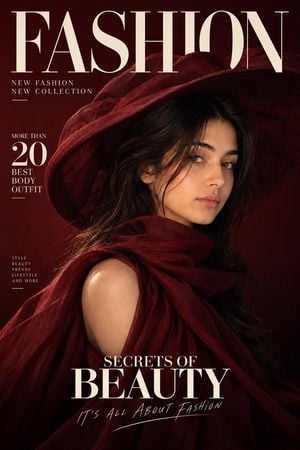
Create a premium, hyper-realistic high-fashion editorial magazine cover using my {argument name="reference face" default="uploaded female face"} as the ONLY identity reference for the main female subject. Preserve my exact facial identity and natural appearance — facial structure, skin tone, eyes, eyebrows, nose, lips, cheekbones, jawline, facial proportions, natural skin texture, and overall likeness. Keep me instantly recognizable. Do not beautify, reshape, feminize, age, de-age, or alter my facial features. Recreate the overall composition, fashion aesthetic, lighting, typography placement, and editorial mood of the reference image, while creating an original design. Pose & styling: A sophisticated female fashion model shown in an elegant three-quarter/profile pose, looking slightly toward the left. She wears a dramatic {argument name="accessory" default="oversized wide-brim sculptural hat"} and a luxurious flowing fashion outfit with a high draped collar/cowl around the neck. The outfit should feel avant-garde, elegant, and couture. Color palette: Deep burgundy, crimson red, wine red, and black, with subtle tonal gradients. Use dramatic cinematic lighting with soft highlights across the face and strong shadows for a mysterious luxury-fashion atmosphere. Background: Minimalist deep burgundy editorial backdrop with a smooth gradient transitioning toward near-black at the bottom. Clean, sophisticated, premium fashion-magazine aesthetic. Typography: Create a large elegant serif magazine title at the upper left reading “FASHION”, with sophisticated editorial typography. Add: “NEW FASHION” “NEW COLLECTION” Include a small editorial text box reading: “MORE THAN 20 BEST BODY OUTFIT” Near the lower center, add the headline: “SECRETS OF” “BEAUTY” Add a small handwritten-style tagline beneath: “IT’S ALL ABOUT FASHION” Typography should look professionally typeset, balanced, refined, and integrated naturally into the composition. Avoid random or misspelled text. Photography style: ultra-realistic professional fashion photography, luxury magazine editorial, cinematic studio lighting, realistic skin texture, detailed fabric, subtle shadows, high dynamic range, sophisticated composition, premium print-quality finish. Composition: vertical magazine-cover layout, subject positioned toward the right side with generous negative space on the left for typography. Keep the face clearly visible beneath the hat brim. Strong visual hierarchy and polished Vogue/Harper’s Bazaar-inspired editorial sophistication.
Choose the primary action to open PicX Studio with the available template settings. Review the model and format, personalize the creative direction, and generate when ready.
Yes. You can change the subject, setting, lighting, mood, format, and available model controls before creating your image.
This template is free to open and customize. Generation usage is shown in PicX Studio before you create.
Start with GPT Image 2, which is the model associated with this template. You can compare another compatible model for a different finish.
Follow a topic to a crawlable collection of related PicX Studio templates.