How do I use the Luxury Social Media Editorial Portrait template?
Edit the prompt in the box under the preview — the template's model and format are already selected — and press Generate. Your version appears right on this page.
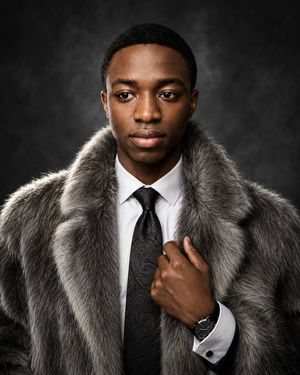
A high-end cinematic studio portrait prompt designed for social media impact, focusing on precise facial identity and vibrant luxury lighting.

This template uses your photo — add one with the + button.
{ "prompt": { "reference": "Use my uploaded reference image as the exact facial identity reference. Preserve my exact facial structure, eyes, nose, jawline, hairstyle, beard, natural skin texture, proportions, and overall identity.", "subject": { "description": "A highly realistic, cinematic, X-viral luxury editorial portrait of me.", "expression": "Looking directly into the camera with a relaxed, confident, genuine smile.", "pose": "Head slightly tilted, with one hand naturally raised toward the collar/neck area.", "hair": "Thick, slightly messy, naturally voluminous dark hair with a few loose strands falling naturally across the forehead.", "facial_hair": "Well-groomed beard and moustache.", "eyewear": "Stylish thick black-frame glasses.", "clothing": "Deep black ribbed turtleneck sweater.", "accessories": { "ring": "A subtle elegant luxury ring on one finger.", "watch": "A premium polished silver metal wristwatch with a dark dial, clearly visible on the wrist." } }, "color_direction": { "style": "Bold, vibrant, cinematic luxury color aesthetic designed to be highly eye-catching and shareable on X.", "shadows": "Rich electric blue and deep violet tones.", "rim_lighting": "Subtle magenta and pink highlights around the hair and shoulders.", "skin_highlights": "Warm golden highlights on the face.", "skin_rendering": "Natural, realistic skin with visible pores and fine details.", "overall_look": "Premium luxury fashion campaign with striking cinematic color separation and a modern viral social-media aesthetic." }, "background": { "description": "Deep midnight-blue and black seamless studio background.", "lighting": "Subtle blue and purple atmospheric gradients.", "effect": "A soft cinematic halo around the subject while the edges naturally fade into darkness." }, "lighting": { "style": "Dramatic low-key cinematic studio lighting.", "key_light": "Soft directional key light illuminating one side of the face.", "rim_light": "Blue and magenta rim lighting around the hair and shoulders.", "highlights": "Subtle warm highlights on the cheekbones, eyes, teeth, hand, ring, and metallic watch.", "contrast": "Rich cinematic contrast with controlled deep shadows and high dynamic range." }, "composition": { "framing": "Close-up upper-body portrait.", "orientation": "Vertical.", "face_position": "Face prominently positioned in the upper center.", "foreground": "Hand and wristwatch clearly visible in the lower foreground.", "focus": "Strong eye contact with sharp facial details and shallow depth of field." } } }
Edit the prompt in the box under the preview — the template's model and format are already selected — and press Generate. Your version appears right on this page.
Yes. You can change the subject, setting, lighting, mood, format, and available model controls before creating your image.


Opening and editing this template is free. Generating uses credits, shown on the Generate button when you are signed in.
Start with GPT Image 2, which is the model associated with this template. You can compare another compatible model for a different finish.
Follow a topic to a crawlable collection of related PicX Studio templates.