How do I use the Surreal Miniature Person on Giant Hand template?
Choose the primary action to open PicX Studio with the available template settings. Review the model and format, personalize the creative direction, and generate when ready.
This prompt creates a striking surreal photograph of a miniature person relaxing on the fingers of a giant human hand, set against an elegant urban backdrop.
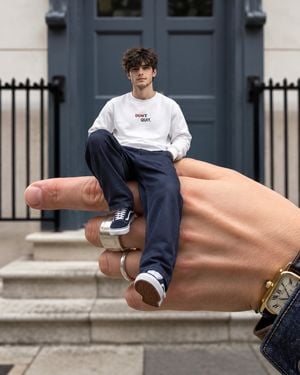
Subject: A {argument name="subject" default="young man"} sitting casually on the fingers of a {argument name="giant object" default="giant human hand"}, creating a surreal miniature-person illusion. He has curly brown hair, black sunglasses, light stubble, a white sweatshirt with small “DON’T QUIT.” text on the chest, loose navy blue trousers, and white and navy sneakers. Style: Photorealistic surreal street photography, realistic miniature effect, natural proportions, subtle cinematic look, shallow depth of field, highly detailed skin and clothing textures. Scene: The giant hand is positioned in the foreground, with the young man sitting naturally across the fingers as if they were a bench. He sits relaxed with one knee raised and one leg hanging down. The hand wears several simple silver rings and a vintage rectangular gold wristwatch is visible near the lower right corner. Background: {argument name="background" default="Elegant city townhouse entrance"} with large dark blue double doors, pale stone walls, black iron railings, and stone steps. The background is softly blurred to emphasize the miniature subject and giant hand. Camera: Eye-level perspective, close-up foreground composition, 35mm lens, realistic depth of field, sharp focus on the man and hand, soft background bokeh. Lighting: Soft natural daylight, slightly overcast, balanced exposure, realistic shadows, warm skin tones. Aspect ratio: 4:5 vertical.
Choose the primary action to open PicX Studio with the available template settings. Review the model and format, personalize the creative direction, and generate when ready.
Yes. You can change the subject, setting, lighting, mood, format, and available model controls before creating your image.
This template is free to open and customize. Generation usage is shown in PicX Studio before you create.
Start with GPT Image 2, which is the model associated with this template. You can compare another compatible model for a different finish.
Follow a topic to a crawlable collection of related PicX Studio templates.