How do I use the Autumn Alpine Lake Above Cloud Sea template?
Choose the primary action to open PicX Studio with the available template settings. Review the model and format, personalize the creative direction, and generate when ready.
A realistic vertical travel landscape showing a vivid autumn mountain forest, blue alpine lake, rugged peaks, and a sea of clouds.
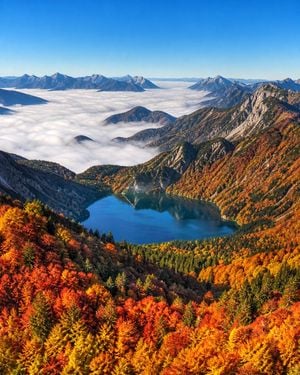
Create a highly realistic, ultra-detailed landscape photograph of a {argument name="season" default="autumn"} alpine mountain valley viewed from a high overlook. In the foreground and lower half, show dense forest covering steep slopes, with vivid fall foliage in saturated crimson, orange, gold, and yellow mixed with dark green conifers. In the middle distance, place a calm deep-blue mountain lake in a bowl-shaped valley, reflecting the surrounding forested slopes and rocky peaks. Surround the lake with rugged mountains and steep ridgelines, including pale gray exposed rock faces on the right and darker forested mountains on the left. Beyond the lake, fill the valley with a thick white sea of clouds or fog, smooth and rolling like cotton, with multiple distant mountain peaks and ridges emerging above it across the horizon. Use a clear bright blue sky with no clouds above, crisp morning light, high visibility, strong natural contrast, and vibrant colors. Composition should be vertical, approximately 4:5, with the lake centered slightly below the middle, autumn forest dominating the foreground, cloud sea spanning the background, and dramatic alpine peaks framing the scene. Style: professional travel and nature photography, sharp focus throughout, realistic lighting, no people, no buildings, no text, no watermark.
Choose the primary action to open PicX Studio with the available template settings. Review the model and format, personalize the creative direction, and generate when ready.
Yes. You can change the subject, setting, lighting, mood, format, and available model controls before creating your image.
This template is free to open and customize. Generation usage is shown in PicX Studio before you create.
Start with GPT Image 2, which is the model associated with this template. You can compare another compatible model for a different finish.
Follow a topic to a crawlable collection of related PicX Studio templates.