How do I use the Unmotivated Hamster Manga Panel template?
Choose the primary action to open PicX Studio with the available template settings. Review the model and format, personalize the creative direction, and generate when ready.
A black-and-white manga-style prompt for creating a lazy round hamster on tatami with humorous Japanese text bubbles.
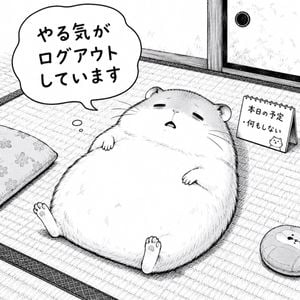
Create a square black-and-white manga panel illustration of a very round, fluffy hamster lying on its back on a tatami mat floor in a traditional Japanese room, looking completely unmotivated and sleepy. The hamster is the central subject, huge and pear-shaped with tiny paws resting on its belly, two little feet sticking up at the bottom, small ears, half-closed eyes, and a small open mouth. Use delicate ink linework, cross-hatching, manga screentone texture, and soft fur strokes, with a cute deadpan comedic mood. Add one large irregular speech bubble above the hamster on the left containing Japanese text: {argument name="speech bubble text" default="やる気が\nログアウト\nしています"}. Include exactly 3 small thought-bubble dots leading from the hamster toward the speech bubble. On the right side, place a small standing spiral-bound desk calendar sign angled in perspective with Japanese text: {argument name="calendar text" default="本日の予定\n・何もしない"} and a tiny doodle of a hamster face near the bottom. Show the room details: tatami weave lines and dark fabric borders, a sliding door or wall panel in the upper right with a round black pull handle, a patterned floor cushion partially visible on the left edge, and a round cushion or small plush-like mat partially visible in the lower right. Keep the composition clean and mostly white, with the hamster occupying most of the lower center, humorous and cozy. No color, no photorealism, no extra characters, no watermark.
Choose the primary action to open PicX Studio with the available template settings. Review the model and format, personalize the creative direction, and generate when ready.
Yes. You can change the subject, setting, lighting, mood, format, and available model controls before creating your image.
This template is free to open and customize. Generation usage is shown in PicX Studio before you create.
Start with GPT Image 2, which is the model associated with this template. You can compare another compatible model for a different finish.
Follow a topic to a crawlable collection of related PicX Studio templates.