How do I use the Paris Floral Dress Anime Illustration template?
Choose the primary action to open PicX Studio with the available template settings. Review the model and format, personalize the creative direction, and generate when ready.
A detailed prompt for generating an elegant anime fashion illustration of a woman in a blue floral dress walking through sunlit Montmartre.
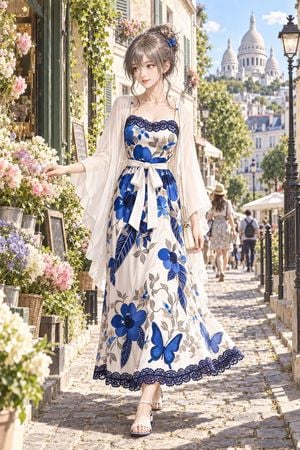
Create a polished full-body anime-style fashion illustration of {argument name="character name" default="a graceful young woman"} walking down a sunlit cobblestone street in Montmartre, Paris, with the Sacré-Cœur basilica softly visible in the distance. She has {argument name="hair color" default="ash-gray brown"} hair styled in a loose messy updo with soft face-framing strands and a small blue butterfly hair accessory, fair skin, delicate features, and a calm slightly wistful expression as she looks to the side. Her outfit is a romantic summer dress: an ivory ankle-length camisole dress with dark navy lace trim at the neckline and hem, thin straps, a fitted bodice, a wide ivory waist ribbon tied in a bow, and a flowing skirt printed with large cobalt-blue flowers, gray vines and leaves, beige ornamental details, and exactly 2 prominent blue butterflies on the lower skirt. Add a sheer translucent ivory kimono-style shawl or robe with wide fluttering sleeves draped over her shoulders, a slim gold chain shoulder bag, and white open-toe heeled sandals. Set the scene beside a charming Parisian flower shop with exactly 5 visible flower display groupings: pink roses and white blossoms climbing near the shop entrance, a bucket of pale purple flowers, a basket of hydrangea-like pastel blooms, a foreground cluster of soft white flowers, and greenery with small pink blossoms on the wall. Include wrought-iron railings, vintage street lamps, cream stone buildings with green shutters, distant pedestrians, café umbrellas, and warm summer sunlight. Use a refined high-detail Japanese character-sheet texture blended with warm painterly realism, crisp clean linework without jagged edges, luminous skin, soft atmospheric depth of field, intricate textile detail, elegant proportions, vertical portrait composition, bright blue sky, romantic travel-poster mood, no text, no watermark.
Choose the primary action to open PicX Studio with the available template settings. Review the model and format, personalize the creative direction, and generate when ready.
Yes. You can change the subject, setting, lighting, mood, format, and available model controls before creating your image.
This template is free to open and customize. Generation usage is shown in PicX Studio before you create.
Start with GPT Image 2, which is the model associated with this template. You can compare another compatible model for a different finish.
Follow a topic to a crawlable collection of related PicX Studio templates.