How do I use the Photoreal Emilia Cosplay Portrait template?
Choose the primary action to open PicX Studio with the available template settings. Review the model and format, personalize the creative direction, and generate when ready.
A vertical photorealistic cosplay portrait of Emilia from Re:Zero in a bright modern indoor setting, useful for anime-to-real character art.
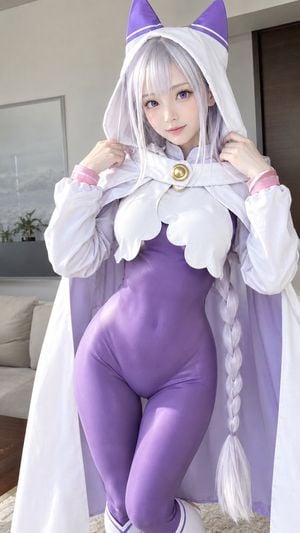
Create a photorealistic vertical cosplay portrait of {argument name="character name" default="Emilia from Re:Zero"} as a young woman standing indoors in a modern apartment. She has very pale skin, large soft violet eyes, a gentle slight smile, and long {argument name="hair color" default="silver-white"} hair with straight bangs and one thick braid falling down the right side of her body. She wears a glossy fitted {argument name="bodysuit color" default="purple"} bodysuit, a white hooded cape with lavender lining, oversized purple elf-like cat-ear shapes on top of the hood with thin white stripe accents, white scalloped chest panels, long puffy white sleeves with pink cuffs, a round gold brooch at the collar, and white thigh-high boot tops with purple trim. Pose her from mid-thigh upward, centered and facing the camera, both hands lightly holding the edges of her hood near her shoulders, with relaxed shoulders and an elegant cute expression. The setting is a bright contemporary living room with a beige sofa, soft rug, neutral walls, a framed wall art piece, a small plant, and a dark wooden door in the background. Use natural daylight from the left, soft shadows, realistic skin texture, detailed fabric folds and satin sheen, shallow depth of field, high-resolution fashion photography, 85mm lens look, clean composition, no text, no watermark.
Choose the primary action to open PicX Studio with the available template settings. Review the model and format, personalize the creative direction, and generate when ready.
Yes. You can change the subject, setting, lighting, mood, format, and available model controls before creating your image.
This template is free to open and customize. Generation usage is shown in PicX Studio before you create.
Start with GPT Image 2, which is the model associated with this template. You can compare another compatible model for a different finish.
Follow a topic to a crawlable collection of related PicX Studio templates.