How do I use the Japanese Text Ball Gown Portrait template?
Choose the primary action to open PicX Studio with the available template settings. Review the model and format, personalize the creative direction, and generate when ready.
A photorealistic fantasy fashion portrait of a blonde woman wearing a magenta-and-white striped gown printed with Japanese motivational text on a sparkling thea
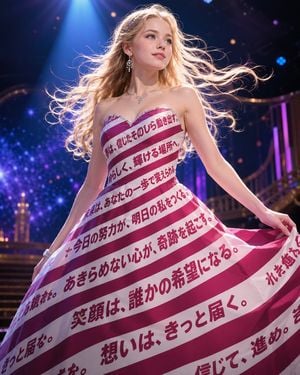
Create a glamorous vertical fashion portrait of a young blonde woman on a theatrical stage, shown from mid-thigh up in a dynamic princess-like pose, holding out the sides of her voluminous strapless ball gown as if mid-twirl. She has fair skin, blue eyes, soft makeup, long wavy {argument name="hair color" default="golden blonde"} hair blown dramatically to the right by a stage fan, and a calm hopeful expression looking slightly upward off-camera. She wears sparkling drop earrings, a delicate silver necklace, and a bracelet. The dress is the central concept: a couture strapless gown with a sweetheart neckline and wide diagonal candy-cane stripes in deep magenta and white, covered with bold Japanese motivational typography printed directly across the fabric in dark magenta. Include exactly 9 visible Japanese text bands on the dress, with phrases resembling: 「夢は、信じたそのひら動き出す。」, 「あなたらしく、輝ける場所へ。」, 「未来は、あなたの一歩で変えられる。」, 「今日の努力が、明日の私をつくる。」, 「あきらめない心が、奇跡を起こす。」, 「笑顔は、誰かの希望になる。」, 「想いは、きっと届く。」, 「信じて、進め。」, and partial cropped edge text near the hem. The background is a dreamy concert or ballroom stage with purple-blue spotlights, bokeh lights, sparkling particles, a staircase and balcony railings softly blurred, cinematic depth of field, rim lighting around the hair, high-detail photorealistic fantasy editorial style, vibrant magenta and violet color grading, no watermark, no extra people. Use {argument name="dress stripe color" default="deep magenta"} for the colored stripes, {argument name="main dress text" default="Japanese motivational phrases"} for the printed typography, and {argument name="setting" default="glittering purple-blue theater stage"}.
Choose the primary action to open PicX Studio with the available template settings. Review the model and format, personalize the creative direction, and generate when ready.
Yes. You can change the subject, setting, lighting, mood, format, and available model controls before creating your image.
This template is free to open and customize. Generation usage is shown in PicX Studio before you create.
Start with GPT Image 2, which is the model associated with this template. You can compare another compatible model for a different finish.
Follow a topic to a crawlable collection of related PicX Studio templates.