How do I use the Architectural Watercolor Sketch template?
Choose the primary action to open PicX Studio with the available template settings. Review the model and format, personalize the creative direction, and generate when ready.
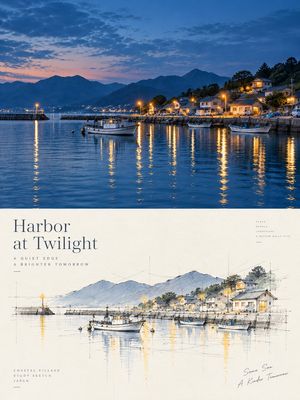
A customizable architectural sketching prompt that combines ink linework with loose watercolor washes to create vibrant, atmospheric interiors.
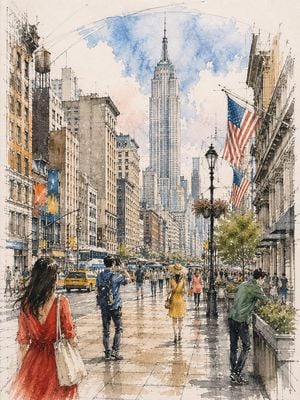
Loose watercolor and pen sketch inside {argument name="location" default="[LOCATION / SUBJECT]"}, seen from {argument name="viewpoint" default="[VIEWPOINT]"} toward {argument name="focal point" default="[ARCHITECTURAL FOCAL POINT]"}, {argument name="central feature" default="[CENTRAL FEATURE]"} at center, {argument name="overhead structure" default="[OVERHEAD ARCHITECTURAL FEATURE]"} overhead. Ink line drawn first and left visible through every wash — {argument name="linework details" default="[ARCHITECTURAL LINEWORK]"} and {argument name="floor grid" default="[GROUND / FLOOR GRID]"} overshooting into blank paper, one long confident arc for {argument name="major curve" default="[MAJOR CURVE]"}. Wash about 65%, warm below and cool above: {argument name="warm palette" default="[WARM ARCHITECTURAL PALETTE]"} on {argument name="lower elements" default="[LOWER ARCHITECTURAL ELEMENTS]"}, {argument name="cool palette" default="[COOL PALETTE]"} over {argument name="upper feature" default="[UPPER ARCHITECTURAL FEATURE]"} thinning to bare line at the crown. Diagonal light shafts left as reserved white paper, the brightest value. Floor in {argument name="floor wash" default="[FLOOR COLOR / WASH]"} with a backrun. Figures in three depth bands, clustered and gapped, never in a row: {argument name="near figures" default="[NEAR FIGURES AND SCALE]"}, one cropped by the bottom edge; {argument name="mid figures" default="[MID FIGURES AND SCALE]"} scattered at different distances, {argument name="midground cluster" default="[MIDGROUND CLUSTER]"} clustered at {argument name="focal point" default="[FOCAL POINT]"}; {argument name="far figures" default="[FAR FIGURES AND SCALE]"} dissolving into strokes. Different actions each — {argument name="action 1" default="[ACTION 1]"}, {argument name="action 2" default="[ACTION 2]"}, {argument name="action 3" default="[ACTION 3]"}
Choose the primary action to open PicX Studio with the available template settings. Review the model and format, personalize the creative direction, and generate when ready.
Yes. You can change the subject, setting, lighting, mood, format, and available model controls before creating your image.
This template is free to open and customize. Generation usage is shown in PicX Studio before you create.
Start with GPT Image 2, which is the model associated with this template. You can compare another compatible model for a different finish.
Follow a topic to a crawlable collection of related PicX Studio templates.