How do I use the Cinematic Video Game Cutscene with Subtitles template?
Choose the primary action to open PicX Studio with the available template settings. Review the model and format, personalize the creative direction, and generate when ready.
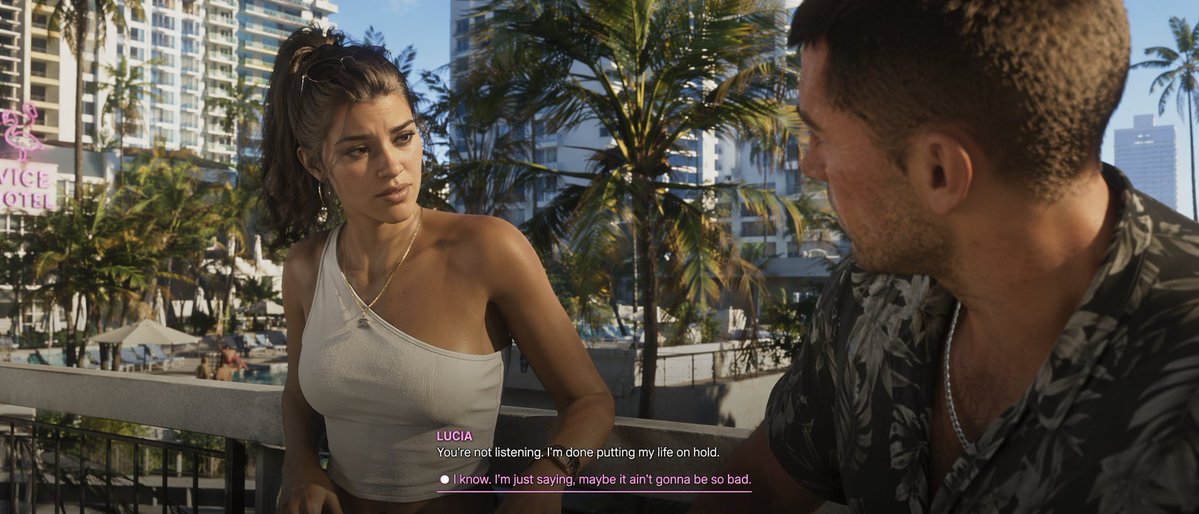
Generates a photorealistic video game cutscene screenshot featuring two characters conversing with customizable subtitle UI. (free to use) — Free AI image template on PicX Studio.
A {argument name="visual style" default="photorealistic modern video game cutscene"} of a young Latina woman and a Caucasian man conversing on a {argument name="setting" default="tropical city balcony overlooking palm trees and a hotel pool"}. The woman faces the camera, wearing a messy high ponytail, hoop earrings, and a white one-shoulder crop top, looking serious. The man is seen from an over-the-shoulder profile on the right, wearing a dark floral shirt. The background features a pink neon 'VICE HOTEL' sign. At the bottom center, video game subtitles show the speaker name {argument name="speaker name" default="LUCIA"} in pink, above the white dialogue {argument name="dialogue text" default="You're not listening. I'm done putting my life on hold."}. Below is a player choice with a white circle and pink underlined text reading {argument name="response option" default="I know. I'm just saying, maybe it ain't gonna be so bad."}.
Use Cinematic Video Game Cutscene with Subtitles to plan an AI image around gpt-image-2 generation, themes such as en and gpt-image-2. Match the preview's composition first, then personalize the subject, setting, and mood for your own project.
Use the primary action to load the template settings in PicX Studio.
Adjust the subject and creative details for your destination.
Create the image, compare the result with the preview, and refine one variable at a time.
A continuous mix — similar concepts first, woven with same-model prompts and fresh picks from the catalog.
Choose the primary action to open PicX Studio with the available template settings. Review the model and format, personalize the creative direction, and generate when ready.
Yes. You can change the subject, setting, lighting, mood, format, and available model controls before creating your image.
This template is free to open and customize. Generation usage is shown in PicX Studio before you create.
Start with gpt-image-2, which is the model associated with this template. You can compare another compatible model for a different finish.
Follow a topic to a crawlable collection of related PicX Studio templates.
39,157 public templates available. Verified via the PicX Studio public templates API; refreshed hourly.
A continuous mix — similar concepts first, woven with same-model prompts and fresh picks from the catalog.