How do I use the Gothic Maid Acrobatic Kick template?
Choose the primary action to open PicX Studio with the available template settings. Review the model and format, personalize the creative direction, and generate when ready.
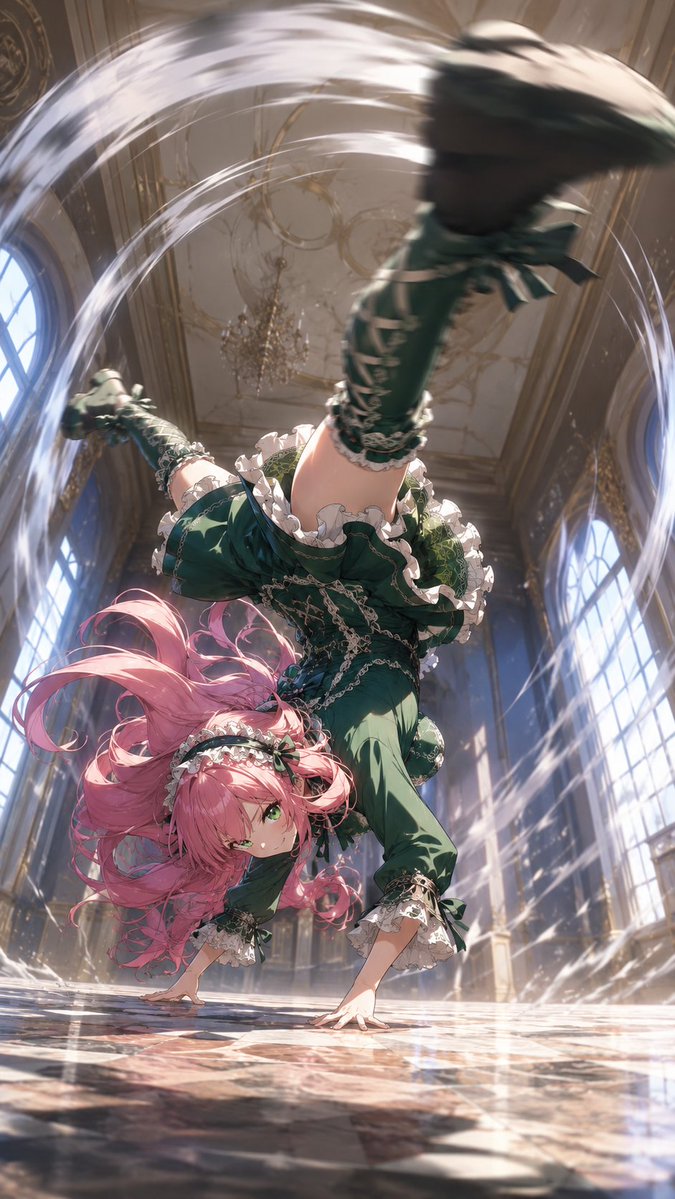
Generates a cinematic anime action scene of a pink-haired gothic maid performing a dramatic breakdance-style kick in a palace ballroom. (free to use) — Free AI image template on PicX Studio.
Create a dynamic vertical anime action illustration of a {argument name="character type" default="pink-haired gothic lolita maid girl"} performing an acrobatic one-handed breakdance handstand kick inside a grand European palace ballroom. The camera is extremely low near the polished marble floor, looking upward with dramatic foreshortening: one booted leg thrusts close to the viewer and is heavily motion-blurred, the other leg extends backward, while one hand presses on the reflective floor and the character looks toward the viewer with a confident fierce expression. She has long flowing {argument name="hair color" default="rose pink"} twin-tail hair whipping through the air, green eyes, frilly white maid headband, and an ornate {argument name="outfit color" default="deep emerald green"} gothic lolita maid dress with puff sleeves, ruffled white lace trim, corset-like bodice, bows, layered skirt, stockings, and lace-up heeled boots. Add bright white circular speed trails and arcing wind ribbons around her spinning body to emphasize high-speed action. The environment is a luxurious sunlit ballroom with tall arched windows on both sides, gilded wall details, high ceiling, chandeliers, dust motes, shafts of light, and glossy patterned marble reflections. Use cinematic lighting, extreme perspective, intense motion blur, sharp focus on the face and supporting hand, detailed fabric folds and lace, elegant fantasy anime rendering, high detail, vertical composition, dramatic action energy, no text, no watermark.
Use Gothic Maid Acrobatic Kick to plan an AI image around gpt-image-2 generation, themes such as en and gpt-image-2. Match the preview's composition first, then personalize the subject, setting, and mood for your own project.
Use the primary action to load the template settings in PicX Studio.
Adjust the subject and creative details for your destination.
Create the image, compare the result with the preview, and refine one variable at a time.
A continuous mix — similar concepts first, woven with same-model prompts and fresh picks from the catalog.
Choose the primary action to open PicX Studio with the available template settings. Review the model and format, personalize the creative direction, and generate when ready.
Yes. You can change the subject, setting, lighting, mood, format, and available model controls before creating your image.
This template is free to open and customize. Generation usage is shown in PicX Studio before you create.
Start with gpt-image-2, which is the model associated with this template. You can compare another compatible model for a different finish.
Follow a topic to a crawlable collection of related PicX Studio templates.
39,157 public templates available. Verified via the PicX Studio public templates API; refreshed hourly.
A continuous mix — similar concepts first, woven with same-model prompts and fresh picks from the catalog.