
Chaoshan Beef Ball Vintage Food Poster
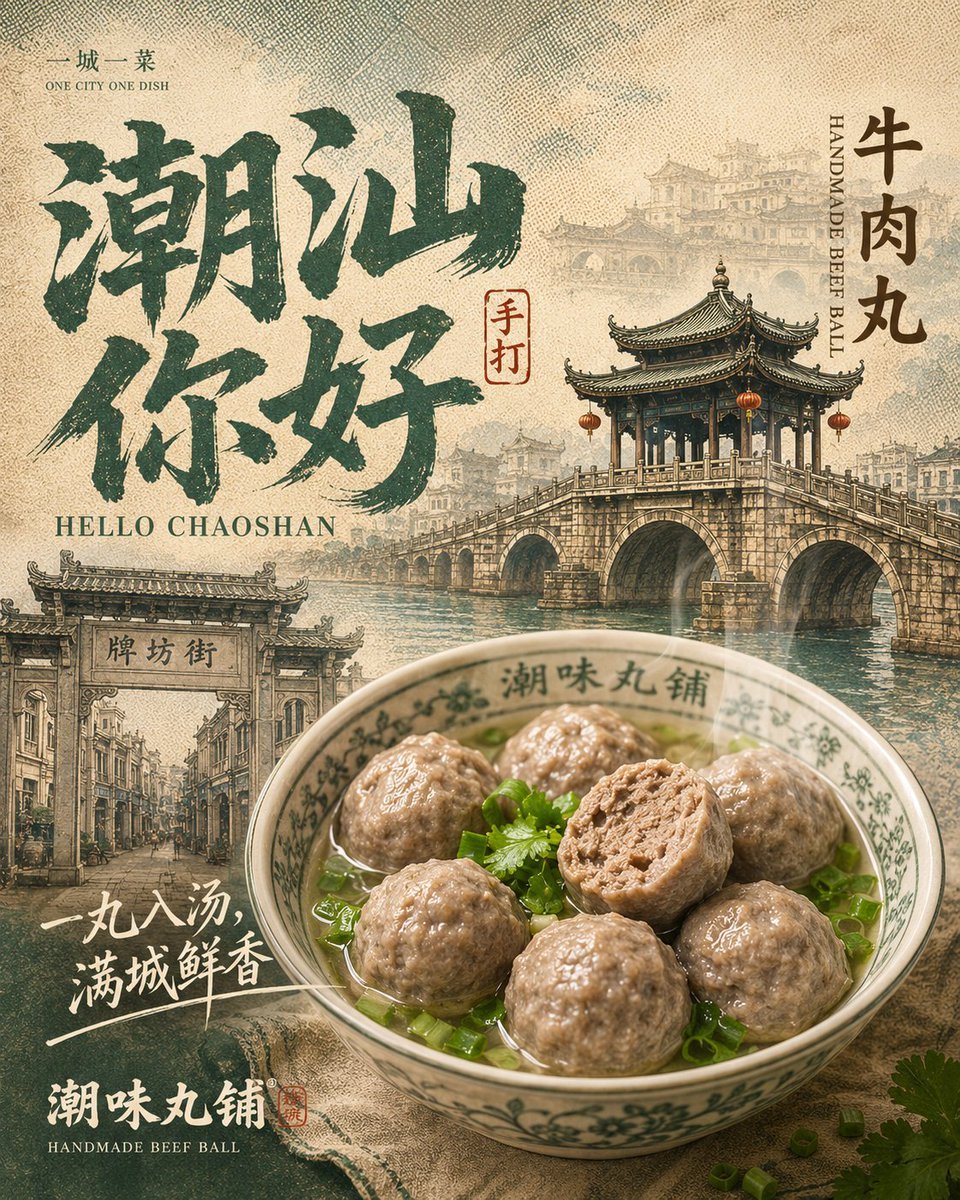
A retro Chinese city food poster featuring Chaoshan landmarks, brush calligraphy, and a realistic bowl of handmade beef balls for culinary tourism or restaurant branding.
- Prompt included
- Model and format preset
- Free template
The prompt behind this image
Copy the exact prompt behind Chaoshan Beef Ball Vintage Food Poster, or open it in the studio and make it yours.
Goal: Create a vintage Chinese travel-and-food poster for {argument name="city name" default="Chaoshan"} featuring {argument name="local dish" default="handmade beef balls"}, combining local landmark architecture, regional flavor, and retro printed-paper texture. Canvas: Square poster, 4:5-feeling composition within a 1:1 frame, warm beige rice-paper background with heavy halftone grain, faded ink wash, slightly weathered edges, muted teal-green and sepia palette with realistic food photography blended into illustrated print style. Layout: Large expressive dark teal Chinese brush-calligraphy dominates the upper left and center, reading “潮汕你好”. Small top-left text reads “一城一菜” with the English subtitle “ONE CITY ONE DISH”. Below the main calligraphy, add serif English text “HELLO CHAOSHAN”. On the right side, place vertical Chinese text “牛肉丸” with small vertical English text beside it reading “HANDMADE BEEF BALL”. Add a small red seal stamp near the calligraphy reading “手打”. Background landmarks: Use three distinct architectural elements: 1) a detailed traditional arched stone bridge with a double-roof pavilion and red lanterns across the mid-right, reflected in water; 2) a pale faded skyline of old Chaoshan buildings behind the bridge; 3) a street gate and old arcade street scene in the lower left, with the sign “牌坊街”. Keep all architecture semi-illustrated, printed like an old tourism poster, with atmospheric depth and pale sepia haze. Foreground dish: In the lower right foreground, place one large porcelain bowl of clear broth containing exactly 7 visible beef balls: six whole round beef balls and one cut-open beef ball showing the textured minced interior. Garnish with chopped green onions and cilantro. The bowl has green floral rim patterns and Chinese characters around the inside rim, filled with glossy soup highlights. The food should look appetizing and more realistic than the background, with warm lighting and shallow depth. Additional text: In the lower left, add handwritten white Chinese slogan text “一丸入汤,满城鲜香” with two brush underline strokes. At the bottom left, add bold white Chinese brand-style text “潮味丸铺” and small English text below it “HANDMADE BEEF BALL”, plus a tiny red seal accent. Visual style: Retro Chinese food tourism poster, screen-printed travel postcard, hand-painted landmark collage, ink-brush typography, aged paper, stippled halftone dots, layered translucent city silhouettes, nostalgic restaurant branding. Make the composition dense but balanced, with the bowl overlapping the lower architecture. Constraints: Use exactly 7 visible beef balls and exactly 3 main landmark/background architectural elements. Preserve the specified Chinese and English text accurately. Avoid modern neon, flat vector minimalism, people, logos, QR codes, or watermarks.
How to use Chaoshan Beef Ball Vintage Food Poster in 3 steps
- 1Upload ImagePNG, JPG or paste
Add your photo
Upload the photo the template builds on. The prompt, model and format are already set.
- 2…a portrait of your subject in softgolden-hour light, 85mm…
Personalize
Edit the subject and creative details for your destination.
- 3Generate
Generate
Press Generate — your image is created in PicX Studio, so you can compare it with the original and refine one variable at a time.
More like this
Templates with the same subject, style or setup. Open one to see its prompt.












Make it yours
Chaoshan Beef Ball Vintage Food Poster works as-is. These are the safest ways to change it without losing the look.
Change one field
Copy a single group, rewrite it, and generate again so you can see what that field is doing.
Keep the frame, change the subject
Hold the composition and light of Chaoshan Beef Ball Vintage Food Poster, then swap wardrobe, props or the person for a new take.
| If the result… | Why | Fix |
|---|---|---|
| The result drifts from the preview | Too many fields changed at once. | Reuse Chaoshan Beef Ball Vintage Food Poster as-is first, then change one group — subject, light, or setting. |
| The model over-stylizes the scene | The prose prompt leaves finish and camera underspecified. | Add one camera or lighting sentence and stay on GPT Image 2. |
More GPT Image 2 templates
Other prompts made for GPT Image 2.

Six VTuber Japanese Logo Sheet

Realistic Portrait of Woman and Deer

The Vista Modular Condo Poster

AI Model Routing Comparison Infographic

2.5D Anime Art Board

Isometric Productivity Desk Scene

New York Double Exposure Poster

Four-Panel AI Landscape Comparison

Japanese Tatami Lifestyle Magazine Cover

NESCAFÉ Coffee Map Poster
More image prompts
Fresh picks from across the catalog.

Tiny Self Motivational Collage
Tropical Bohemian Fashion
Dinosaur Jungle Adventure Collage
Photorealistic Modern Country Cowgirl Portrait
Pilates Selfie Prompt
Ultra-Realistic Portrait with Vintage Camera Prompt

Editorial Street Photography Candid Capture
Anime Cosmos Credit Card Design
Editorial Portrait of Woman and Cat with Braid Interaction
Fashion Editorial Description Using Goog
Browse template categories
Chaoshan Beef Ball Vintage Food Poster questions
How do I use the Chaoshan Beef Ball Vintage Food Poster template?
Add your photo if the template asks for one, edit the prompt if you like — the template's model and format are already selected — and press Generate. Your version opens in PicX Studio.
Can I customize the Chaoshan Beef Ball Vintage Food Poster template?
Yes. You can change the subject, setting, lighting, mood, format, and available model controls before creating your image.
Is the Chaoshan Beef Ball Vintage Food Poster template free?
Opening and editing this template is free. Generating uses credits, shown on the Generate button when you are signed in.
Which AI model should I use?
Start with GPT Image 2, which is the model associated with this template. You can compare another compatible model for a different finish.
Looking for something else? Browse all templates.

Your photo, any look
Thousands of ready templates for every top image and video model, from one credit balance.