How do I use the GTA-Style Beach Club Gameplay Screenshot template?
Choose the primary action to open PicX Studio with the available template settings. Review the model and format, personalize the creative direction, and generate when ready.
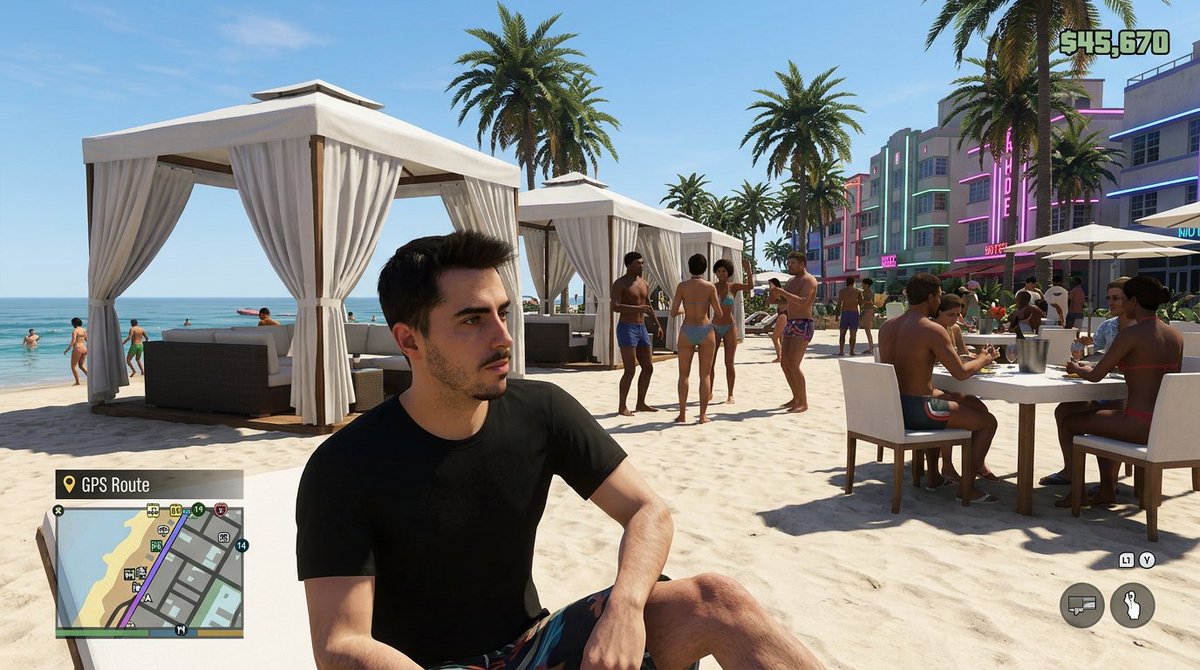
A realistic next-gen open-world game screenshot showing a playable character at a lively luxury beach club, ideal for mock GTA-style promo visuals or social media comparisons. (free to use) — Free AI image template on PicX Studio.
Create a hyper-realistic open-world crime video game screenshot in the style of a modern Miami-inspired beach club mission scene, captured in bright midday sunlight with a clear blue sky. Show a third-person gameplay-like composition with {argument name="character description" default="a young adult man with short dark hair, light skin, wearing a plain black t-shirt and patterned swim shorts"} seated casually in the foreground on pale sand, turned slightly to the side as if the player camera stopped near him. Place him large in frame, off-center left, with natural relaxed body posture. Behind him, depict an upscale beachfront club with exactly 3 white cabanas with flowing curtains visible across the sand, multiple tall palm trees, turquoise ocean water on the left, and an art-deco hotel strip on the right with pastel facades and neon accents. Populate the beach with a lively crowd of exactly 12 background people in swimwear: some standing and chatting, some walking near the shoreline, and exactly 2 seated at a dining table on the right with food and drinks. Include white lounge furniture, umbrellas, and a polished social party atmosphere. Add a convincing video game HUD overlay: a square mini-map in the bottom-left labeled {argument name="map label" default="GPS Route"}, weapon and control icons in the bottom-right, and a money counter in the top-right reading {argument name="money amount" default="$45,670"}. The overall feel should resemble a next-gen Grand Theft Auto VI gameplay screenshot, cinematic but clearly in-game, with sharp environmental detail, realistic shadows, vibrant coastal color grading, and subtle satirical luxury-beach energy in {argument name="city setting" default="Vice City"}.
Use GTA-Style Beach Club Gameplay Screenshot to plan an AI image around gpt-image-2 generation, themes such as en and gpt-image-2. Match the preview's composition first, then personalize the subject, setting, and mood for your own project.
Use the primary action to load the template settings in PicX Studio.
Adjust the subject and creative details for your destination.
Create the image, compare the result with the preview, and refine one variable at a time.
A continuous mix — similar concepts first, woven with same-model prompts and fresh picks from the catalog.
Choose the primary action to open PicX Studio with the available template settings. Review the model and format, personalize the creative direction, and generate when ready.
Yes. You can change the subject, setting, lighting, mood, format, and available model controls before creating your image.
This template is free to open and customize. Generation usage is shown in PicX Studio before you create.
Start with gpt-image-2, which is the model associated with this template. You can compare another compatible model for a different finish.
Follow a topic to a crawlable collection of related PicX Studio templates.
39,157 public templates available. Verified via the PicX Studio public templates API; refreshed hourly.
A continuous mix — similar concepts first, woven with same-model prompts and fresh picks from the catalog.