How do I use the Tech CEOs Awkward Meme Photo template?
Choose the primary action to open PicX Studio with the available template settings. Review the model and format, personalize the creative direction, and generate when ready.
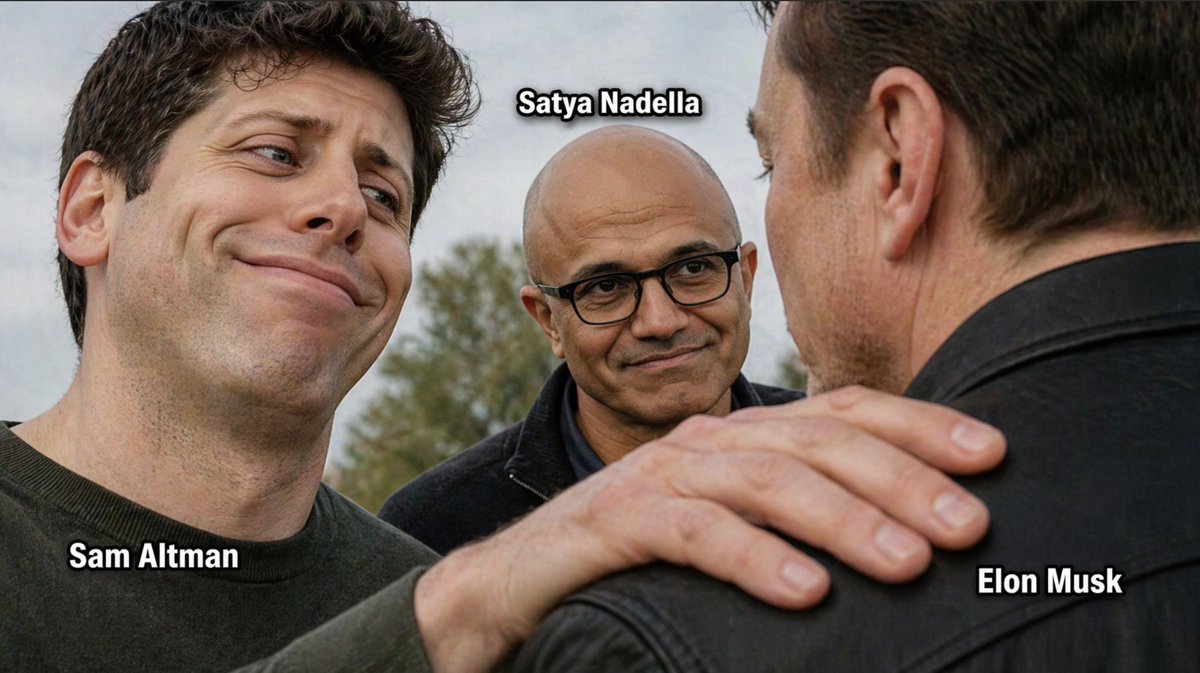
This prompt generates a photorealistic three-person tech meme image with labeled faces, useful for social media jokes and internet-style reaction memes. (free to use) — Free AI image template on PicX Studio.
A funny photorealistic meme-style candid outdoor photo of three well-known tech CEOs standing close together in an awkward, emotionally loaded triangle. On the left foreground, {argument name="left person name" default="Sam Altman"} is shown in a close-up three-quarter view, with dark curly hair, light skin, a dark crewneck shirt, and an exaggerated smug, pleased, slightly teary-eyed grin as he looks toward the man on the right. In the center background, {argument name="center person name" default="Satya Nadella"} stands between them, bald with glasses, medium-brown skin, wearing a dark zip-up jacket, giving a calm, knowing, faintly amused smile while looking toward the man on the right. On the right foreground, {argument name="right person name" default="Elon Musk"} is seen mostly from the back and side, with short dark hair and a black leather jacket, his face largely turned away from the camera. A large hand from the left person rests on the right person’s shoulder in the foreground, creating the comedic tension. Use a shallow depth of field, natural overcast daylight, soft realistic skin texture, and documentary-style photography. Add exactly 3 bold white meme labels with thick black outline placed near each person: {argument name="left label" default="Sam Altman"} at the lower left near the left man, {argument name="center label" default="Satya Nadella"} above the center man’s head, and {argument name="right label" default="Elon Musk"} at the lower right near the right man. Landscape composition, tight crop on faces and shoulder, realistic proportions, internet meme energy.
Use Tech CEOs Awkward Meme Photo to plan an AI image around gpt-image-2 generation, themes such as en and gpt-image-2. Match the preview's composition first, then personalize the subject, setting, and mood for your own project.
Use the primary action to load the template settings in PicX Studio.
Adjust the subject and creative details for your destination.
Create the image, compare the result with the preview, and refine one variable at a time.
A continuous mix — similar concepts first, woven with same-model prompts and fresh picks from the catalog.
Choose the primary action to open PicX Studio with the available template settings. Review the model and format, personalize the creative direction, and generate when ready.
Yes. You can change the subject, setting, lighting, mood, format, and available model controls before creating your image.
This template is free to open and customize. Generation usage is shown in PicX Studio before you create.
Start with gpt-image-2, which is the model associated with this template. You can compare another compatible model for a different finish.
Follow a topic to a crawlable collection of related PicX Studio templates.
39,157 public templates available. Verified via the PicX Studio public templates API; refreshed hourly.
A continuous mix — similar concepts first, woven with same-model prompts and fresh picks from the catalog.