
Posture Analysis Report Infographic
A premium Chinese before-and-after posture correction report board for generating body alignment diagnostics, styling advice, and a 7-day improvement plan.
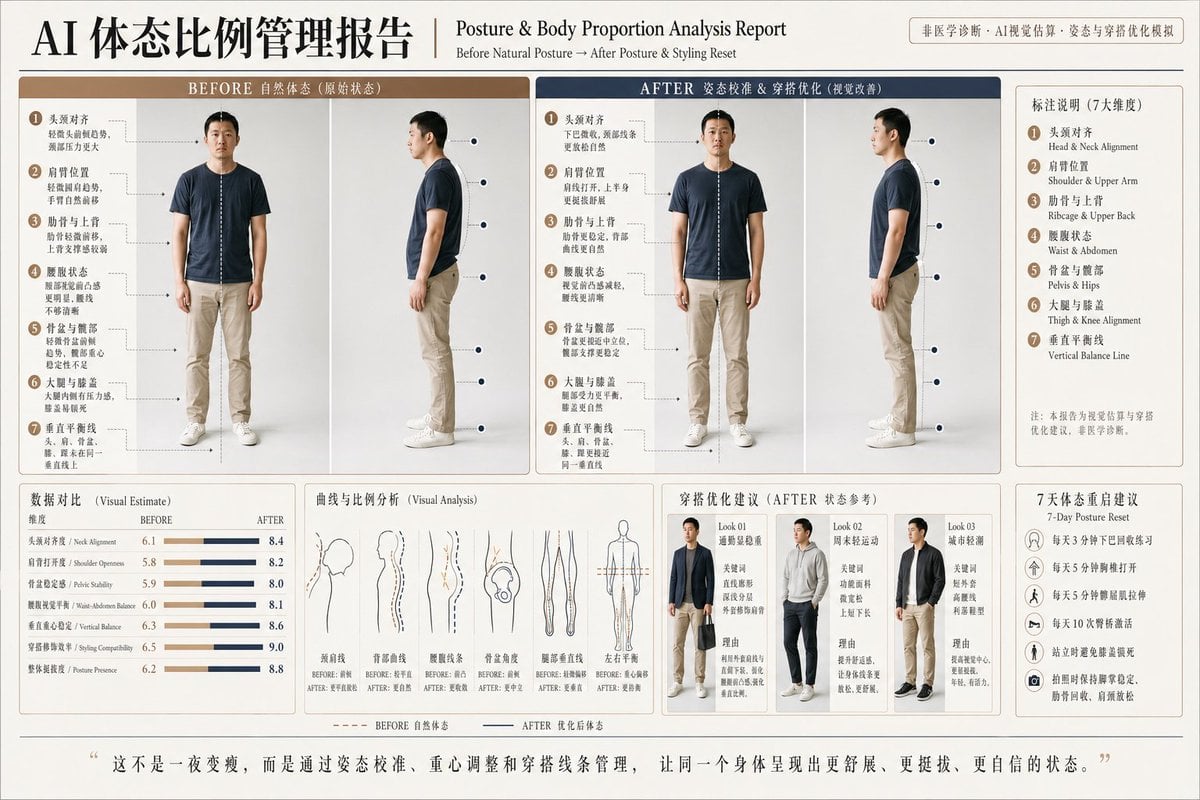
- Prompt included
- Model and format preset
- Premium template
The prompt behind this image
Copy the exact prompt behind Posture Analysis Report Infographic, or open it in the studio and make it yours.
- Type
- posture and body proportion analysis report infographic
- Style
- clean medical-meets-fashion editorial board, neutral beige and navy palette, premium Chinese wellness poster, high-resolution studio composite, symmetrical grid layout, soft shadowing, minimalist white background
- Language
- Chinese with small English subtitles
- Title Block › Main Title
- AI 体态比例管理报告
- Title Block › Subtitle
- Posture & Body Proportion Analysis Report
- Title Block › Tagline
- Before Natural Posture → After Posture & Styling Reset
- Subject › Person
- young adult East Asian man with blurred face, short black hair, average build, wearing a dark navy crew-neck t-shirt, light khaki slim pants, and white sneakers
- Subject › Photo Style
- full-body studio photos on plain light gray background, front view and side view
- Layout › Sections › 0 › Title
- BEFORE 自然体态(原始状态)
- Layout › Sections › 0 › Position
- upper left
- Layout › Sections › 0 › Count
- 2
- Layout › Sections › 0 › Labels
- front view before, side view before
- Layout › Sections › 0 › Details
- two full-body photos with dotted vertical center line on the front view and 7 numbered callout annotations pointing to posture issues
- Layout › Sections › 1 › Title
- AFTER 姿态校准 & 穿搭优化(视觉改善)
- Layout › Sections › 1 › Position
- upper center-right
- Layout › Sections › 1 › Count
- 2
- Layout › Sections › 1 › Labels
- front view after, side view after
- Layout › Sections › 1 › Details
- two full-body photos of the same man in corrected posture, same outfit, with dotted vertical line and 7 numbered callout annotations showing improved alignment
- Layout › Sections › 2 › Title
- 标注说明(7大维度)
- Layout › Sections › 2 › Position
- upper far right
- Layout › Sections › 2 › Count
- 7
- Layout › Sections › 2 › Labels
- 头颈对齐, 肩肘位置, 肋骨与上背, 腰腹状态, 骨盆与髋部, 大腿与膝盖, 垂直平衡线
- Layout › Sections › 2 › Details
- boxed legend listing the 7 analysis dimensions with small English translations
- Layout › Sections › 3 › Title
- 数据对比(Visual Estimate)
Raw JSON
{"type":"posture and body proportion analysis report infographic","style":"clean medical-meets-fashion editorial board, neutral beige and navy palette, premium Chinese wellness poster, high-resolution studio composite, symmetrical grid layout, soft shadowing, minimalist white background","language":"Chinese with small English subtitles","title_block":{"main_title":"AI 体态比例管理报告","subtitle":"Posture & Body Proportion Analysis Report","tagline":"Before Natural Posture → After Posture & Styling Reset"},"subject":{"person":"young adult East Asian man with blurred face, short black hair, average build, wearing a dark navy crew-neck t-shirt, light khaki slim pants, and white sneakers","photo_style":"full-body studio photos on plain light gray background, front view and side view"},"layout":{"sections":[{"title":"BEFORE 自然体态(原始状态)","position":"upper left","count":2,"labels":["front view before","side view before"],"details":"two full-body photos with dotted vertical center line on the front view and 7 numbered callout annotations pointing to posture issues"},{"title":"AFTER 姿态校准 & 穿搭优化(视觉改善)","position":"upper center-right","count":2,"labels":["front view after","side view after"],"details":"two full-body photos of the same man in corrected posture, same outfit, with dotted vertical line and 7 numbered callout annotations showing improved alignment"},{"title":"标注说明(7大维度)","position":"upper far right","count":7,"labels":["头颈对齐","肩肘位置","肋骨与上背","腰腹状态","骨盆与髋部","大腿与膝盖","垂直平衡线"],"details":"boxed legend listing the 7 analysis dimensions with small English translations"},{"title":"数据对比(Visual Estimate)","position":"lower left","count":7,"labels":["头颈对齐度 / Neck Alignment","肩打开度 / Shoulder Openness","骨盆稳定度 / Pelvic Stability","腰腹视觉平衡 / Waist-Abdomen Balance","重心垂直稳定 / Vertical Balance","穿搭修饰感 / Styling Compatibility","整体挺拔度 / Posture Presence"],"details":"horizontal before-and-after comparison bars in beige and navy, numeric scores rise from roughly 6.0 before to roughly 8.0-9.0 after"},{"title":"曲线与比例分析(Visual Analysis)","position":"lower center-left","count":6,"labels":["颈前线","背部曲线","腰腹线条","骨盆角度","腿部垂直线","左右平衡"],"details":"six thin line-drawing diagrams comparing before and after body curves and vertical alignment"},{"title":"穿搭优化建议(AFTER 状态参考)","position":"lower center-right","count":3,"labels":["Look 01","Look 02","Look 03"],"details":"three outfit recommendation mini-panels showing the same man in upgraded styling: Look 01 smart-casual navy blazer over light top with dark trousers, Look 02 athletic casual gray hoodie with dark pants, Look 03 urban light-business black jacket over white shirt with khaki pants; each panel includes short Chinese rationale text below"},{"title":"7天体态重启建议","position":"lower far right","count":5,"labels":["每天3分钟下巴回收练习","每天5分钟靠墙打开","每天5分钟臀腿肌强化","每天10次呼吸矫活","站立时避免膝盖锁死"],"details":"vertical checklist card with circular icons and concise habit suggestions"}],"footer_quote":"这不是一夜变瘦,而是通过姿态校准、重心调整和穿搭线条管理,让同一个身体呈现出更舒展、更挺拔、更自信的状态。"},"composition":"landscape poster, dense report-style infographic, thin dividing lines, bordered panels, elegant serif-and-sans mixed typography, balanced spacing, magazine-quality layout","rendering_notes":"keep faces intentionally anonymized and softly blurred, preserve a realistic photo-collage look rather than pure illustration, use numbered circles 1 through 7 beside annotation callouts, make the before side look slightly slouched with forward head and rounded shoulders, make the after side appear taller and more aligned, maintain consistent studio lighting across all photos","customization":{"report title":"{argument name=\"headline text\" default=\"AI 体态比例管理报告\"}","subject gender":"{argument name=\"subject gender\" default=\"male\"}","shirt color":"{argument name=\"shirt color\" default=\"dark navy\"}","pants color":"{argument name=\"pants color\" default=\"light khaki\"}","footer quote":"{argument name=\"quote\" default=\"这不是一夜变瘦,而是通过姿态校准、重心调整和穿搭线条管理,让同一个身体呈现出更舒展、更挺拔、更自信的状态。\"}"}}How to use Posture Analysis Report Infographic in 3 steps
- 1Upload ImagePNG, JPG or paste
Add your photo
Upload the photo the template builds on. The prompt, model and format are already set.
- 2…a portrait of your subject in softgolden-hour light, 85mm…
Personalize
Edit the subject and creative details for your destination.
- 3Generate
Generate
Press Generate — your image is created in PicX Studio, so you can compare it with the original and refine one variable at a time.
More like this
Templates with the same subject, style or setup. Open one to see its prompt.

Japan Travel Brochure Poster

Isometric Process Educational Diorama

Isometric Vehicle Teardown Infographic Template
Facial Beauty Analysis Report Layout

Gpt2 E Commerce Main Image Earbuds E Commerce Infographic

Gpt2 Infographic Edu Visual Alishan One Day Travel Poster

Gpt2 Infographic Edu Visual Ethnographic Plate for Tibetan Ceremonial Hat

Gpt2 Infographic Edu Visual Earth Signs Zodiac Character Poster

Gpt2 Infographic Edu Visual Water Signs Zodiac Character Poster

Gpt2 Infographic Edu Visual Ink Wash Tribute Poster for Chen Uen

Gpt2 Infographic Edu Visual Vintage Claude Shannon Infographic Poster

Gpt2 Infographic Edu Visual Taoist Three Souls Seven Po Poster
Make it yours
Posture Analysis Report Infographic works as-is. These are the safest ways to change it without losing the look.
Change one field
Copy a single group, rewrite it, and generate again so you can see what that field is doing.
Keep the frame, change the subject
Hold the composition and light of Posture Analysis Report Infographic, then swap wardrobe, props or the person for a new take.
| If the result… | Why | Fix |
|---|---|---|
| The result drifts from the preview | Too many fields changed at once. | Reuse Posture Analysis Report Infographic as-is first, then change one group — subject, light, or setting. |
| GPT Image 2 ignores part of the JSON | Some models flatten or skip nested keys. | Keep the same values and paste them as a short paragraph instead. |
More GPT Image 2 templates
Other prompts made for GPT Image 2.

Six VTuber Japanese Logo Sheet

Realistic Portrait of Woman and Deer

The Vista Modular Condo Poster

AI Model Routing Comparison Infographic

2.5D Anime Art Board

Isometric Productivity Desk Scene

New York Double Exposure Poster

Four-Panel AI Landscape Comparison

Japanese Tatami Lifestyle Magazine Cover

NESCAFÉ Coffee Map Poster
More image prompts
Fresh picks from across the catalog.
Cinematic Fantasy Country Atlas
Pokémon Overworld Screenshot Generation
Romantic Weekend Getaway Poster
Creating LINE Stickers with Nano Banana 2
Photorealistic Coastal Sports Car
Neo-Noir Hitman Film Still
Low-Light Kitchen Portrait (Persian/Middle Eastern)
Pink Power Gym Glow Lifestyle Image
Anime AI Plaza Make-Up Scene
Ultra-Realistic Street Portrait with Identity Lock
Browse template categories
Posture Analysis Report Infographic questions
How do I use the Posture Analysis Report Infographic template?
Add your photo if the template asks for one, edit the prompt if you like — the template's model and format are already selected — and press Generate. Your version opens in PicX Studio.
Can I customize the Posture Analysis Report Infographic template?
Yes. You can change the subject, setting, lighting, mood, format, and available model controls before creating your image.
Is the Posture Analysis Report Infographic template free?
Opening and editing this template is free. Generating uses credits, shown on the Generate button when you are signed in.
Which AI model should I use?
Start with GPT Image 2, which is the model associated with this template. You can compare another compatible model for a different finish.
Looking for something else? Browse all templates.

Your photo, any look
Thousands of ready templates for every top image and video model, from one credit balance.