
3D City Food Stand Grid
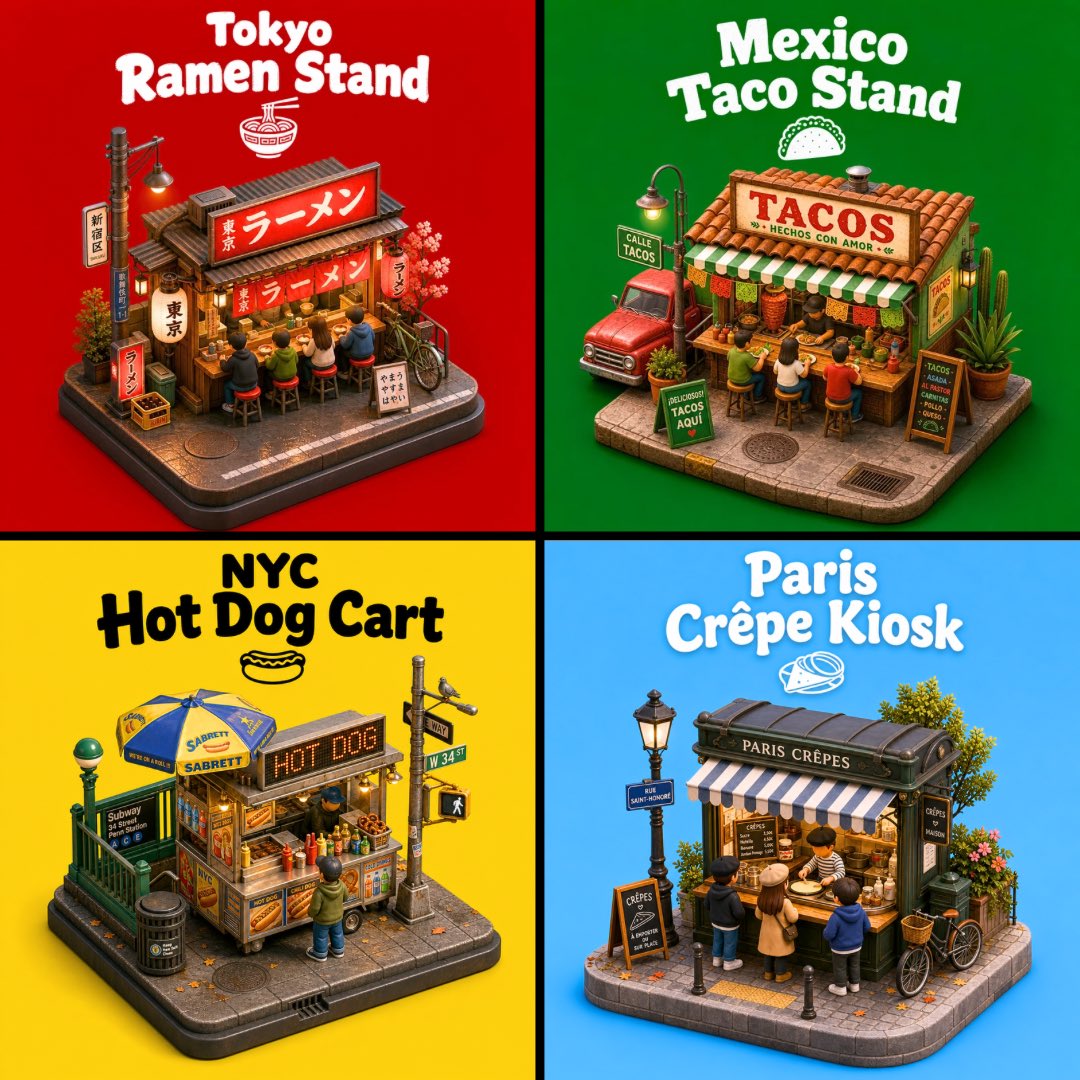
Creates a colorful four-panel isometric 3D poster featuring miniature street-food stands from Tokyo, Mexico, NYC, and Paris.
- Prompt included
- Model and format preset
- Free template
The prompt behind this image
Copy the exact prompt behind 3D City Food Stand Grid, or open it in the studio and make it yours.
Goal: Create a vibrant 2x2 poster grid of four miniature 3D city street-food stands, each shown as an isometric diorama on a small rounded sidewalk base, with bold city-and-food titles above each scene. The image should feel like collectible toy miniatures rendered in polished clay/plastic 3D, highly detailed, cheerful, and social-media friendly. Canvas: Square 1:1 composition divided into exactly 4 equal quadrants by thick black cross-shaped dividers. Each quadrant has a solid bright background color and one centered food-stand diorama with a large playful title at the top. Layout and sections: Use exactly 4 food stands: 1. Top-left: {argument name="Tokyo stand title" default="Tokyo Ramen Stand"}. Red background. A compact Japanese ramen shop with red lanterns, Japanese signage, a glowing red ramen sign, wooden storefront, noren curtains, stools with customers eating at the counter, small crates, a bicycle, cherry blossom accents, and a tiny ramen bowl icon under the title. 2. Top-right: {argument name="Mexico stand title" default="Mexico Taco Stand"}. Green background. A Mexican taco stall with terracotta roof tiles, a large sign reading “TACOS,” green-and-white striped awning, customers on stools, taco ingredients at the counter, cactus plants, a red pickup truck parked beside it, streetlamp, menu boards, and a small taco icon under the title. 3. Bottom-left: {argument name="NYC stand title" default="NYC Hot Dog Cart"}. Yellow background. A New York hot dog cart with metal cart body, blue-and-yellow umbrella, illuminated “HOT DOG” sign, condiment bottles, pretzels or buns, one customer standing in front, subway entrance railing, trash can, street pole with signs, pedestrian signal, and a small hot dog icon under the title. 4. Bottom-right: {argument name="Paris stand title" default="Paris Crêpe Kiosk"}. Sky-blue background. A Paris crêpe kiosk with dark green vintage booth, striped awning, sign reading “PARIS CRÊPES,” customers gathered around the counter, chalkboard menus, ornate streetlamp, flowers, a leafy tree, bicycle, wicker basket, bollards, and a small crêpe icon under the title. Visual style: Cute isometric 3D render, miniature diorama / toy model aesthetic, high detail, soft ambient occlusion, warm tiny lights, crisp shadows, saturated colors, rounded edges, realistic but stylized materials, thick playful white or black display lettering depending on contrast, slightly puffy retro typography. Text content: Titles must be large, legible, and centered near the top of each quadrant. Keep the main shop signs readable where possible: “TACOS,” “HOT DOG,” and “PARIS CRÊPES.” Japanese shop signs can use authentic-looking Japanese characters. Avoid adding extra captions outside the four titles and shop signage. Constraints: Exactly 4 quadrants and exactly 4 diorama food stands. Keep each stand fully visible within its quadrant, with no overlap across the black dividers. No watermark, no logo, no photorealistic humans, no extra panels.
How to use 3D City Food Stand Grid in 3 steps
- 1Upload ImagePNG, JPG or paste
Add your photo
Upload the photo the template builds on. The prompt, model and format are already set.
- 2…a portrait of your subject in softgolden-hour light, 85mm…
Personalize
Edit the subject and creative details for your destination.
- 3Generate
Generate
Press Generate — your image is created in PicX Studio, so you can compare it with the original and refine one variable at a time.
More like this
Templates with the same subject, style or setup. Open one to see its prompt.

Nano Banana Pro 2.0 — 3x3 Travel Profile Grid

Cozy Knit Sweater Window Portrait

Minimalist Hand-Drawn Doodle Portrait

Korean Luxury Fashion Editorial 2x2 Grid Series

Minimalist Fashion Editorial Split Layout

Ultra-Realistic Vogue-Style Editorial Fashion Grid

Headphones Lifestyle Nine Panel Grid

Cozy Food Flat Lay Doodle Labels
Illustrated City Food Map
Four-Season Plush Festival City Grid

4x4 Grid - Candid Nostalgic Vacation Selfies

Movement Sheet - Dance Reference (Seedance 2.0)
Make it yours
3D City Food Stand Grid works as-is. These are the safest ways to change it without losing the look.
Change one field
Copy a single group, rewrite it, and generate again so you can see what that field is doing.
Keep the frame, change the subject
Hold the composition and light of 3D City Food Stand Grid, then swap wardrobe, props or the person for a new take.
| If the result… | Why | Fix |
|---|---|---|
| The result drifts from the preview | Too many fields changed at once. | Reuse 3D City Food Stand Grid as-is first, then change one group — subject, light, or setting. |
| The model over-stylizes the scene | The prose prompt leaves finish and camera underspecified. | Add one camera or lighting sentence and stay on GPT Image 2. |
More GPT Image 2 templates
Other prompts made for GPT Image 2.

Six VTuber Japanese Logo Sheet

Realistic Portrait of Woman and Deer

The Vista Modular Condo Poster

AI Model Routing Comparison Infographic

2.5D Anime Art Board

Isometric Productivity Desk Scene

New York Double Exposure Poster

Four-Panel AI Landscape Comparison

Japanese Tatami Lifestyle Magazine Cover

NESCAFÉ Coffee Map Poster
More image prompts
Fresh picks from across the catalog.
Convenience Store Candid Portrait

Urban Urban Fashion Cinematic Portrait

Wounded Man Cinematic Film Still

Panel Japanese Digital Ad Banner Grid
Dark Medieval Sorceress Scene

Ultra-Realistic Winter Fashion Portrait

19 Luxury Helicopter Travel — California Series

F1 VIP fan hyper-realistic selfie edit

High-End Valentine’s Dinner Photoshoot
Candid Warm Indoor Portrait
Browse template categories
3D City Food Stand Grid questions
How do I use the 3D City Food Stand Grid template?
Add your photo if the template asks for one, edit the prompt if you like — the template's model and format are already selected — and press Generate. Your version opens in PicX Studio.
Can I customize the 3D City Food Stand Grid template?
Yes. You can change the subject, setting, lighting, mood, format, and available model controls before creating your image.
Is the 3D City Food Stand Grid template free?
Opening and editing this template is free. Generating uses credits, shown on the Generate button when you are signed in.
Which AI model should I use?
Start with GPT Image 2, which is the model associated with this template. You can compare another compatible model for a different finish.
Looking for something else? Browse all templates.

Your photo, any look
Thousands of ready templates for every top image and video model, from one credit balance.