
Mixue Di Mo Campaign Proposal Slide
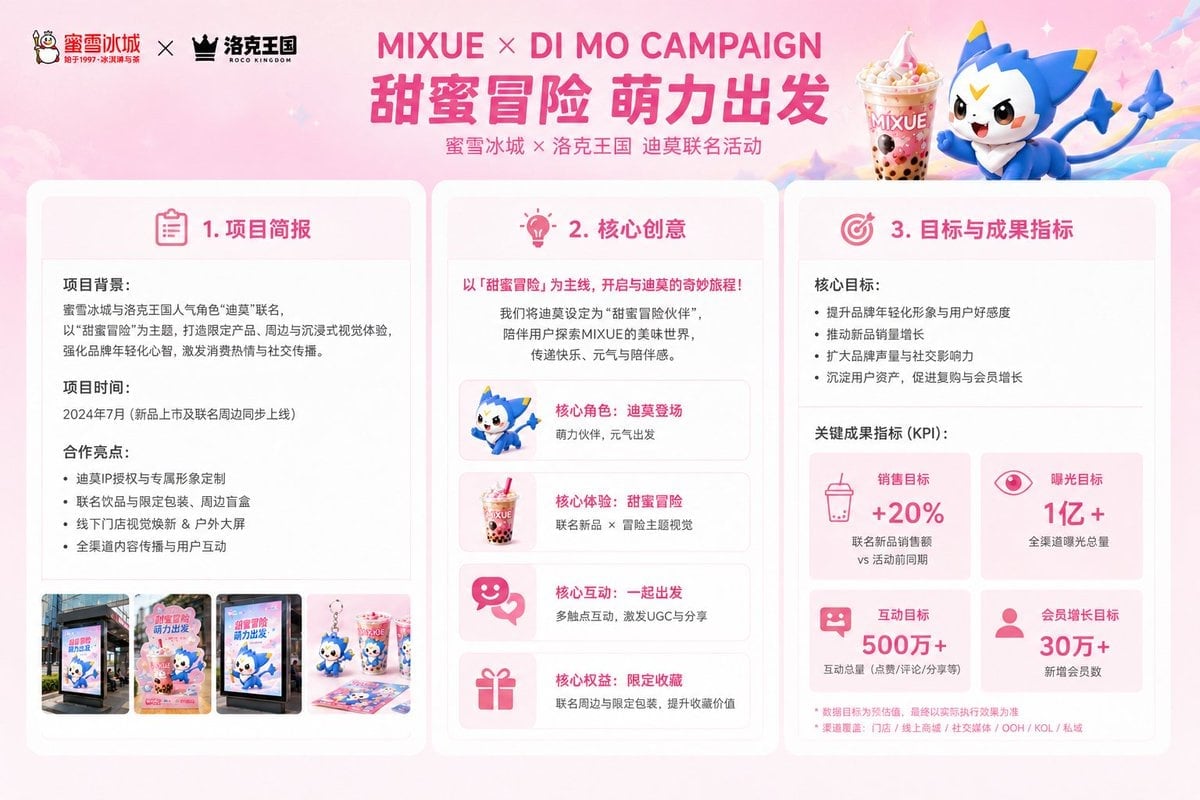
A polished pastel-pink Chinese marketing proposal slide for a Mixue Ice Cream & Tea and Roco Kingdom Di Mo co-branded campaign.
- Prompt included
- Model and format preset
- Free template
The prompt behind this image
Copy the exact prompt behind Mixue Di Mo Campaign Proposal Slide, or open it in the studio and make it yours.
- Type
- wide marketing proposal slide for a co-branded campaign visual concept
- Format
- 16:9 presentation board, clean commercial deck design
- Language
- Chinese visible text with English campaign title
- Style
- cute youthful brand-collaboration pitch deck, pastel pink gradient background, rounded white cards, soft shadows, hot-pink headings, small decorative sparkles and clouds, polished agency proposal aesthetic
- Header › Position
- top
- Header › Left Logos › Count
- 2
- Header › Left Logos › Items
- 蜜雪冰城 logo with snowman mascot and text, 洛克王国 ROCO KINGDOM logo with black crown icon
- Header › Left Logos › Separator
- ×
- Header › Main Title
- {argument name="campaign title" default="MIXUE × DI MO CAMPAIGN"}
- Header › Large Chinese Headline
- {argument name="Chinese headline text" default="甜蜜冒险 萌力出发"}
- Header › Subtitle
- 蜜雪冰城 × 洛克王国 迪莫联合活动
- Header › Right Hero
- large Mixue bubble tea dessert cup beside a cute blue-and-white Di Mo mascot character with yellow horn-like ears and tail, floating on a pastel rainbow streak
- Layout › Main Sections Count
- 3
- Layout › Sections › 0 › Title
- 1. 项目简报
- Layout › Sections › 0 › Position
- left card
- Layout › Sections › 0 › Icon
- pink clipboard outline
- Layout › Sections › 0 › Content Blocks Count
- 3
- Layout › Sections › 0 › Content Blocks › 0 › Label
- 项目背景:
- Layout › Sections › 0 › Content Blocks › 0 › Body
- 蜜雪冰城与洛克王国人气角色‘迪莫’联名,以‘甜蜜冒险’为主题,打造限定产品、周边与沉浸式视觉体验,强化品牌年轻化心智,激发消费热情与社交传播。
- Layout › Sections › 0 › Content Blocks › 1 › Label
- 项目时间:
- Layout › Sections › 0 › Content Blocks › 1 › Body
- 2024年7月(新品上市及联名周边同步上线)
- Layout › Sections › 0 › Content Blocks › 2 › Label
- 合作亮点:
- Layout › Sections › 0 › Content Blocks › 2 › Bullets Count
- 4
- Layout › Sections › 0 › Content Blocks › 2 › Bullets
- 迪莫IP授权与专属形象定制, 联名饮品与限定包装、周边盲盒, 线下门店视觉焕新 & 户外大屏, 全渠道内容传播与用户互动
Raw JSON
{"type":"wide marketing proposal slide for a co-branded campaign visual concept","format":"16:9 presentation board, clean commercial deck design","language":"Chinese visible text with English campaign title","style":"cute youthful brand-collaboration pitch deck, pastel pink gradient background, rounded white cards, soft shadows, hot-pink headings, small decorative sparkles and clouds, polished agency proposal aesthetic","header":{"position":"top","left_logos":{"count":2,"items":["蜜雪冰城 logo with snowman mascot and text","洛克王国 ROCO KINGDOM logo with black crown icon"],"separator":"×"},"main_title":"{argument name=\"campaign title\" default=\"MIXUE × DI MO CAMPAIGN\"}","large_chinese_headline":"{argument name=\"Chinese headline text\" default=\"甜蜜冒险 萌力出发\"}","subtitle":"蜜雪冰城 × 洛克王国 迪莫联合活动","right_hero":"large Mixue bubble tea dessert cup beside a cute blue-and-white Di Mo mascot character with yellow horn-like ears and tail, floating on a pastel rainbow streak"},"layout":{"main_sections_count":3,"sections":[{"title":"1. 项目简报","position":"left card","icon":"pink clipboard outline","content_blocks_count":3,"content_blocks":[{"label":"项目背景:","body":"蜜雪冰城与洛克王国人气角色‘迪莫’联名,以‘甜蜜冒险’为主题,打造限定产品、周边与沉浸式视觉体验,强化品牌年轻化心智,激发消费热情与社交传播。"},{"label":"项目时间:","body":"2024年7月(新品上市及联名周边同步上线)"},{"label":"合作亮点:","bullets_count":4,"bullets":["迪莫IP授权与专属形象定制","联名饮品与限定包装、周边盲盒","线下门店视觉焕新 & 户外大屏","全渠道内容传播与用户互动"]}],"bottom_thumbnails":{"count":4,"items":["street storefront poster mockup","pink campaign standee featuring Di Mo and drink","digital outdoor advertising screen mockup","tabletop collectible merchandise and drink display"]}},{"title":"2. 核心创意","position":"center card","icon":"pink lightbulb outline","intro_headline":"以「甜蜜冒险」为主线,开启与迪莫的奇妙旅程!","intro_body":"我们将迪莫设定为‘甜蜜冒险伙伴’,陪伴用户探索MIXUE的美味世界,传递快乐、元气与陪伴感。","creative_cards_count":4,"creative_cards":[{"label":"核心角色:迪莫登场","description":"萌力伙伴,元气出发","icon_or_image":"Di Mo mascot running"},{"label":"核心体验:甜蜜冒险","description":"联名新品 × 冒险主题视觉","icon_or_image":"Mixue drink cup"},{"label":"核心互动:一起出发","description":"多触点互动,激发UGC与分享","icon_or_image":"pink chat bubbles with heart"},{"label":"核心权益:限定收藏","description":"联名周边与限定包装,提升收藏价值","icon_or_image":"pink gift box"}]},{"title":"3. 目标与成果指标","position":"right card","icon":"pink target outline","goals_block":{"label":"核心目标:","bullets_count":4,"bullets":["提升品牌年轻化形象与用户好感度","推动新品销量增长","扩大品牌声量与社交影响力","沉淀用户资产,促进复购与会员增长"]},"kpi_tiles":{"title":"关键成果指标 (KPI):","count":4,"items":[{"label":"销售目标","value":"+20%","subtext":"联名新品销售额 vs 活动前同期","icon":"pink drink cup"},{"label":"曝光目标","value":"1亿+","subtext":"全渠道曝光总量","icon":"pink eye"},{"label":"互动目标","value":"500万+","subtext":"互动总量(点赞/评论/分享等)","icon":"pink chat face"},{"label":"会员增长目标","value":"30万+","subtext":"新增会员数","icon":"pink user silhouette"}]},"footnote":"数据目标为预估值,最终以实际执行效果为准;渠道覆盖:门店 / 线上商城 / 社交媒体 / OOH / KOL / 私域"}]},"visual_requirements":{"canvas":"{argument name=\"canvas size\" default=\"1152×768\"}","palette":"{argument name=\"color palette\" default=\"soft pastel pink, white, hot pink accents, sky blue mascot details, small yellow highlights\"}","typography":"bold rounded sans-serif Chinese headings, clean readable body copy, hierarchy like a professional brand proposal","composition":"three equal rounded white panels aligned horizontally under the hero header, generous margins, consistent pink icons, precise grid layout, high-resolution polished mockup"}}How to use Mixue Di Mo Campaign Proposal Slide in 3 steps
- 1Upload ImagePNG, JPG or paste
Add your photo
Upload the photo the template builds on. The prompt, model and format are already set.
- 2…a portrait of your subject in softgolden-hour light, 85mm…
Personalize
Edit the subject and creative details for your destination.
- 3Generate
Generate
Press Generate — your image is created in PicX Studio, so you can compare it with the original and refine one variable at a time.
More like this
Templates with the same subject, style or setup. Open one to see its prompt.
Japanese Industrial Proposal Cover Slide

Retro Pop-Art K-Fashion Ultraluxury Campaign Poster

Monroe and Ash Mediterranean Luxury Fashion Campaign

Polo Ralph Lauren Luxury American Heritage Fashion Campaign

Retro Mirror Luxury Fashion Campaign Poster

Luxury Fashion Campaign Typography Poster System

Premium Fashion Editorial Campaign Poster System

Korean Streetwear Minimalist Campaign Portrait

Korean Model Floating Magazine Pages Campaign

Blue Backdrop Luxury Fashion Portrait Campaign

Frozen Street Luxe Graffiti Fashion Campaign

Premium Vertical Product Campaign Poster
Make it yours
Mixue Di Mo Campaign Proposal Slide works as-is. These are the safest ways to change it without losing the look.
Change one field
Copy a single group, rewrite it, and generate again so you can see what that field is doing.
Keep the frame, change the subject
Hold the composition and light of Mixue Di Mo Campaign Proposal Slide, then swap wardrobe, props or the person for a new take.
| If the result… | Why | Fix |
|---|---|---|
| The result drifts from the preview | Too many fields changed at once. | Reuse Mixue Di Mo Campaign Proposal Slide as-is first, then change one group — subject, light, or setting. |
| GPT Image 2 ignores part of the JSON | Some models flatten or skip nested keys. | Keep the same values and paste them as a short paragraph instead. |
More GPT Image 2 templates
Other prompts made for GPT Image 2.

Six VTuber Japanese Logo Sheet

Realistic Portrait of Woman and Deer

The Vista Modular Condo Poster

AI Model Routing Comparison Infographic

2.5D Anime Art Board

Isometric Productivity Desk Scene

New York Double Exposure Poster

Four-Panel AI Landscape Comparison

Japanese Tatami Lifestyle Magazine Cover

NESCAFÉ Coffee Map Poster
More image prompts
Fresh picks from across the catalog.
Fantasy Character Archive Sheet
Cinematic Forest Campfire Portrait
Devotee and Holographic Krishna Creation
Candid Street Photography at European Cafe
Pixar-style 3D character of a cheerful girl in yellow
Backlit Silver-Haired Model Portrait
Surreal Smartphone Portal with Frozen Liquid Splash
Citrus Product Photography
Crumpled Fabric Editorial Poster
Reference Character Painting Self-Portrait in Oil Style
Browse template categories
Mixue Di Mo Campaign Proposal Slide questions
How do I use the Mixue Di Mo Campaign Proposal Slide template?
Add your photo if the template asks for one, edit the prompt if you like — the template's model and format are already selected — and press Generate. Your version opens in PicX Studio.
Can I customize the Mixue Di Mo Campaign Proposal Slide template?
Yes. You can change the subject, setting, lighting, mood, format, and available model controls before creating your image.
Is the Mixue Di Mo Campaign Proposal Slide template free?
Opening and editing this template is free. Generating uses credits, shown on the Generate button when you are signed in.
Which AI model should I use?
Start with GPT Image 2, which is the model associated with this template. You can compare another compatible model for a different finish.
Looking for something else? Browse all templates.

Your photo, any look
Thousands of ready templates for every top image and video model, from one credit balance.