
Complex Tech Speculation Infographic
Generates a highly dense, mind-map style infographic detailing speculative features, comparisons, and use cases for an AI model.
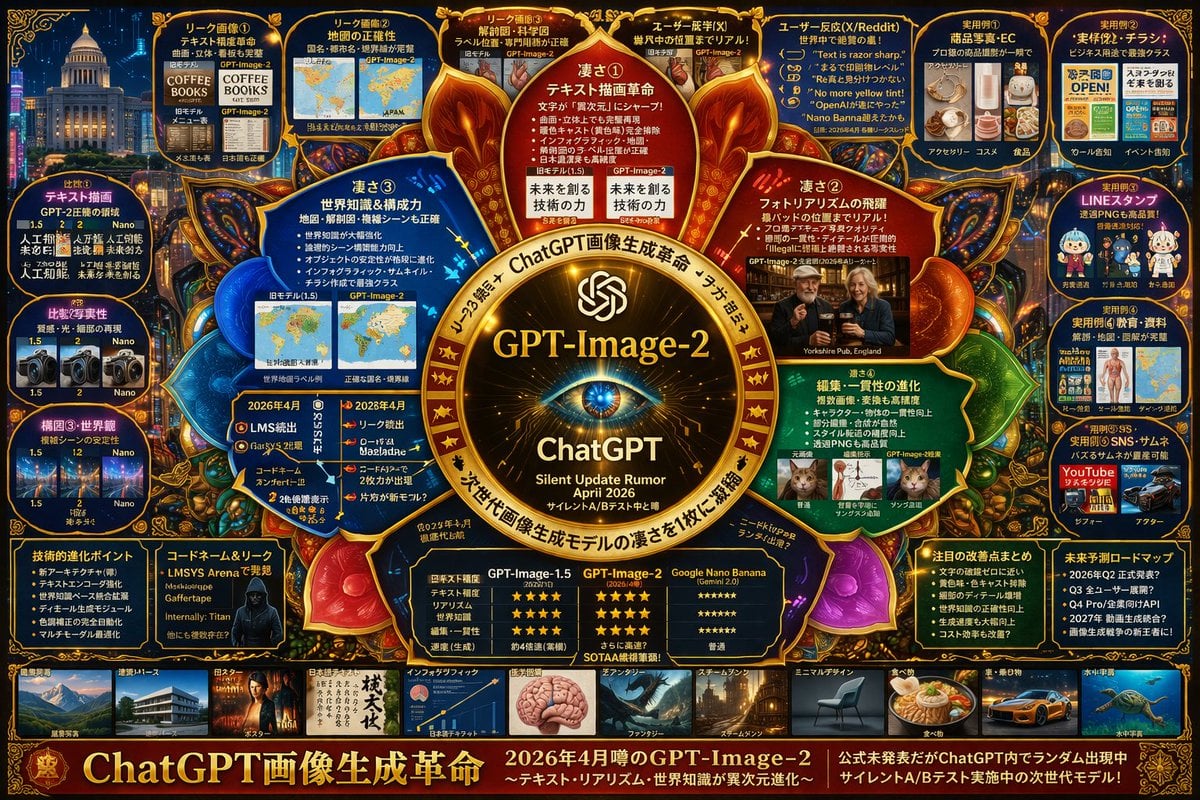
- Prompt included
- Model and format preset
- Free template
The prompt behind this image
Copy the exact prompt behind Complex Tech Speculation Infographic, or open it in the studio and make it yours.
- Type
- complex speculative tech infographic
- Style
- {argument name="color palette" default="dark blue background with gold, red, and cyan glowing accents"}, highly dense, cyber-investigation board, mind-map layout
- Centerpiece › Description
- {argument name="central emblem" default="glowing golden circular emblem with an eye"}
- Centerpiece › Text
- {argument name="main title" default="GPT-Image-2"}, ChatGPT, {argument name="subtitle" default="Silent Update Rumor April 2026"}
- Layout › Sections › 0 › Title
- Inner Nodes
- Layout › Sections › 0 › Position
- surrounding center
- Layout › Sections › 0 › Count
- 4
- Layout › Sections › 0 › Labels
- 凄さ①, 凄さ②, 凄さ③, 凄さ④
- Layout › Sections › 0 › Description
- glowing circular text nodes highlighting core strengths
- Layout › Sections › 1 › Title
- Top Leak Panels
- Layout › Sections › 1 › Position
- top row
- Layout › Sections › 1 › Count
- 4
- Layout › Sections › 1 › Labels
- リーク画像①, リーク画像②, リーク画像③, ユーザー既視(X)
- Layout › Sections › 1 › Description
- before/after image comparisons
- Layout › Sections › 2 › Title
- User Reactions
- Layout › Sections › 2 › Position
- top right
- Layout › Sections › 2 › Count
- 1
- Layout › Sections › 2 › Labels
- ユーザー反応(X/Reddit)
- Layout › Sections › 2 › Description
- panel containing 5 quote bubbles
- Layout › Sections › 3 › Title
- Practical Examples
- Layout › Sections › 3 › Position
- far right column
- Layout › Sections › 3 › Count
- 5
- Layout › Sections › 3 › Labels
- 実用例①, 実用例②, 実用例③, 実用例④, 実用例⑤
- Layout › Sections › 3 › Description
- use-case image grids including e-commerce, flyers, LINE stamps, education, and thumbnails
Raw JSON
{
  "type": "complex speculative tech infographic",
  "style": "{argument name=\"color palette\" default=\"dark blue background with gold, red, and cyan glowing accents\"}, highly dense, cyber-investigation board, mind-map layout",
  "centerpiece": {
    "description": "{argument name=\"central emblem\" default=\"glowing golden circular emblem with an eye\"}",
    "text": ["{argument name=\"main title\" default=\"GPT-Image-2\"}", "ChatGPT", "{argument name=\"subtitle\" default=\"Silent Update Rumor April 2026\"}"]
  },
  "layout": {
    "sections": [
      {
        "title": "Inner Nodes",
        "position": "surrounding center",
        "count": 4,
        "labels": ["凄さ①", "凄さ②", "凄さ③", "凄さ④"],
        "description": "glowing circular text nodes highlighting core strengths"
      },
      {
        "title": "Top Leak Panels",
        "position": "top row",
        "count": 4,
        "labels": ["リーク画像①", "リーク画像②", "リーク画像③", "ユーザー既視(X)"],
        "description": "before/after image comparisons"
      },
      {
        "title": "User Reactions",
        "position": "top right",
        "count": 1,
        "labels": ["ユーザー反応(X/Reddit)"],
        "description": "panel containing 5 quote bubbles"
      },
      {
        "title": "Practical Examples",
        "position": "far right column",
        "count": 5,
        "labels": ["実用例①", "実用例②", "実用例③", "実用例④", "実用例⑤"],
        "description": "use-case image grids including e-commerce, flyers, LINE stamps, education, and thumbnails"
      },
      {
        "title": "Comparisons",
        "position": "far left column",
        "count": 3,
        "labels": ["比較①", "比較②", "構図③・世界観"],
        "description": "version comparison image pairs"
      },
      {
        "title": "Bottom Data Panels",
        "position": "bottom row above gallery",
        "count": 5,
        "labels": ["技術的進化ポイント", "コードネーム&リーク", "比較表", "注目の改善点まとめ", "未来予測ロードマップ"],
        "description": "bulleted lists, a hacker portrait, and a 3-column star-rating comparison table"
      },
      {
        "title": "Style Gallery",
        "position": "bottom strip",
        "count": 10,
        "labels": ["建築・パース", "ポスター", "日本語テキスト", "インフォグラフィック", "ファンタジー", "スチームパンク", "ミニマルデザイン", "食べ物", "車・乗り物", "水中宇宙"],
        "description": "horizontal row of thumbnail images showcasing different generation styles"
      }
    ],
    "footer": {
      "text": "{argument name=\"footer text\" default=\"ChatGPT画像生成革命\"}",
      "position": "bottom edge"
    }
  }
}Reference images included
Complex Tech Speculation Infographic needs input media to work. They load alongside the prompt when you open it in the studio.
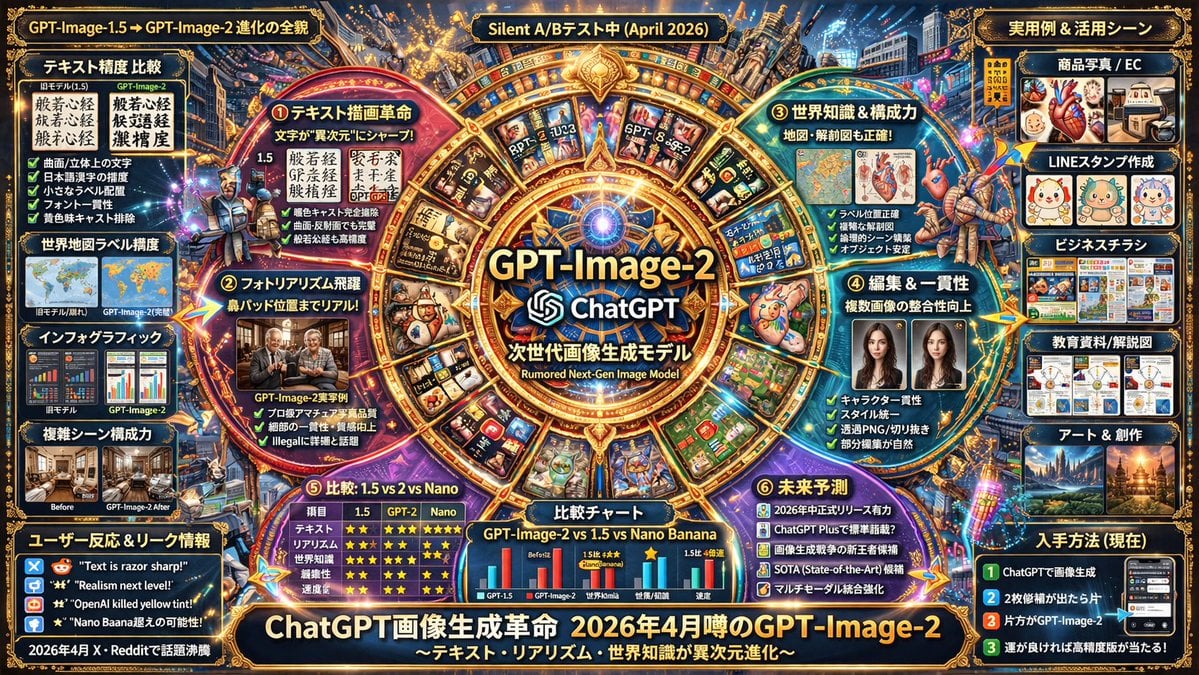
How to use Complex Tech Speculation Infographic in 3 steps
- 1Upload ImagePNG, JPG or paste
Add your photo
Upload the photo the template builds on. The prompt, model and format are already set.
- 2…a portrait of your subject in softgolden-hour light, 85mm…
Personalize
Edit the subject and creative details for your destination.
- 3Generate
Generate
Press Generate — your image is created in PicX Studio, so you can compare it with the original and refine one variable at a time.
More like this
Templates with the same subject, style or setup. Open one to see its prompt.

Japan Travel Brochure Poster

Isometric Process Educational Diorama

Isometric Vehicle Teardown Infographic Template

Gpt2 E Commerce Main Image Earbuds E Commerce Infographic

Gpt2 Infographic Edu Visual Alishan One Day Travel Poster

Gpt2 Infographic Edu Visual Ethnographic Plate for Tibetan Ceremonial Hat

Gpt2 Infographic Edu Visual Earth Signs Zodiac Character Poster

Gpt2 Infographic Edu Visual Water Signs Zodiac Character Poster

Gpt2 Infographic Edu Visual Ink Wash Tribute Poster for Chen Uen

Gpt2 Infographic Edu Visual Vintage Claude Shannon Infographic Poster

Gpt2 Infographic Edu Visual Taoist Three Souls Seven Po Poster

Gpt2 Infographic Edu Visual Biomimetic Skyray Aircraft Poster
Make it yours
Complex Tech Speculation Infographic works as-is. These are the safest ways to change it without losing the look.
Change one field
Copy a single group, rewrite it, and generate again so you can see what that field is doing.
Keep the frame, change the subject
Hold the composition and light of Complex Tech Speculation Infographic, then swap wardrobe, props or the person for a new take.
| If the result… | Why | Fix |
|---|---|---|
| The result drifts from the preview | Too many fields changed at once. | Reuse Complex Tech Speculation Infographic as-is first, then change one group — subject, light, or setting. |
| GPT Image 2 ignores part of the JSON | Some models flatten or skip nested keys. | Keep the same values and paste them as a short paragraph instead. |
More GPT Image 2 templates
Other prompts made for GPT Image 2.

Six VTuber Japanese Logo Sheet

Realistic Portrait of Woman and Deer

The Vista Modular Condo Poster

AI Model Routing Comparison Infographic

2.5D Anime Art Board

Isometric Productivity Desk Scene

New York Double Exposure Poster

Four-Panel AI Landscape Comparison

Japanese Tatami Lifestyle Magazine Cover

NESCAFÉ Coffee Map Poster
More image prompts
Fresh picks from across the catalog.

Mediterranean Village Street Portrait

Luxury Golf Club Editorial Prompt

Printmaking Style Couple Illustration
Gen Z Chaotic Fairy Selfie Collage Prompt
Emoji Aesthetic Prompts (Dark vs. Pastel)
Casual Collegiate Lifestyle Portrait with Iced Drink
Steampunk Miniature Clockwork Machine
Surreal Dark Digital Collage
Themed Worldview Visual Construction Engine Prompt
JSON Prompt for Black and White Fashion Editorial Contact Sheet
Browse template categories
Complex Tech Speculation Infographic questions
How do I use the Complex Tech Speculation Infographic template?
Add your photo if the template asks for one, edit the prompt if you like — the template's model and format are already selected — and press Generate. Your version opens in PicX Studio.
Can I customize the Complex Tech Speculation Infographic template?
Yes. You can change the subject, setting, lighting, mood, format, and available model controls before creating your image.
Is the Complex Tech Speculation Infographic template free?
Opening and editing this template is free. Generating uses credits, shown on the Generate button when you are signed in.
Which AI model should I use?
Start with GPT Image 2, which is the model associated with this template. You can compare another compatible model for a different finish.
Looking for something else? Browse all templates.

Your photo, any look
Thousands of ready templates for every top image and video model, from one credit balance.