How do I use the Cinematic Dr Pepper Diner Ad template?
Choose the primary action to open PicX Studio with the available template settings. Review the model and format, personalize the creative direction, and generate when ready.
A hyper-realistic vertical soda advertisement featuring a stylish woman holding a chilled can amid a dramatic red soda splash and retro neon diner scene. Change the subject, setting, or lighting one variable at a time.
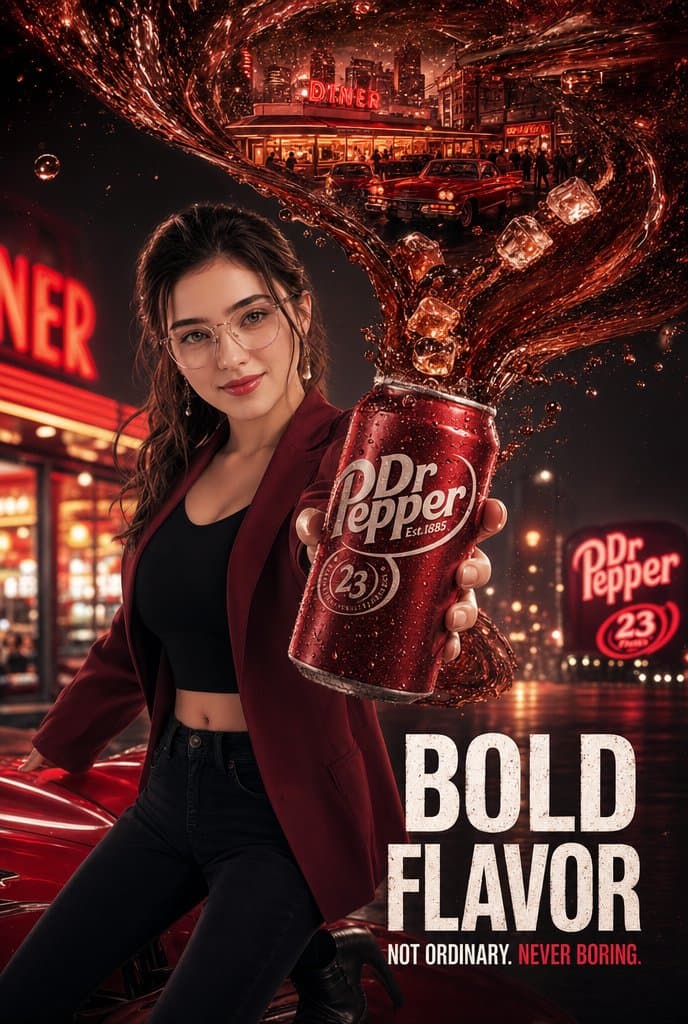
Goal: Create a hyper-realistic vertical cinematic soda advertisement poster for {argument name="beverage brand" default="Dr Pepper"}, styled like premium commercial beverage photography with dramatic red lighting and a retro-night atmosphere. Canvas: Vertical 2:3 poster, high-resolution, glossy commercial finish, dark black-and-crimson color palette, shallow depth of field, wet reflective street, neon glow, strong contrast, realistic skin and fabric texture. Main subject: A fashionable young woman stands in the left foreground in a confident commercial pose, leaning near a shiny red classic car while extending one hand toward the camera holding a cold red soda can. She has messy tied-back dark hair, natural realistic skin, soft makeup, and elegant earrings. Her face is intentionally covered by a centered plain rectangular skin-tone censor block, while the rest of her body remains detailed. Outfit pieces: exactly 5 visible outfit elements — burgundy fitted blazer, black crop top, black high-waisted jeans, black heeled boots, and earrings. Product hero: The soda can is large and close to the lens in the right-center foreground, covered in condensation droplets, metallic red, with a clear white {argument name="can logo text" default="Dr Pepper"} logo. The woman’s fingers wrap around the can realistically. From the open top of the can, a dramatic swirling wave of dark red soda explodes upward and arcs across the top of the poster like a liquid ribbon. Include exactly 5 visible ice cubes suspended inside the splash, plus many small droplets and bubbles. Background and scene: Set the poster outside a glowing retro American diner at night. The diner is warm-lit with glass windows, silhouettes of patrons, and a rooftop neon sign reading {argument name="diner sign text" default="DINER"}. The soda splash visually contains a miniature cinematic reflection/scene of the diner, city skyline, and classic cars inside its liquid curve. Include exactly 3 visible cars: one red classic car in the lower-left foreground, and two classic cars parked near the diner in the upper background. Add a large blurred neon diner sign on the far left and a roadside billboard on the right. Visible text content: Include exactly 6 main readable text elements: 1) the can logo "Dr Pepper", 2) small can text "Est. 1885", 3) circular can seal "23", 4) the diner rooftop sign "DINER", 5) the right-side billboard logo "Dr Pepper" with "23" below it, and 6) the bottom headline {argument name="headline text" default="BOLD FLAVOR"} with the tagline {argument name="tagline text" default="NOT ORDINARY. NEVER BORING."}. Make the headline huge, bold, distressed white block lettering in the lower-right corner; make the words "NEVER BORING." red. Visual style: Hyper-realistic cinematic beverage campaign, luxury soda commercial poster, dramatic specular highlights, glowing red neon, rain-slick asphalt, volumetric night lighting, sharp product focus, realistic condensation, high-impact advertising composition. Constraints: Keep the product can as the clearest focal point, preserve the face-obscuring rectangle, avoid extra brands beyond the chosen beverage, avoid misspelled text, no watermark, no extra poster borders.
Choose the primary action to open PicX Studio with the available template settings. Review the model and format, personalize the creative direction, and generate when ready.
Yes. You can change the subject, setting, lighting, mood, format, and available model controls before creating your image.
This template is free to open and customize. Generation usage is shown in PicX Studio before you create.
Start with GPT Image 2, which is the model associated with this template. You can compare another compatible model for a different finish.
© 2026 PicX Studio. All rights reserved.

Follow a topic to a crawlable collection of related PicX Studio templates.
43,474 public templates available. Verified via the PicX Studio public templates API; refreshed hourly.











![Minimalist Flat Vector Travel Poster — Premium minimalist flat-vector travel poster for {argument name="city name" default="[CITY_NAME]"}, 3:4 vertical format.](https://cms-assets.youmind.com/media/1787917359711_3ug846_HQX205cbMAA6F6S-300x400.jpg)


























![Ultra-Realistic 3D Render of a Furry Logo — Ultra-realistic 3D render of the official [{argument name="brand name" default="BRAND NAME"}] logo, exact original s](https://pbs.twimg.com/media/HAjlHnJacAEf8YV.jpg)