How do I use the Hand-Drawn Pencil Sketch Portrait template?
Choose the primary action to open PicX Studio with the available template settings. Review the model and format, personalize the creative direction, and generate when ready.
A prompt for generating a hyper-realistic top-down view of a hand sketching a detailed portrait in a notebook.
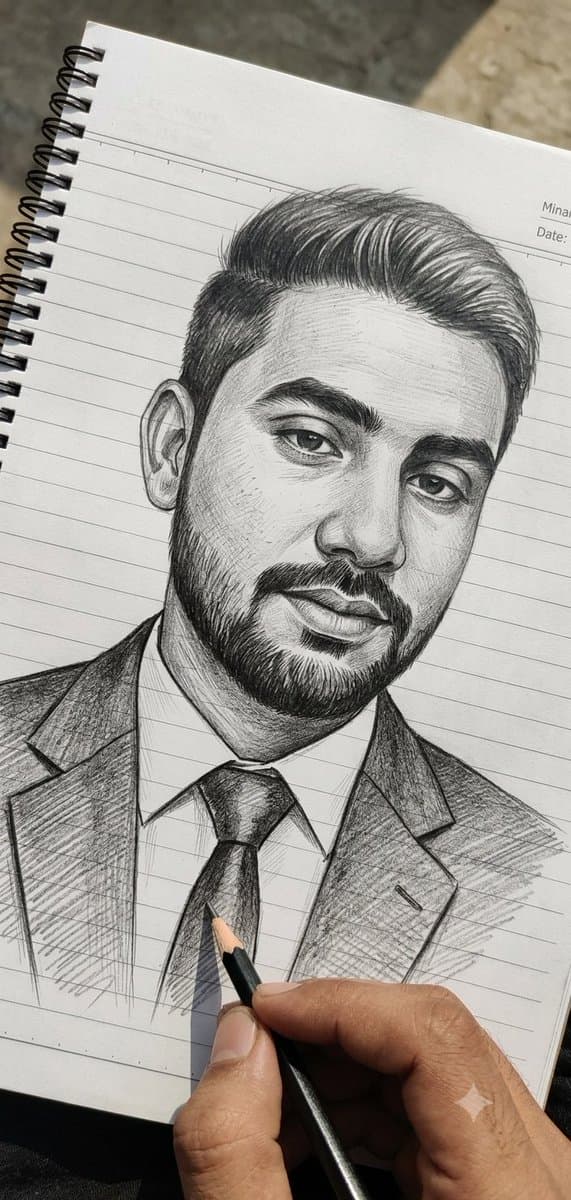
Ultra-realistic pencil sketch portrait being drawn by hand on a white spiral-bound notebook with horizontal blue ruled lines and a red margin line on the left. Centered head-and-shoulders portrait of a {argument name="subject" default="handsome young South Asian man"} facing forward, medium-length voluminous side-swept hair with detailed strands, thick eyebrows, expressive eyes, straight nose, trimmed mustache connected to a short full beard, natural lips, confident calm expression. Wearing a {argument name="outfit" default="formal business suit jacket, collared shirt, and neatly tied necktie"}. Highly detailed {argument name="style" default="graphite drawing"} with professional cross-hatching, fine linework, realistic shading, facial contours, skin texture, and hair detailing. A realistic human hand holding a graphite pencil is actively sketching the tie area of the portrait. Another sharpened pencil lies diagonally at the bottom left of the notebook. Small graphite dust particles, pencil shavings, sketch smudges, and scattered graphite marks visible around the drawing. Handwritten artist signature and note near the lower right side of the portrait. Spiral notebook binding clearly visible along the left edge. Top-down view, close-up composition, photorealistic drawing process, monochrome graphite artwork, crisp focus, natural lighting, high contrast pencil textures, professional artist workspace, ultra-detailed, hyper-realistic, 8K quality, masterpiece, realistic sketching scene, depth and precision in every pencil stroke.
Choose the primary action to open PicX Studio with the available template settings. Review the model and format, personalize the creative direction, and generate when ready.
Yes. You can change the subject, setting, lighting, mood, format, and available model controls before creating your image.
This template is free to open and customize. Generation usage is shown in PicX Studio before you create.
Start with GPT Image 2, which is the model associated with this template. You can compare another compatible model for a different finish.
© 2026 PicX Studio. All rights reserved.

Follow a topic to a crawlable collection of related PicX Studio templates.