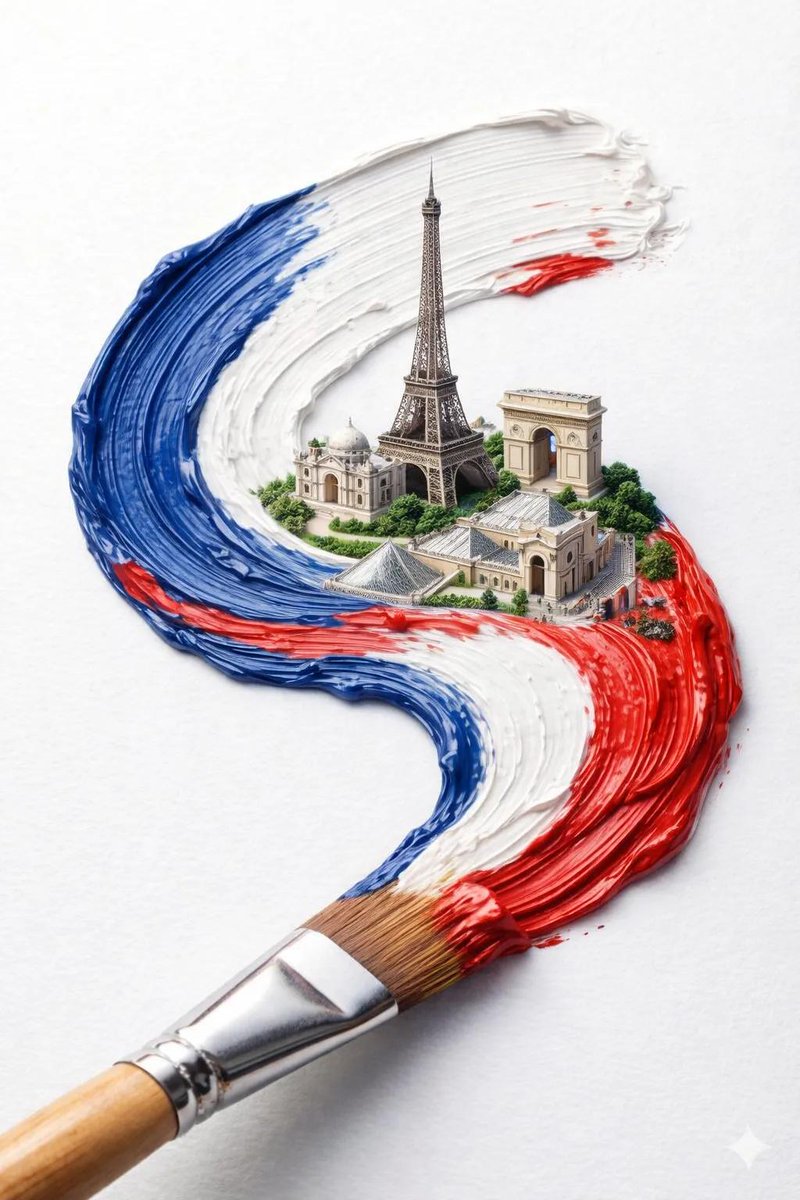
Impasto Oil Architectural Painting
Create a sophisticated fine-art architectural painting of [STRUCTURE / LANDMARK], presented as a highly tactile, three-dimensional impasto oil painting on textured archival paper. Make [STRUCTURE / LANDMARK] the unmistakable central focal point, shown from a slightly low, frontal perspective so its architecture feels grand, monumental, elegant, and sculptural. Preserve the recognizable architectural features, proportions, silhouette, windows, columns, arches, roofline, ornamentation, materials, and distinctive details of the structure, but reinterpret the entire scene as a handcrafted contemporary oil painting. Use extremely thick palette-knife impasto with visible raised strokes, layered paint, broken edges, scraped textures, ridges, and expressive overlapping marks. The architecture should appear almost sculpted entirely from paint, with heavy cream, warm stone, soft gray, muted blue, dusty green, subtle charcoal, and delicate antique-gold accents. Behind the structure, create a simplified atmospheric sky made entirely from thick textured brushstrokes in soft powder blue, ivory, pale gray, and warm white. Keep the background understated, elegant, and painterly so the architectural form remains dominant. Add subtle environmental details at the bottom — a few bicycles, elegant vintage street lamps, plants, steps, pavement, tiny distant figures, or other small location-specific details — but keep them secondary, miniature, and painterly. The artwork should sit like a physical painted panel mounted on a warm off-white handmade paper background. Give the painted panel an irregular, naturally torn and rough painted edge, with subtle dimensional shadows around it, suggesting that a thick original artwork has been physically placed onto textured archival paper. At the bottom of the artwork, incorporate the name of the landmark in beautiful refined italic typography: “[STRUCTURE / LANDMARK]” Use sophisticated high-contrast editorial serif lettering, elegant flowing italics, slightly vintage European book-cover styling, subtle antique-gold or muted charcoal ink, perfectly centered and carefully integrated into the artwork. The typography should feel printed/painted onto the textured surface rather than digitally overlaid. Keep the lettering delicate, tasteful, and legible without competing with the architecture. If appropriate, add a smaller understated italic subtitle beneath it: “[CITY, COUNTRY]” Use generous spacing, refined typography, and a museum-quality art-print composition. Lighting should be soft and natural, emphasizing the raised impasto texture and creating tiny shadows between layers of paint. Elegant European art-book aesthetic, museum-quality architectural painting, sophisticated vintage travel-art feeling, tactile handmade surface, restrained luxury color palette, painterly realism, highly detailed, atmospheric, timeless, no photorealistic appearance. Vertical composition, centered architecture, generous off-white negative space around the artwork, premium editorial art print, collectible gallery poster, 8k detail. --ar 4:5 --style raw


![Impasto Oil Architectural Painting — Create a sophisticated fine-art architectural painting of [STRUCTURE / LANDMARK], presented as a highly tactile, three-dime](https://cms-assets.youmind.com/media/1788163891448_cwh0eu_HQ8zY0FaUAAXBua-300x375.jpg)

![Stylized Hand-Painted 3D Game Asset — 3D render of {argument name="subject" default="[SUBJECT]"}, stylized hand-painted 3D game asset, chunky simplified geometr](https://cms-assets.youmind.com/media/1786523300267_agrith_HPdIC33X0AAgmym-300x450.jpg)

![A hand-painted isometric bird s-eye view illustration of in a vintage — A hand-painted isometric bird’s-eye view illustration of [COUNTRY] in a vintage map styl](https://images.meigen.ai/tweets/2037508886639366409/0.jpg)



![A hand-painted isometric bird s-eye view illustration of in a vintage — A hand-painted isometric bird’s-eye view illustration of [COUNTRY] in a vintage map styl](https://images.meigen.ai/tweets/2006361629651603477/0.jpg)
![Hand-Painted Gouache Product Poster — Create a premium illustrated product poster for {argument name="product" default="[PRODUCT]"} in a whimsical hand-painted](https://cms-assets.youmind.com/media/1781517879416_5fucoe_HKvwsrWbIAALM2K-300x450.jpg)


![Minimalist Flat Vector Travel Poster — Premium minimalist flat-vector travel poster for {argument name="city name" default="[CITY_NAME]"}, 3:4 vertical format.](https://cms-assets.youmind.com/media/1787917359711_3ug846_HQX205cbMAA6F6S-300x400.jpg)