How do I use the AI Code Explanation English Poster template?
Choose the primary action to open PicX Studio with the available template settings. Review the model and format, personalize the creative direction, and generate when ready.
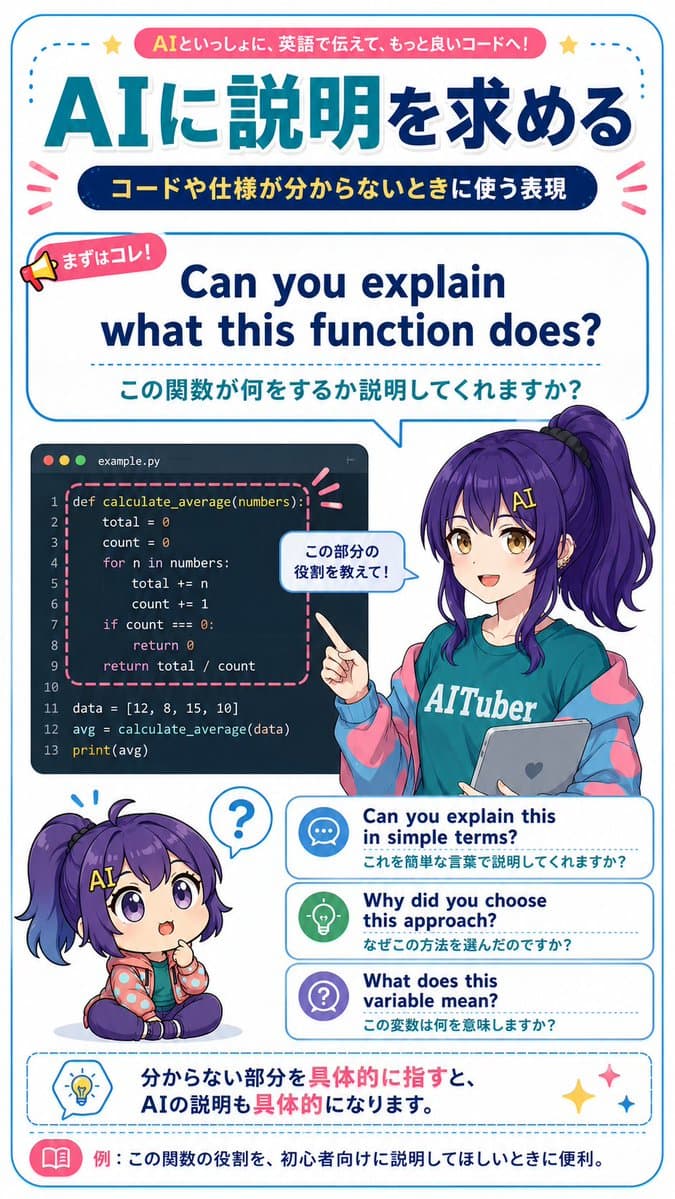
Generates a vertical Japanese anime-style study poster teaching practical English phrases for asking an AI to explain code. (free to use) — Free AI image template on PicX Studio.
{"type":"vertical Japanese educational infographic poster for English learning with AI coding assistant","style":"bright clean anime magazine layout, gpt-image-2 style, crisp vector typography mixed with polished anime illustration, white background, rounded blue border, teal and navy gradients, pink accent ribbons, dotted divider lines, cute icons, high-resolution printable study material","canvas":{"orientation":"portrait","aspect_ratio":"9:16","background":"white with thin rounded cyan frame and small decorative stars and emphasis marks"},"theme":{"headline_context":"fictional practical English learning material for asking AI to explain code and specifications","main_topic":"{argument name=\"main topic\" default=\"AIに説明を求める\"}","top_badge_text":"{argument name=\"top badge text\" default=\"AIといっしょに、英語で伝えて、もっと良いコードへ!\"}","subtitle_text":"{argument name=\"subtitle text\" default=\"コードや仕様が分からないときに使う表現\"}"},"layout":{"sections":[{"title":"top header","position":"top","count":3,"elements":["pink rounded banner with the top badge text","huge Japanese headline in teal-to-navy gradient: AIに説明を求める","dark navy pill subtitle with yellow Japanese text"]},{"title":"main phrase speech panel","position":"upper middle","count":3,"elements":["small megaphone label reading まずはコレ!","large English phrase: Can you explain what this function does?","Japanese translation below: この関数が何をするか説明してくれますか?"],"panel_style":"large rounded rectangle speech bubble outlined in cyan, pointing down toward the character"},{"title":"coding example panel","position":"middle left","count":1,"elements":["dark code editor window labeled example.py with three macOS-style dots and Python code for def calculate_average(numbers):, total=0, count=0, loop through numbers, return total/count, data list, avg calculation, print(avg); function block highlighted by pink dashed rounded rectangle"]},{"title":"anime teacher character","position":"middle right","count":1,"elements":["female anime AI-tuber teacher with long purple hair in a high side ponytail, teal T-shirt reading AITuber, oversized blue-and-pink jacket, holding a gray tablet with a heart icon, pointing at the code panel","small speech bubble near her hand reading この部分の役割を教えて!"],"character":{"name":"{argument name=\"character name\" default=\"Nike-chan\"}","hair_color":"{argument name=\"hair color\" default=\"deep purple\"}","outfit":"teal AITuber shirt, pastel cyber jacket, casual friendly educator look"}},{"title":"chibi reaction character","position":"lower left","count":1,"elements":["small seated chibi version of the same purple-haired character, puzzled expression, question mark speech bubble above head"]},{"title":"alternative phrase cards","position":"lower middle right","count":3,"labels":["Can you explain this in simple terms? / これを簡単な言葉で説明してくれますか?","Why did you choose this approach? / なぜこの方法を選んだのですか?","What does this variable mean? / この変数は何を意味しますか?"],"card_style":"three stacked rounded white cards with blue outlines, dotted separators, and circular icons: chat bubble, light bulb, question mark"},{"title":"bottom advice box","position":"bottom","count":2,"elements":["dashed rounded blue advice box with light bulb icon and Japanese sentence: 分からない部分を具体的に指すと、AIの説明も具体的になります。","bottom example strip with pink book icon and text: 例:この関数の役割を、初心者向けに説明してほしいときに便利。"]}],"composition":"dense but readable educational poster; typography hierarchy is very strong, with the English example phrase centered as the main learning point; character overlaps the code panel and phrase cards slightly to create depth"},"rendering_notes":"Use accurate Japanese typography, clean sans-serif fonts, thick rounded outlines, vibrant cyan/navy/pink palette, cute classroom-tech atmosphere, no photorealism, no extra unrelated text, preserve all listed visible text exactly."}
Use AI Code Explanation English Poster to plan an AI image around gpt-image-2 generation, themes such as en and gpt-image-2. Match the preview's composition first, then personalize the subject, setting, and mood for your own project.
Use the primary action to load the template settings in PicX Studio.
Adjust the subject and creative details for your destination.
Create the image, compare the result with the preview, and refine one variable at a time.
A continuous mix — similar concepts first, woven with same-model prompts and fresh picks from the catalog.
Choose the primary action to open PicX Studio with the available template settings. Review the model and format, personalize the creative direction, and generate when ready.
Yes. You can change the subject, setting, lighting, mood, format, and available model controls before creating your image.
This template is free to open and customize. Generation usage is shown in PicX Studio before you create.
Start with gpt-image-2, which is the model associated with this template. You can compare another compatible model for a different finish.
A continuous mix — similar concepts first, woven with same-model prompts and fresh picks from the catalog.
Follow a topic to a crawlable collection of related PicX Studio templates.
36,410 public templates available. Verified via the PicX Studio public templates API; refreshed hourly.