
Pastel Anime Girl at Shibuya Crossing
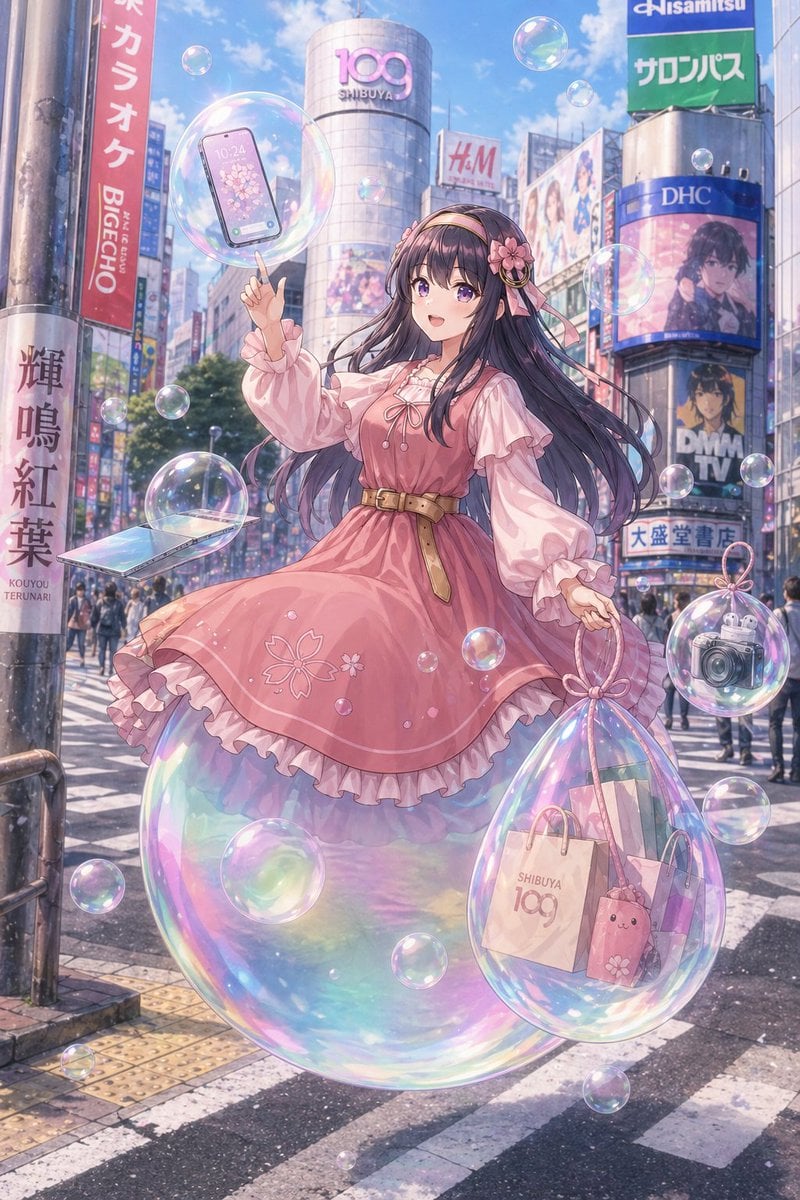
This prompt generates a polished anime-style fantasy city portrait of a stylish girl floating through Shibuya amid iridescent bubbles, ideal for social-media-ready AI art with a magical Tokyo vibe.
- Prompt included
- Model and format preset
- Free template
The prompt behind this image
Copy the exact prompt behind Pastel Anime Girl at Shibuya Crossing, or open it in the studio and make it yours.
A dreamy anime-style illustration of a fashionable young woman floating through the famous Shibuya Scramble Crossing in Tokyo on a bright spring day, with a soft pastel palette, glowing light, and whimsical urban fantasy mood. She is centered full-body, hovering slightly above the crosswalk while standing on a giant iridescent soap bubble. She has very long flowing dark indigo-black hair with a slight violet sheen, a pink floral headband with ribbons, and a sweet elegant outfit: a dusty pink knee-length dress with puffed long sleeves, layered ruffles, ribbon lacing at the chest, sakura flower embroidery near the hem, and a tan belt at the waist. Her expression should feel gentle and dreamy, her pose graceful and balanced, with one hand raised and pointing upward. Around her are many transparent rainbow soap bubbles of different sizes, about 16 visible bubbles total, drifting through the air. One large bubble near her raised hand contains a modern smartphone with a cherry blossom wallpaper. One medium bubble at lower left contains an open slim laptop angled toward the viewer. One large teardrop-shaped bubble hanging from her other hand contains 3 shopping items: a paper shopping bag printed with “SHIBUYA 109”, a second pastel shopping bag, and a pink bunny-shaped pouch or plush accessory. One medium bubble on the lower right contains a silver compact camera. The setting is a lively, recognizable Shibuya streetscape with the cylindrical SHIBUYA 109 building in the center background and multiple Japanese commercial billboards and signs surrounding the crossing, including visible signage such as “DHC,” “H&M,” “DMM TV,” and colorful vertical Japanese signs. Include pedestrians in the distance, crosswalk stripes, city poles, and realistic urban depth, but keep the girl as the clear focal point. The atmosphere should feel airy, magical, glossy, and slightly nostalgic, combining detailed city realism with highly polished anime character art, soft bloom lighting, shimmering reflections, translucent materials, and delicate springtime romance.
How to use Pastel Anime Girl at Shibuya Crossing in 3 steps
- 1Upload ImagePNG, JPG or paste
Add your photo
Upload the photo the template builds on. The prompt, model and format are already set.
- 2…a portrait of your subject in softgolden-hour light, 85mm…
Personalize
Edit the subject and creative details for your destination.
- 3Generate
Generate
Press Generate — your image is created in PicX Studio, so you can compare it with the original and refine one variable at a time.
More like this
Templates with the same subject, style or setup. Open one to see its prompt.
Soft Pastel Anime Girl Full Body
Chaotic Shibuya Scramble Crossing

Teen Girl Alpine Lake Mountain View

Pastel Anime Idol Concert Finale

Framed Quilling Anime Girl

Pastel Anime Summer Beach Collage

Anime Lantern Girl Character Sheet

Anime Girl Generation Grid

Chaotic Anime Schoolgirl Fan Collage

Layered Paper Cut Illustration Template

Cel 2D Finale Fireworks

Cel 2D Garden Maze
Make it yours
Pastel Anime Girl at Shibuya Crossing works as-is. These are the safest ways to change it without losing the look.
Change one field
Copy a single group, rewrite it, and generate again so you can see what that field is doing.
Keep the frame, change the subject
Hold the composition and light of Pastel Anime Girl at Shibuya Crossing, then swap wardrobe, props or the person for a new take.
| If the result… | Why | Fix |
|---|---|---|
| The result drifts from the preview | Too many fields changed at once. | Reuse Pastel Anime Girl at Shibuya Crossing as-is first, then change one group — subject, light, or setting. |
| The model over-stylizes the scene | The prose prompt leaves finish and camera underspecified. | Add one camera or lighting sentence and stay on GPT Image 2. |
More GPT Image 2 templates
Other prompts made for GPT Image 2.

Six VTuber Japanese Logo Sheet

Realistic Portrait of Woman and Deer

The Vista Modular Condo Poster

AI Model Routing Comparison Infographic

2.5D Anime Art Board

Isometric Productivity Desk Scene

New York Double Exposure Poster

Four-Panel AI Landscape Comparison

Japanese Tatami Lifestyle Magazine Cover

NESCAFÉ Coffee Map Poster
More image prompts
Fresh picks from across the catalog.

Cinematic 3D Action Advertisement Prompt
High-Fashion Tiered Ballgown Editorial
High-Fashion Black and White Portrait with Cigarette Smoke
Convex Mirror Neon Street Selfie
Biological Illustration Page
AI Chat Screenshot With Censored Women
Horror Cinematic Image with Identity Consistency

Editorial poolside fashion photoshoot of a man
Cinematic Male Editorial Portrait
Romantic Beach Couple Closeup with Identity Preservation
Browse template categories
Pastel Anime Girl at Shibuya Crossing questions
How do I use the Pastel Anime Girl at Shibuya Crossing template?
Add your photo if the template asks for one, edit the prompt if you like — the template's model and format are already selected — and press Generate. Your version opens in PicX Studio.
Can I customize the Pastel Anime Girl at Shibuya Crossing template?
Yes. You can change the subject, setting, lighting, mood, format, and available model controls before creating your image.
Is the Pastel Anime Girl at Shibuya Crossing template free?
Opening and editing this template is free. Generating uses credits, shown on the Generate button when you are signed in.
Which AI model should I use?
Start with GPT Image 2, which is the model associated with this template. You can compare another compatible model for a different finish.
Looking for something else? Browse all templates.

Your photo, any look
Thousands of ready templates for every top image and video model, from one credit balance.