How do I use the Noir Fashion Editorial Magazine Cover template?
Choose the primary action to open PicX Studio with the available template settings. Review the model and format, personalize the creative direction, and generate when ready.
A dark luxury fashion magazine cover with a realistic model, layered portrait background, winter noir lighting, and elegant editorial typography. Change the subject, setting, or lighting one variable at a time.
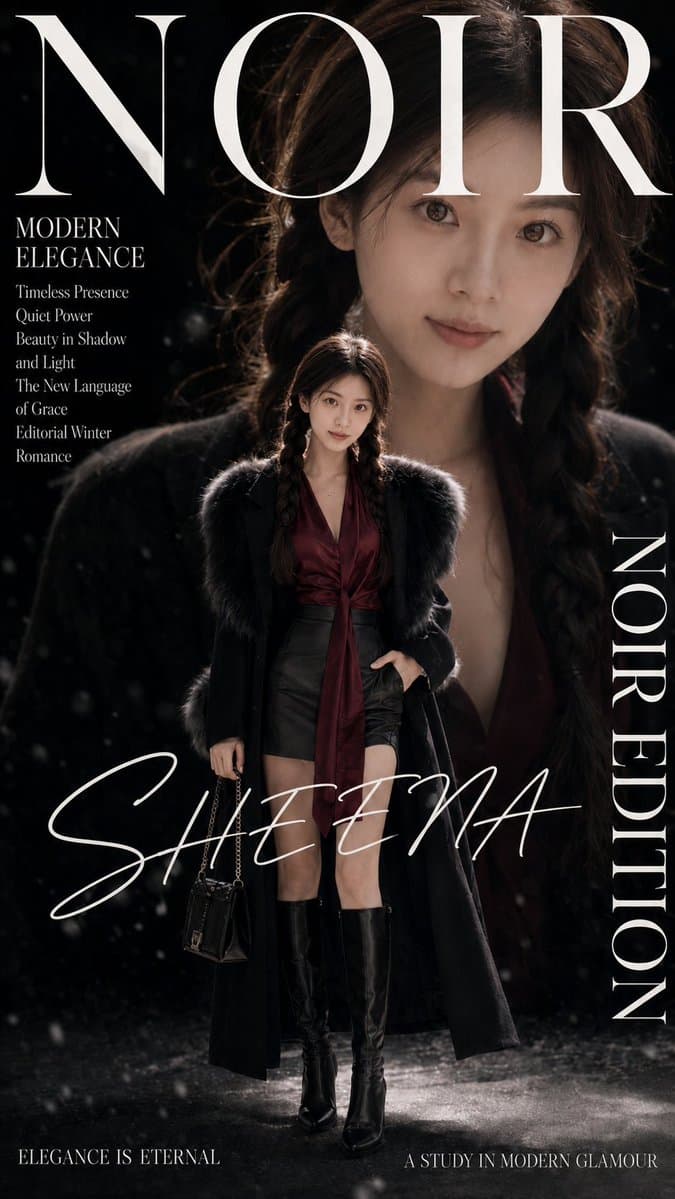
Goal: Create a dark luxury noir fashion editorial magazine cover featuring a realistic full-body portrait of {argument name="character name" default="Sheena"} as the central model, with cinematic winter glamour, high contrast lighting, and a premium fashion-magazine composition. Canvas: Vertical 9:16 magazine cover, approximately 675 × 1200 px. Deep black background with subtle snowfall or dust-like particles, glossy wet floor reflections, and dramatic rim lighting. Main subject: A fashionable woman stands centered in a confident editorial pose, full body visible. She has long dark wavy hair styled with two loose braids in front, natural realistic presence, and elegant proportions. Her face is intentionally covered by solid neutral brown rectangular privacy blocks: one large vertical rectangle over the upper face and head area, and one smaller rectangle over the lower-left face area. Outfit consists of exactly 6 visible fashion pieces: a deep burgundy satin blouse with a plunging V neckline and long tie scarf detail, black high-waisted leather shorts, a long black wool coat, dark black fur or faux-fur shoulder trim, knee-high glossy black leather boots, and a small black chain-strap handbag held in one hand. Pose: one hand in pocket, the other holding the handbag, standing slightly angled like a luxury editorial cover model. Background portrait layer: Add an oversized close-up portrait of the same woman behind the full-body figure, filling most of the upper and middle background. The enlarged portrait should be dark, softly blurred, partially hidden by shadows, with hair and neckline visible, creating a dramatic double-exposure magazine-cover effect. Typography and layout: Use elegant high-fashion serif and script typography in white. Include exactly 7 distinct text groups: 1. Huge masthead at the top: “NOIR”, in a refined Didot-style serif, white, spanning nearly the full width and partially behind/around the background portrait. 2. Left upper feature headline: “MODERN ELEGANCE”, stacked in two lines, small white serif. 3. Left feature list below it, exactly 6 lines: “Timeless Presence”, “Quiet Power”, “Beauty in Shadow”, “and Light”, “The New Language”, “of Grace”, plus a final line “Editorial Winter Romance” beneath, all in small white serif text. 4. Large handwritten script name across the lower middle: “{argument name="cover name" default="SHEENA"}”, white, sweeping across the model and background. 5. Right vertical title: “NOIR EDITION”, rotated vertically along the right edge in tall white serif caps. 6. Bottom-left tagline: “ELEGANCE IS ETERNAL”, small white serif caps. 7. Bottom-right tagline: “A STUDY IN MODERN GLAMOUR”, small white serif caps. Visual style: Noir fashion editorial, cinematic winter romance, luxury magazine cover, realistic portrait photography, dramatic chiaroscuro, black and burgundy color palette, soft snowfall particles, glossy reflective ground, premium Vogue-like styling, moody shadows, crisp white typography. Constraints: Keep the composition clean and magazine-level, do not add extra text, logos, barcodes, dates, or watermarks. Preserve the exact text content and text group count. Maintain the two solid face-obscuring rectangles and the layered oversized background portrait.
Choose the primary action to open PicX Studio with the available template settings. Review the model and format, personalize the creative direction, and generate when ready.
Yes. You can change the subject, setting, lighting, mood, format, and available model controls before creating your image.
This template is free to open and customize. Generation usage is shown in PicX Studio before you create.
Start with GPT Image 2, which is the model associated with this template. You can compare another compatible model for a different finish.
© 2026 PicX Studio. All rights reserved.

Follow a topic to a crawlable collection of related PicX Studio templates.
43,474 public templates available. Verified via the PicX Studio public templates API; refreshed hourly.






![Minimalist Flat Vector Travel Poster — Premium minimalist flat-vector travel poster for {argument name="city name" default="[CITY_NAME]"}, 3:4 vertical format.](https://cms-assets.youmind.com/media/1787917359711_3ug846_HQX205cbMAA6F6S-300x400.jpg)