How do I use the Solar System Ice Cream Cones template?
Choose the primary action to open PicX Studio with the available template settings. Review the model and format, personalize the creative direction, and generate when ready.
This prompt generates a whimsical photorealistic lineup of 8 planet-themed ice cream cones, ideal for surreal food art, creative ad visuals, or social media concept imagery. Change the subject, setting, or lighting one variable at a time.
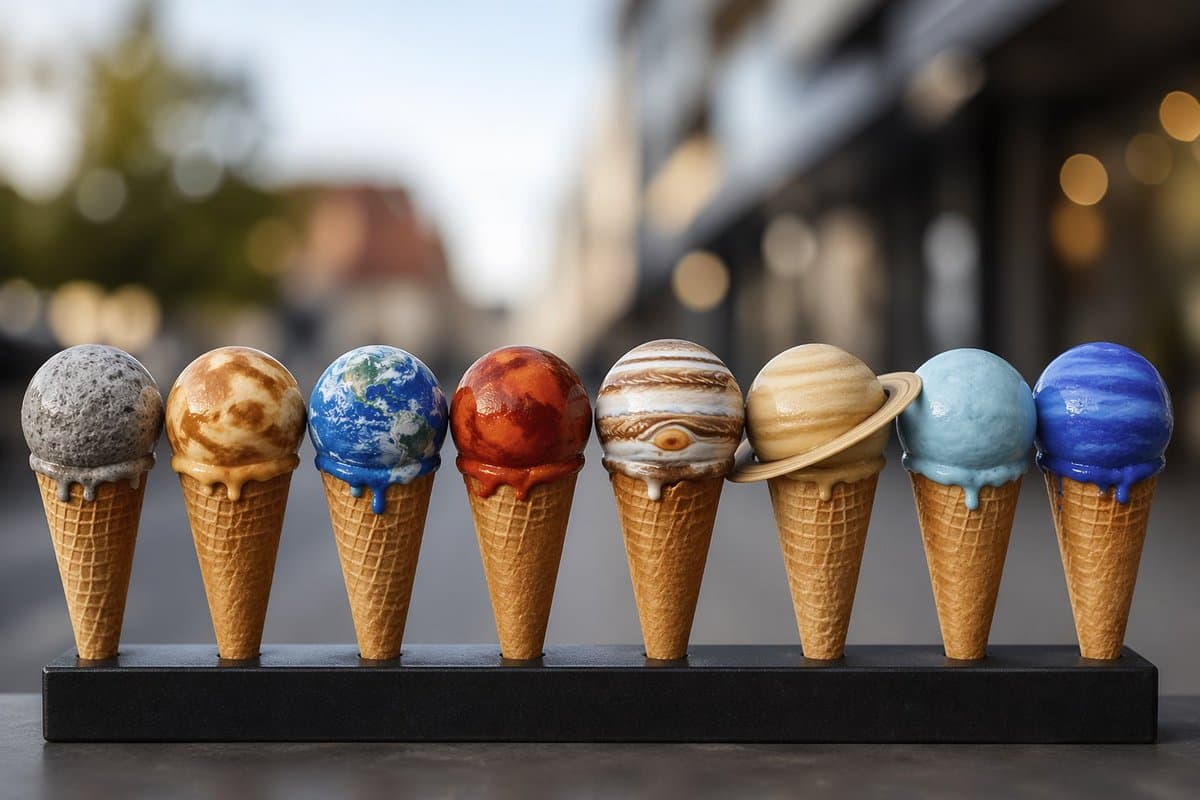
A whimsical, photorealistic product-style food photograph of 8 ice cream cones lined up in a straight row on a matte black rectangular stand, each scoop designed to look like a different planet of the solar system. The scene is shot at eye level with a shallow depth of field and creamy urban bokeh in the background, suggesting an outdoor city street or café setting in soft daylight. From left to right, show exactly 8 cones: a gray speckled Mercury scoop, a yellow-brown swirling Venus scoop, a blue-and-green Earth scoop with white cloud patterns and a small blue drip, a deep red Mars scoop with darker marbling and red melted drips, a striped Jupiter scoop with its Great Red Spot visible, a pale tan Saturn scoop with a thin ring encircling it, a light icy blue Uranus scoop with a blue drip, and a vivid cobalt-blue Neptune scoop with glossy texture and blue dripping melt. Use crisp waffle cones, realistic melting details, glossy frozen surfaces, careful studio-quality lighting, and a centered symmetrical composition. Keep the planets highly recognizable but rendered as believable ice cream, with the black stand spanning the width of the frame and the background softly blurred.
Choose the primary action to open PicX Studio with the available template settings. Review the model and format, personalize the creative direction, and generate when ready.
Yes. You can change the subject, setting, lighting, mood, format, and available model controls before creating your image.
This template is free to open and customize. Generation usage is shown in PicX Studio before you create.
Start with GPT Image 2, which is the model associated with this template. You can compare another compatible model for a different finish.
© 2026 PicX Studio. All rights reserved.

Follow a topic to a crawlable collection of related PicX Studio templates.
43,474 public templates available. Verified via the PicX Studio public templates API; refreshed hourly.


![Brand Ice Sculpture Product Photography — [BRAND NAME] luxury product still life. A large three-dimensional ice sculpture in the exact shape of the [BRAND NAME]](/_next/image?url=https%3A%2F%2Fcdn.picxstudio.com%2Fuploads%2Fmeigen_907cd03b2295_0e348d56-7cfb-4634-969d-dd59d09e75ca.jpg&w=828&q=100)
![Pisa Tower Ice Cream Perspective Prompt — [인물] 이미지 1, 이미지 2참조
[인물의 포즈 및 표정]
{argument name="장소" default="피사의 사탑"}을 배경으로 서서 고개를 약간 좌측 상단으로 든…](https://cms-assets.youmind.com/media/1781256079703_7auvsx_HKK4k_iaMAAYs0h.jpg)





![Minimalist Flat Vector Travel Poster — Premium minimalist flat-vector travel poster for {argument name="city name" default="[CITY_NAME]"}, 3:4 vertical format.](https://cms-assets.youmind.com/media/1787917359711_3ug846_HQX205cbMAA6F6S-300x400.jpg)

































![Photorealistic Omikuji (Fortune Slip) Design — [Purpose]
Based on the attached image, generate a completely original visual of a Japanese “omikuji” fortune slip](https://pbs.twimg.com/media/G-NGPIhawAAkAtw.jpg)