How do I use the Cute AI Mascot Lineup template?
Choose the primary action to open PicX Studio with the available template settings. Review the model and format, personalize the creative direction, and generate when ready.
A four-panel kawaii 3D character render of Claude, ChatGPT, Gemini, and Grok as adorable collectible mascots for social media or concept art. Change the subject, setting, or lighting one variable at a time.
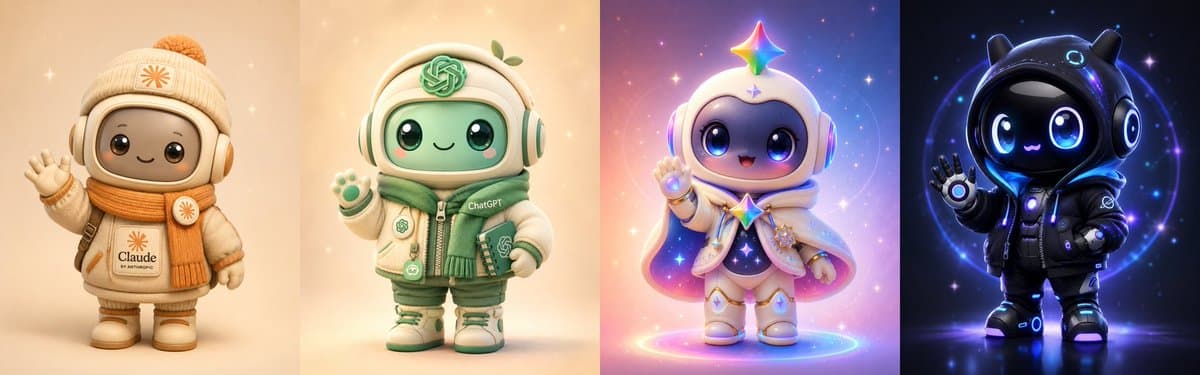
Goal: Create a wide four-panel lineup of cute collectible 3D AI mascot characters, each rendered as a toy-like chibi robot in a distinct themed environment: {argument name="mascot lineup" default="Claude, ChatGPT, Gemini, and Grok"}. Canvas: Ultra-wide horizontal image, approximately 3:1 aspect ratio, divided into exactly 4 equal vertical panels with soft blended edges between panels. Each panel contains one centered full-body mascot standing on a softly lit floor, facing forward, waving or posing cutely. Layout and count: Include exactly 4 discrete mascots, left to right: 1) Claude mascot, 2) ChatGPT mascot, 3) Gemini mascot, 4) Grok mascot. Do not add extra characters, props, or text beyond the intended logos/name marks. Subject details: 1. Claude mascot: Warm beige and cream chibi robot with a rounded square face screen, glossy black eyes, tiny smile, oversized winter headphones, cream knit beanie with orange pom-pom, orange scarf, padded cream coat, mittens, boots, and subtle Claude-style orange starburst emblems. The coat has the visible label {argument name="first mascot label" default="Claude"}. Pose: one hand raised in a friendly wave. Background: soft peach-beige studio glow with tiny sparkles. 2. ChatGPT mascot: Cream and mint-green chibi robot wearing rounded headphones, a puffy jacket, green scarf, shorts or padded pants, sneakers, and small ChatGPT knot logos on hat, jacket, and accessories. The jacket includes the visible label {argument name="second mascot label" default="ChatGPT"}. Pose: one paw-like hand raised. Background: warm pale cream with green accents, subtle magical sparkles. 3. Gemini mascot: Cute cosmic chibi robot in white, lavender, pink, and blue, with glossy oversized eyes, small open happy mouth, rounded helmet, headphones, flowing cape, star charm details, boots, and a bright multicolor Gemini-style star floating above the head. Pose: cheerful raised hand. Background: dreamy pastel galaxy gradient with stars, bokeh, pink-purple-blue glow, and a luminous circular ring on the ground. 4. Grok mascot: Dark futuristic chibi robot with glossy black face screen, huge electric-blue eyes, tiny catlike smile, black hooded suit with small horn-like ear shapes on the hood, padded jacket, gloves, boots, glowing cyan circular tech accents, and a subtle xAI/Grok-like emblem on the chest or sleeve. Pose: one hand raised in a wave. Background: deep navy-black cosmic tech scene with blue neon rings, glowing particles, and star specks. Visual style: Extremely cute kawaii 3D render, plush vinyl toy aesthetic, soft rounded proportions, large head and small body, high-quality glossy materials, cinematic soft lighting, gentle bloom, shallow depth of field, crisp details, adorable expression, premium character design, polished social-media showcase. Constraints: Keep the four panels evenly spaced and aligned at the same scale. Use each mascot’s distinctive color palette: {argument name="overall color mood" default="warm beige for Claude, mint green for ChatGPT, pastel cosmic colors for Gemini, black and electric blue for Grok"}. Avoid photorealistic humans, avoid clutter, avoid scary expressions, avoid misspelled labels, and do not include a watermark.
Choose the primary action to open PicX Studio with the available template settings. Review the model and format, personalize the creative direction, and generate when ready.
Yes. You can change the subject, setting, lighting, mood, format, and available model controls before creating your image.
This template is free to open and customize. Generation usage is shown in PicX Studio before you create.
Start with GPT Image 2, which is the model associated with this template. You can compare another compatible model for a different finish.
© 2026 PicX Studio. All rights reserved.

Follow a topic to a crawlable collection of related PicX Studio templates.
43,474 public templates available. Verified via the PicX Studio public templates API; refreshed hourly.














![Minimalist Flat Vector Travel Poster — Premium minimalist flat-vector travel poster for {argument name="city name" default="[CITY_NAME]"}, 3:4 vertical format.](https://cms-assets.youmind.com/media/1787917359711_3ug846_HQX205cbMAA6F6S-300x400.jpg)