How do I use the Emerald Couture Seasonal Portrait template?
Choose the primary action to open PicX Studio with the available template settings. Review the model and format, personalize the creative direction, and generate when ready.
A moody editorial fashion portrait featuring one woman in a flowing emerald gown against an abstract impasto green palette background. Change the subject, setting, or lighting one variable at a time.
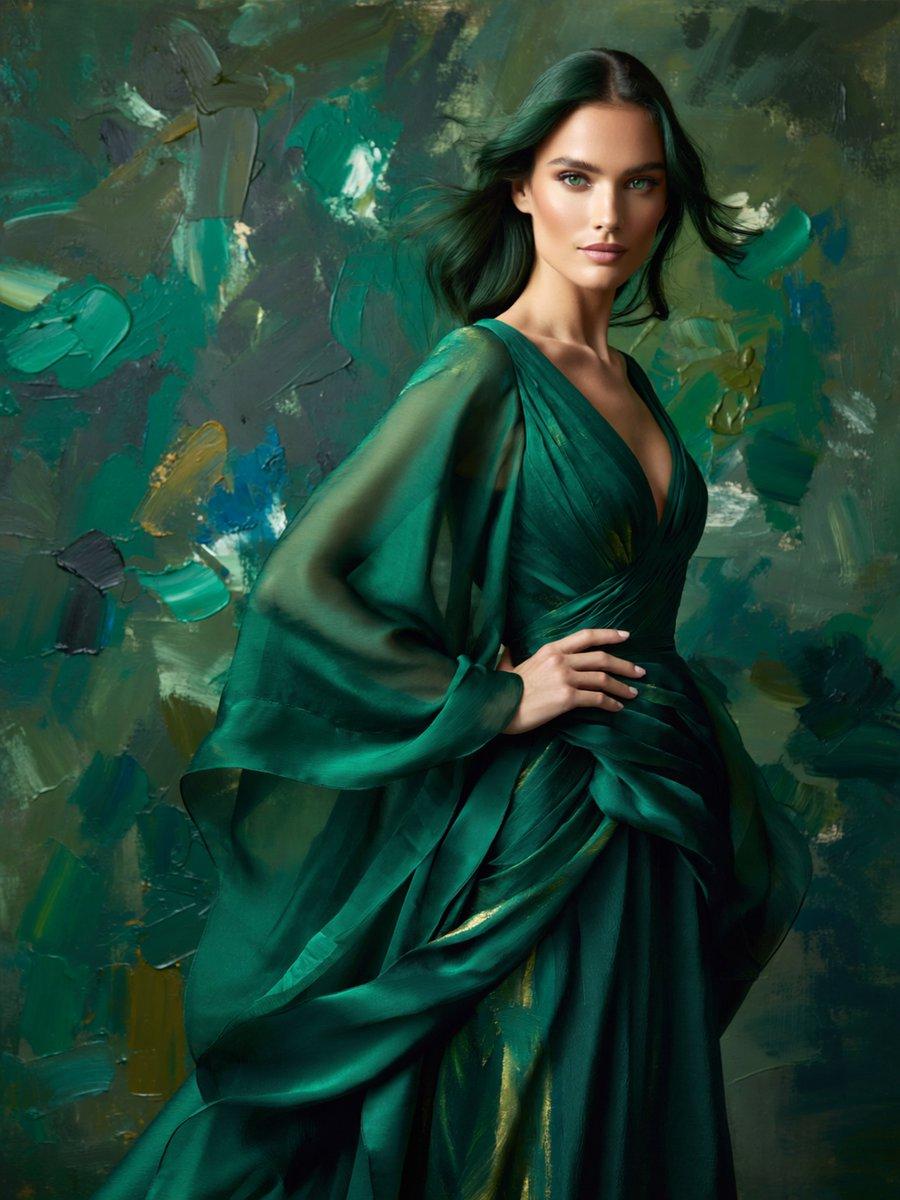
Create a painterly high-fashion portrait of a single elegant woman representing the {argument name="season vibe" default="winter emerald mood"} palette. Vertical 3:4 canvas, waist-to-knee crop, dramatic studio lighting. The woman stands in a graceful contrapposto pose with one hand resting on her waist, wearing a flowing deep {argument name="dress color" default="emerald green"} couture gown with a plunging V neckline, wrapped bodice, layered drapery, long translucent chiffon sleeves, and subtle gold highlights in the folds. Her {argument name="hair color" default="dark teal-black"} hair is shoulder length, glossy, and wind-swept to one side. Place her in front of an abstract impasto oil-paint background made of broad palette-knife strokes in teal, forest green, dark blue, olive, charcoal, and small ochre accents. The overall mood should be moody, luxurious, artistic, and editorial, blending photorealistic fashion photography with visible painterly texture. Keep exactly one human figure, no text, no logos, no jewelry emphasis, no extra props, and leave the face softly obscured or featureless so the focus is on silhouette, garment, color palette, and brushwork.
Choose the primary action to open PicX Studio with the available template settings. Review the model and format, personalize the creative direction, and generate when ready.
Yes. You can change the subject, setting, lighting, mood, format, and available model controls before creating your image.
This template is free to open and customize. Generation usage is shown in PicX Studio before you create.
Start with GPT Image 2, which is the model associated with this template. You can compare another compatible model for a different finish.
© 2026 PicX Studio. All rights reserved.

Follow a topic to a crawlable collection of related PicX Studio templates.
43,474 public templates available. Verified via the PicX Studio public templates API; refreshed hourly.


![69-untitled — FORMAT: 15s / 145 BPM / 14 SHOTS
SUBJECT: @[image1]
WARDROBE: Clean modern outfit
ENVIRONMENT: Street / indoor transitions
MOOD: Discovery → contr](/_next/image?url=https%3A%2F%2Fcdn.picxstudio.com%2Fuploads%2Fpost69_img0_d45faecf-38c3-4bcb-81a4-f6eb1cf42bb2.jpg&w=828&q=100)








![118-google-nano-banana-pro-skincare-product- — A professional skincare shot of a [product container] with [cap/lid], labeled [brand, product, descriptor, volume](/_next/image?url=https%3A%2F%2Fcdn.picxstudio.com%2Fuploads%2Fpost118_img0_332898b8-29ea-42a9-87ab-9ed746a3f944.jpg&w=828&q=100)











![Minimalist Flat Vector Travel Poster — Premium minimalist flat-vector travel poster for {argument name="city name" default="[CITY_NAME]"}, 3:4 vertical format.](https://cms-assets.youmind.com/media/1787917359711_3ug846_HQX205cbMAA6F6S-300x400.jpg)