How do I use the Vintage Indonesia Travel Collage Poster template?
Choose the primary action to open PicX Studio with the available template settings. Review the model and format, personalize the creative direction, and generate when ready.
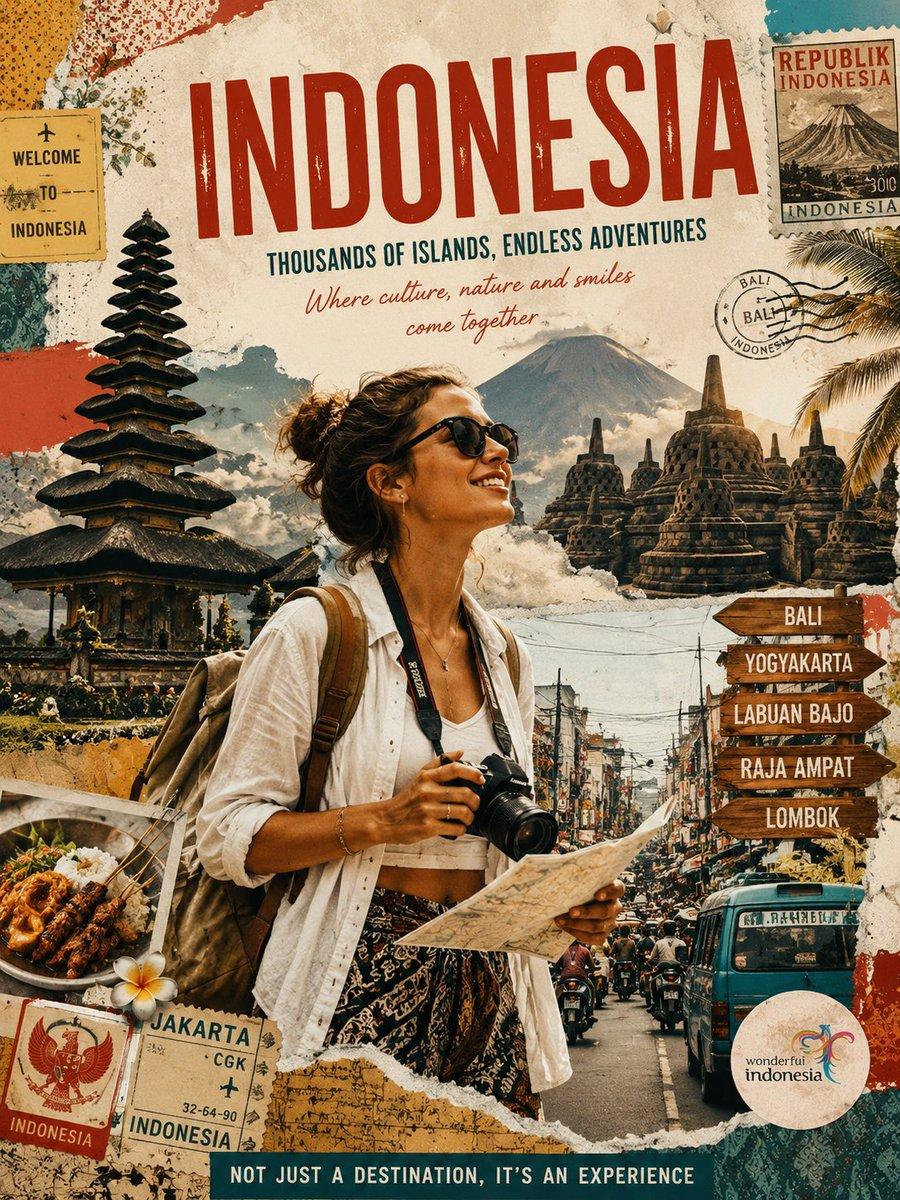
Generates a distressed scrapbook-style tourism poster for Indonesia featuring a traveler, landmarks, stamps, food, and destination signposts. (free to use) — Free AI image template on PicX Studio.
Goal: Create a vintage travel-poster collage advertising {argument name="destination country" default="Indonesia"}, with a scrapbook postcard aesthetic and adventurous tourism mood. Canvas: Vertical 3:4 poster, aged cream paper background with torn edges, distressed ink, speckles, layered paper scraps, postal markings, tape, and weathered print texture. Use warm earthy colors: red, teal, ochre, tan, brown, faded black, and sun-bleached cream. Main subject: Center foreground shows a young female traveler from the waist up, holding a DSLR camera in one hand and an unfolded paper map in the other. She wears a loose white open shirt over a white crop top, patterned batik-style skirt, backpack straps, small jewelry, and messy tied-up hair. Her face is intentionally covered by a soft rectangular blur, while the rest of her body remains sharp and photo-realistic. Text content: At the top, use a huge distressed red headline reading “{argument name="headline text" default="INDONESIA"}”. Beneath it, add a blue uppercase tagline: “{argument name="tagline" default="THOUSANDS OF ISLANDS, ENDLESS ADVENTURES"}”. Under that, add a red handwritten script line: “{argument name="script quote" default="Where culture, nature and smiles come together"}”. At the bottom, place a dark teal strip with white uppercase text: “NOT JUST A DESTINATION, IT’S AN EXPERIENCE”. Layout and collage elements: Include exactly 12 major visible travel elements around the traveler: 1) a Balinese multi-tier temple pagoda on the left, 2) Borobudur-style stone stupas on the right, 3) a misty volcano and clouds in the upper middle background, 4) a busy Indonesian city street with scooters and traffic in the lower middle, 5) a turquoise public bus on the lower right, 6) a palm tree frond in the upper right, 7) a plate of Indonesian satay or grilled food with rice in the lower left, 8) a white frangipani flower near the food, 9) a yellow “WELCOME TO INDONESIA” tag in the upper left, 10) an Indonesian postage stamp in the upper right reading “REPUBLIK INDONESIA” with a volcano illustration, 11) a round Bali postal cancellation stamp near the upper right, and 12) passport-ticket ephemera in the lower left reading Jakarta, CGK, Indonesia, with a Garuda emblem. Destination signpost: On the right side, add exactly 5 wooden arrow signs stacked vertically, each pointing right, labeled: “BALI”, “YOGYAKARTA”, “LABUAN BAJO”, “RAJA AMPAT”, and “LOMBOK”. Brand mark: Bottom right contains a round sticker logo reading “wonderful indonesia” with a colorful flowing bird-like emblem. Style constraints: Combine photorealistic travel photography with illustrated paper collage, vintage tourism poster typography, torn-paper layering, halftone grain, scratches, stamps, and muted cinematic contrast. Keep all text legible, avoid extra destination names beyond the listed ones, and do not add watermarks or modern UI elements.
Use Vintage Indonesia Travel Collage Poster to plan an AI image around gpt-image-2 generation, themes such as en and gpt-image-2. Match the preview's composition first, then personalize the subject, setting, and mood for your own project.
Use the primary action to load the template settings in PicX Studio.
Adjust the subject and creative details for your destination.
Create the image, compare the result with the preview, and refine one variable at a time.
A continuous mix — similar concepts first, woven with same-model prompts and fresh picks from the catalog.
Choose the primary action to open PicX Studio with the available template settings. Review the model and format, personalize the creative direction, and generate when ready.
Yes. You can change the subject, setting, lighting, mood, format, and available model controls before creating your image.
This template is free to open and customize. Generation usage is shown in PicX Studio before you create.
Start with gpt-image-2, which is the model associated with this template. You can compare another compatible model for a different finish.
A continuous mix — similar concepts first, woven with same-model prompts and fresh picks from the catalog.
Follow a topic to a crawlable collection of related PicX Studio templates.
36,410 public templates available. Verified via the PicX Studio public templates API; refreshed hourly.