
Seaside Anime Crossover Manga Page
Generates a four-panel anime manga scene of two schoolgirls meeting at a scenic Japanese rocky coast with a torii gate and Japanese speech bubbles.
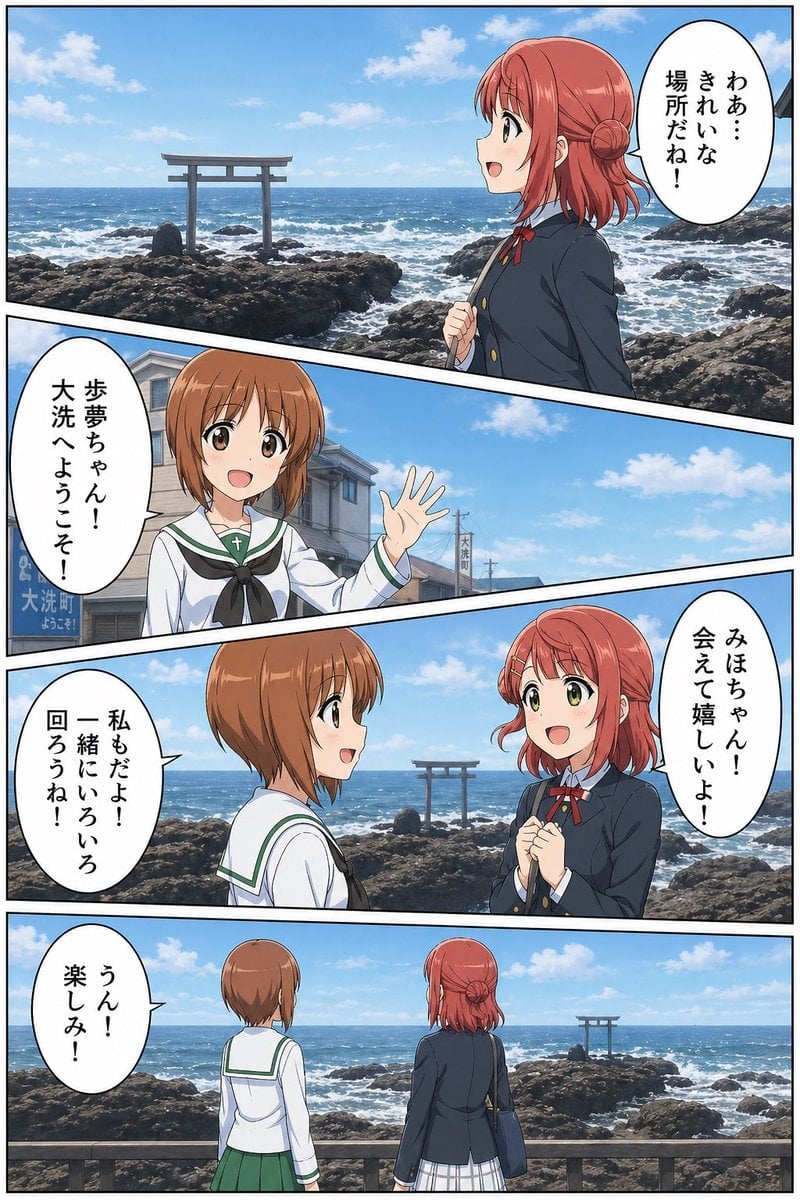
- Prompt included
- Model and format preset
- Free template
The prompt behind this image
Copy the exact prompt behind Seaside Anime Crossover Manga Page, or open it in the studio and make it yours.
- Type
- vertical four-panel anime manga page combining photoreal coastal scenery with cel-shaded schoolgirl characters
- Format
- single page, black panel borders, diagonal manga gutters, clean high-resolution color illustration
- Setting
- {argument name="setting" default="a sunny rocky Japanese seashore with blue ocean waves, a Shinto torii gate standing on offshore rocks, bright blue sky and scattered white clouds"}
- Style
- anime characters composited over detailed realistic seaside backgrounds, vibrant daylight, crisp line art, soft shading, expressive shoujo manga faces, speech bubbles with vertical Japanese text
- Characters › 0 › Name
- {argument name="red haired girl name" default="Ayumu"}
- Characters › 0 › Appearance
- teenage schoolgirl with short coral-red hair, side-swept bangs, small braided bun pinned at the back, large green eyes, cheerful expression
- Characters › 0 › Outfit
- dark navy school blazer with gold buttons, white shirt, red ribbon bow, light plaid skirt, shoulder bag
- Characters › 1 › Name
- {argument name="brown haired girl name" default="Miho"}
- Characters › 1 › Appearance
- teenage schoolgirl with short light-brown bob hair and bangs, friendly demeanor; in the second panel her face is covered by a square soft blur/censor block
- Characters › 1 › Outfit
- white sailor-style school uniform with green trim, black neckerchief, green pleated skirt, small cross-shaped necklace detail
- Layout › Panel Count
- 4
- Layout › Speech Bubble Count
- 5
- Layout › Panels › 0 › Number
- 1
- Layout › Panels › 0 › Position
- top wide panel
- Layout › Panels › 0 › Composition
- red-haired girl shown in right profile from waist up, smiling and looking left toward the sea; rocky coast and torii gate on the left; one large oval speech bubble at upper right
- Layout › Panels › 0 › Dialogue
- {argument name="first dialogue" default="わぁ…きれいな場所だね!"}
- Layout › Panels › 1 › Number
- 2
- Layout › Panels › 1 › Position
- second slanted panel
- Layout › Panels › 1 › Composition
- brown-haired sailor-uniform girl stands in a seaside town street near the coast, waving with one hand; her face is deliberately obscured by a square blur; one oval speech bubble on the left
- Layout › Panels › 1 › Dialogue
- 歩夢ちゃん!大洗へようこそ!
- Layout › Panels › 2 › Number
- 3
- Layout › Panels › 2 › Position
- third wide panel
- Layout › Panels › 2 › Composition
- two girls face each other happily in front of the ocean and torii gate; red-haired girl clasps her hands with excitement, brown-haired girl smiles in profile; two speech bubbles, one on each side
- Layout › Panels › 2 › Dialogue
- みほちゃん!会えて嬉しいよ!, 私もだよ!一緒にいろいろ回ろうね!
Raw JSON
{"type":"vertical four-panel anime manga page combining photoreal coastal scenery with cel-shaded schoolgirl characters","format":"single page, black panel borders, diagonal manga gutters, clean high-resolution color illustration","setting":"{argument name=\"setting\" default=\"a sunny rocky Japanese seashore with blue ocean waves, a Shinto torii gate standing on offshore rocks, bright blue sky and scattered white clouds\"}","style":"anime characters composited over detailed realistic seaside backgrounds, vibrant daylight, crisp line art, soft shading, expressive shoujo manga faces, speech bubbles with vertical Japanese text","characters":[{"name":"{argument name=\"red haired girl name\" default=\"Ayumu\"}","appearance":"teenage schoolgirl with short coral-red hair, side-swept bangs, small braided bun pinned at the back, large green eyes, cheerful expression","outfit":"dark navy school blazer with gold buttons, white shirt, red ribbon bow, light plaid skirt, shoulder bag"},{"name":"{argument name=\"brown haired girl name\" default=\"Miho\"}","appearance":"teenage schoolgirl with short light-brown bob hair and bangs, friendly demeanor; in the second panel her face is covered by a square soft blur/censor block","outfit":"white sailor-style school uniform with green trim, black neckerchief, green pleated skirt, small cross-shaped necklace detail"}],"layout":{"panel count":4,"speech bubble count":5,"panels":[{"number":1,"position":"top wide panel","composition":"red-haired girl shown in right profile from waist up, smiling and looking left toward the sea; rocky coast and torii gate on the left; one large oval speech bubble at upper right","dialogue":["{argument name=\"first dialogue\" default=\"わぁ…きれいな場所だね!\"}"]},{"number":2,"position":"second slanted panel","composition":"brown-haired sailor-uniform girl stands in a seaside town street near the coast, waving with one hand; her face is deliberately obscured by a square blur; one oval speech bubble on the left","dialogue":["歩夢ちゃん!大洗へようこそ!"]},{"number":3,"position":"third wide panel","composition":"two girls face each other happily in front of the ocean and torii gate; red-haired girl clasps her hands with excitement, brown-haired girl smiles in profile; two speech bubbles, one on each side","dialogue":["みほちゃん!会えて嬉しいよ!","私もだよ!一緒にいろいろ回ろうね!"]},{"number":4,"position":"bottom wide panel","composition":"rear view of both girls standing side by side at a wooden railing, looking out over the sparkling sea, rocks, and distant torii gate; peaceful ending panel; one oval speech bubble at left","dialogue":["うん!楽しみ!"]}]},"details":"include ocean foam, dark volcanic rocks, distant horizon, a small town sign in the second panel, natural sunlight, clean manga lettering, white speech balloons with black outlines, no narration boxes"}How to use Seaside Anime Crossover Manga Page in 3 steps
- 1Upload ImagePNG, JPG or paste
Add your photo
Upload the photo the template builds on. The prompt, model and format are already set.
- 2…a portrait of your subject in softgolden-hour light, 85mm…
Personalize
Edit the subject and creative details for your destination.
- 3Generate
Generate
Press Generate — your image is created in PicX Studio, so you can compare it with the original and refine one variable at a time.
More like this
Templates with the same subject, style or setup. Open one to see its prompt.

Sunny Seaside Anime Manga Page

Quiet Hamster Manga Page

Sparkling Seaside Anime Album Cover

Late-Night Hamster Manga Page
Anime Butler Date Manga Screenshot

Surreal Noir Hamster Manga Page

Shojo Horror Manga Corridor Page

Cute AI Manga Lesson Comic Page

Hamster Summons Sol Manga Page

Lazy Day Chibi Manga Page

Overwhelmed Coding Manga Page

Fantasy Wagashi Manga Cooking Page
Make it yours
Seaside Anime Crossover Manga Page works as-is. These are the safest ways to change it without losing the look.
Swap the setting
Keep the rest of the prompt and replace the location block. The current setting is “{argument name="setting" default="a sunny rocky Japanese seashore with blue ocea”.
Change one field
Copy a single group, rewrite it, and generate again so you can see what that field is doing.
Keep the frame, change the subject
Hold the composition and light of Seaside Anime Crossover Manga Page, then swap wardrobe, props or the person for a new take.
| If the result… | Why | Fix |
|---|---|---|
| The result drifts from the preview | Too many fields changed at once. | Reuse Seaside Anime Crossover Manga Page as-is first, then change one group — subject, light, or setting. |
| GPT Image 2 ignores part of the JSON | Some models flatten or skip nested keys. | Keep the same values and paste them as a short paragraph instead. |
More GPT Image 2 templates
Other prompts made for GPT Image 2.

Six VTuber Japanese Logo Sheet

Realistic Portrait of Woman and Deer

The Vista Modular Condo Poster

AI Model Routing Comparison Infographic

2.5D Anime Art Board

Isometric Productivity Desk Scene

New York Double Exposure Poster

Four-Panel AI Landscape Comparison

Japanese Tatami Lifestyle Magazine Cover

NESCAFÉ Coffee Map Poster
More image prompts
Fresh picks from across the catalog.
Mecha Girl Figure Concept Prompt
Warm Beige Married Couple 4-Panel Comic
Dream diary with Kirby blowing bubbles

Ultra-Realistic Romantic Chocolate Portrait
Technical drawing of a speaker from reference
Minecraft Rooftop Aerial Portrait
Soap Bubble Elf in Cozy Apartment
Mixed Media Fashion Film - Seedance 2.0
Nosferatu Cinematic 2x2 Grid Prompt
Fantasy Scene: Man and Grinch Reflection
Browse template categories
Seaside Anime Crossover Manga Page questions
How do I use the Seaside Anime Crossover Manga Page template?
Add your photo if the template asks for one, edit the prompt if you like — the template's model and format are already selected — and press Generate. Your version opens in PicX Studio.
Can I customize the Seaside Anime Crossover Manga Page template?
Yes. You can change the subject, setting, lighting, mood, format, and available model controls before creating your image.
Is the Seaside Anime Crossover Manga Page template free?
Opening and editing this template is free. Generating uses credits, shown on the Generate button when you are signed in.
Which AI model should I use?
Start with GPT Image 2, which is the model associated with this template. You can compare another compatible model for a different finish.
Looking for something else? Browse all templates.

Your photo, any look
Thousands of ready templates for every top image and video model, from one credit balance.