How do I use the Anime Maid on Baroque Sofa template?
Choose the primary action to open PicX Studio with the available template settings. Review the model and format, personalize the creative direction, and generate when ready.
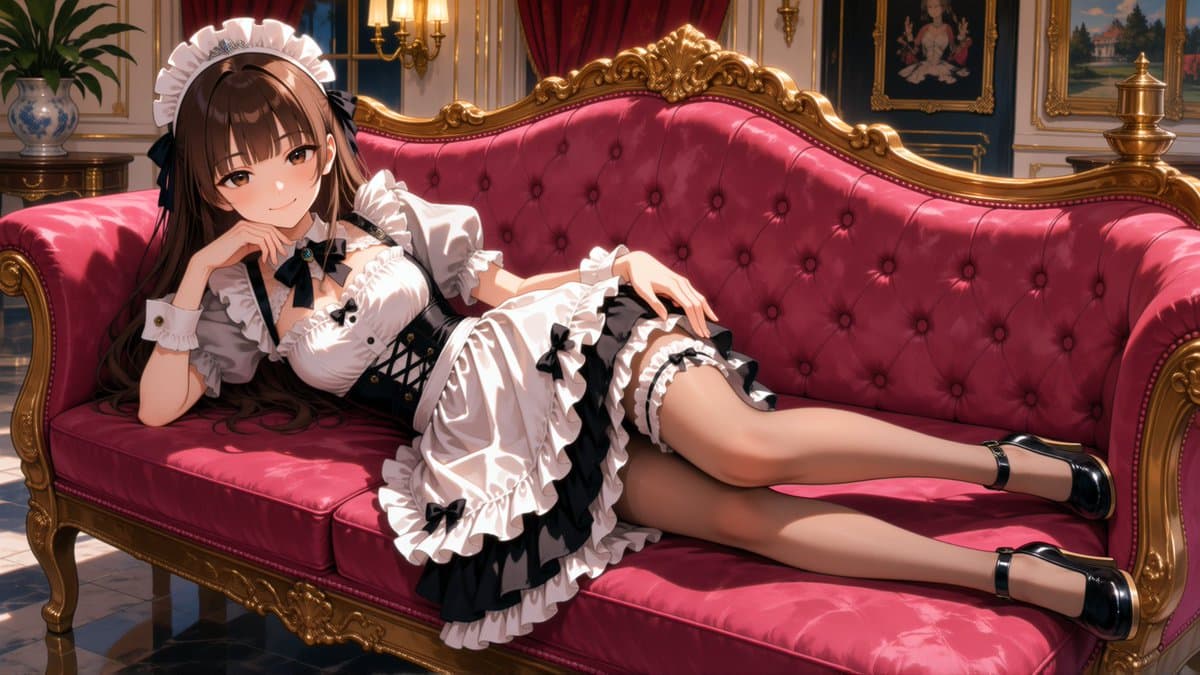
Generates a cinematic anime maid illustration in an ornate Victorian parlor with luxurious red velvet and gold décor. (free to use) — Free AI image template on PicX Studio.
Create a high-quality anime illustration in a luxurious Victorian mansion parlor. A beautiful young adult maid with {argument name="hair color" default="long chestnut-brown hair"} reclines sideways across an ornate deep crimson tufted velvet sofa with gilded baroque wooden trim. Her face is intentionally obscured by a smooth rectangular blur/censor block, but keep the rest of the image detailed and elegant. She wears a frilly classic black-and-white maid outfit: white ruffled headband, puffed short sleeves, fitted white bodice with black ribbon bow at the collar, black corset-style waist panel with crisscross lacing, layered white apron, black skirt accents, multiple ruffled hems, garter-like thigh ruffles, and glossy black Mary Jane heels with ankle straps. Pose her lounging with one elbow propped near her chin, the other hand relaxed on her skirt, legs extended along the sofa. The room should feel opulent and warm: red velvet curtains, gold wall moldings, framed classical paintings, wall sconces with candlelike warm lights, a decorative porcelain vase with a leafy plant on a side table, polished marble floor, and soft sunlight creating dramatic highlights and shadows. Use {argument name="art style" default="polished modern anime, gpt-image-2 style, waiAnima aesthetic"}, highly detailed fabric folds, glossy reflections, cinematic lighting, rich reds and golds, sharp focus, elegant composition, 16:9 horizontal canvas. Avoid text, watermark, extra characters, deformed anatomy, or messy background.
Use Anime Maid on Baroque Sofa to plan an AI image around gpt-image-2 generation, themes such as en and gpt-image-2. Match the preview's composition first, then personalize the subject, setting, and mood for your own project.
Use the primary action to load the template settings in PicX Studio.
Adjust the subject and creative details for your destination.
Create the image, compare the result with the preview, and refine one variable at a time.
A continuous mix — similar concepts first, woven with same-model prompts and fresh picks from the catalog.
Choose the primary action to open PicX Studio with the available template settings. Review the model and format, personalize the creative direction, and generate when ready.
Yes. You can change the subject, setting, lighting, mood, format, and available model controls before creating your image.
This template is free to open and customize. Generation usage is shown in PicX Studio before you create.
Start with gpt-image-2, which is the model associated with this template. You can compare another compatible model for a different finish.
A continuous mix — similar concepts first, woven with same-model prompts and fresh picks from the catalog.
Follow a topic to a crawlable collection of related PicX Studio templates.
36,410 public templates available. Verified via the PicX Studio public templates API; refreshed hourly.