How do I use the Samurai Armor Turnaround Sheet template?
Choose the primary action to open PicX Studio with the available template settings. Review the model and format, personalize the creative direction, and generate when ready.
A structured prompt for generating a wide character concept sheet showing a dark armored samurai from multiple views with a scale silhouette. Change the subject, setting, or lighting one variable at a time.
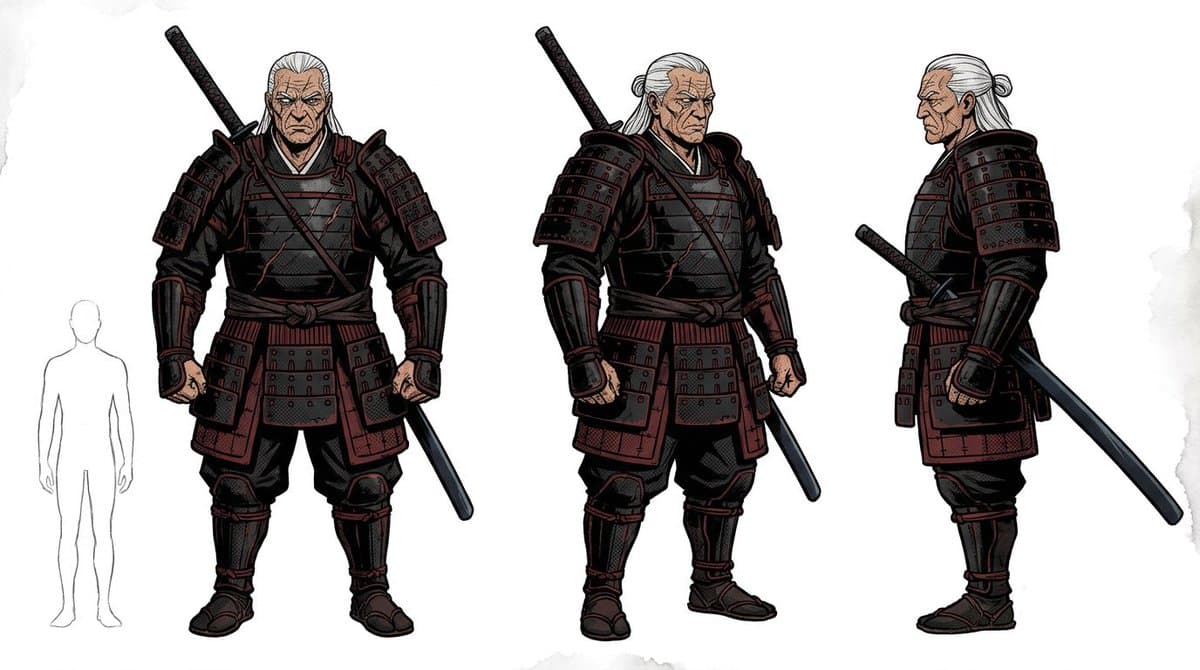
Goal: Create a clean fantasy character concept sheet for a heavily armored samurai warrior, suitable for game or film pre-production. Canvas: Wide horizontal white studio background, roughly 16:9, with faint gray watercolor texture at the edges and no environment. Use crisp comic-book concept art linework, detailed ink outlines, subtle cel shading, muted colors, and high-contrast armor highlights. Layout: Show exactly 4 discrete full-body figures arranged left to right: 1 small pale gray human scale silhouette on the far left, 1 large front-view warrior, 1 large three-quarter-view warrior facing slightly right, and 1 large right-side-profile warrior. Keep the three warrior views evenly spaced and aligned at the feet like a turnaround sheet. Subject details: The character is a tall, broad, muscular older male samurai with {argument name="hair color" default="long white hair"} tied back, visible hairline and ponytail, and a {argument name="face treatment" default="plain blurred rectangular face censor"} over the face in each warrior view. He wears dark layered samurai armor in {argument name="armor colors" default="black lacquer with deep burgundy red plates and cords"}: large segmented shoulder guards, plated chest cuirass, layered waist skirt armor, forearm bracers, shin guards, wrapped trousers, split-toe boots, and tied waist sash. The armor is bulky, worn, and functional, with many rectangular lamellar plates, rivets, straps, red lacing, and black under-cloth. Weapons and counted elements: Include exactly 3 warrior poses and exactly 1 scale silhouette. Include exactly 4 visible sword elements across the sheet: a sheathed katana or sword handle rising diagonally behind the front-view warrior’s left shoulder, a short dark scabbard or sword held downward near the front-view warrior’s right side, a sheathed katana handle rising diagonally behind the three-quarter-view warrior’s left shoulder, and a curved katana drawn at the right-side-profile warrior’s waist extending diagonally backward. Do not add extra weapons. Pose details: Front-view warrior stands powerfully with fists clenched, feet apart, shoulders square. Three-quarter-view warrior stands with one fist clenched and the other hand near a lowered scabbard, head turned slightly. Side-profile warrior stands upright looking left, showing the layered side silhouette of the shoulder armor, waist plates, ponytail, and sword at the hip. Style constraints: Keep the background blank white, no title text, no labels, no logos, no watermark. Use a realistic comic concept-art style rather than anime chibi. Make the armor intricate and readable, with dark red-black palette, white hair contrast, and clean full-body silhouettes.
Choose the primary action to open PicX Studio with the available template settings. Review the model and format, personalize the creative direction, and generate when ready.
Yes. You can change the subject, setting, lighting, mood, format, and available model controls before creating your image.
This template is free to open and customize. Generation usage is shown in PicX Studio before you create.
Start with GPT Image 2, which is the model associated with this template. You can compare another compatible model for a different finish.
© 2026 PicX Studio. All rights reserved.

Follow a topic to a crawlable collection of related PicX Studio templates.
43,474 public templates available. Verified via the PicX Studio public templates API; refreshed hourly.




![Movement Sheet - Dance Reference (Seedance 2.0) — [STYLE]
Monochrome grayscale illustration, 3D-rendered character, clean instructional reference sheet, white b](https://pbs.twimg.com/media/HGzSvcnboAA_bjD.jpg?name=orig)


![Anime Cybernetic Armor Character Sheet — # 画像生成指示書
【入力】シートタイプ:[デザイン重視/シンプル]
未入力は[デザイン重視]
【目的】本指示書と同時に添付された全身女性画像1枚のみを唯一の人物参照として使用し、固定アーマースーツへ着せ替えた高品質な2Dアニメ三面図](https://cms-assets.youmind.com/media/1787044626303_ei5njj_HP5TeudasAAHT98-300x300.jpg)



![Minimalist Flat Vector Travel Poster — Premium minimalist flat-vector travel poster for {argument name="city name" default="[CITY_NAME]"}, 3:4 vertical format.](https://cms-assets.youmind.com/media/1787917359711_3ug846_HQX205cbMAA6F6S-300x400.jpg)



























![Technical Blueprint Drawing Prompt — [Iphone], technical blueprint drawing, orthographic view, front view + side view + top view, white vector line art, thin co](https://pbs.twimg.com/media/HCU_ufcacAAZMH2.jpg)



![Watercolor Dreamscape — Nano Banana — A dreamlike watercolor study of a [subject], painted in airy impressionistic style with loose strokes and transparent [col](/_next/image?url=https%3A%2F%2Fcdn.picxstudio.com%2Fuploads%2Fazed_watercolor_HGLsJBwbwAArl7H_51d66b1e-6f5a-4c80-9384-1e0b0db0f6c3.jpg&w=828&q=100)