
Mobile Communication Evolution Infographic
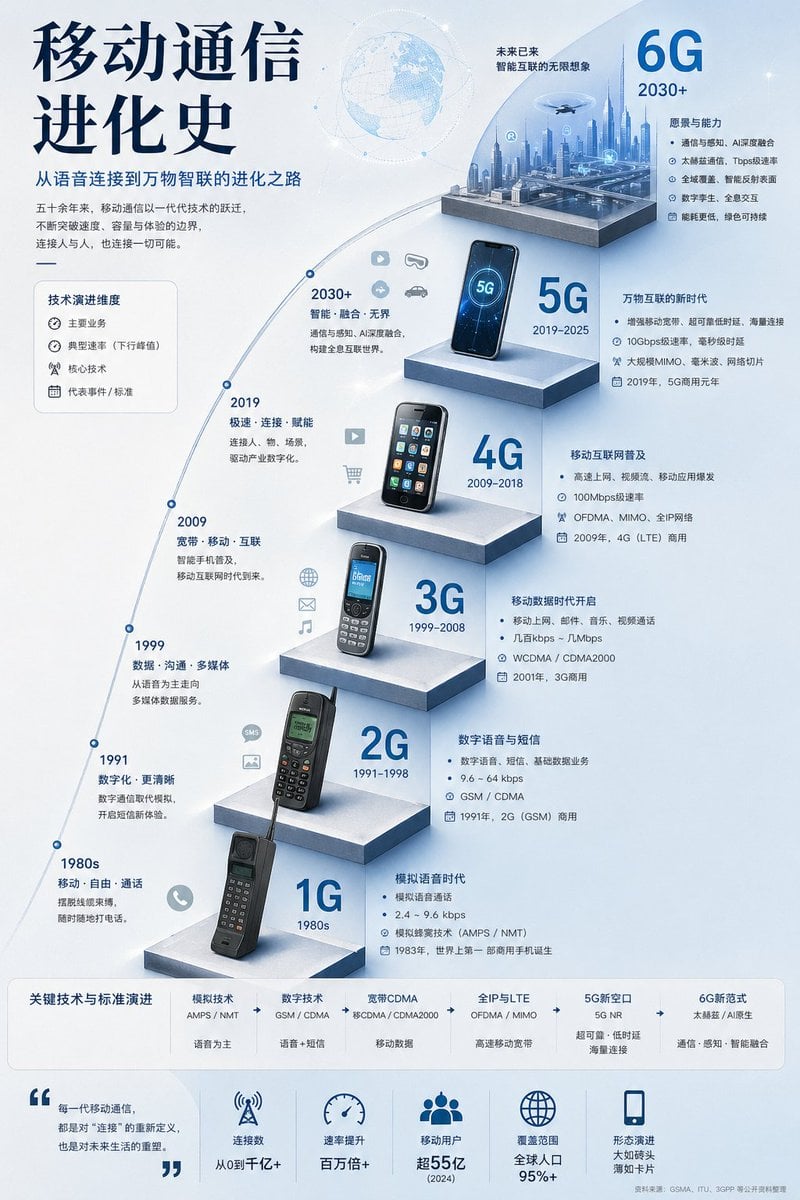
A polished Chinese-language vertical infographic poster showing the timeline from 1G to 6G, ideal for technology education, presentations, and telecom-themed visual explainers.
- Prompt included
- Model and format preset
- Free template
The prompt behind this image
Copy the exact prompt behind Mobile Communication Evolution Infographic, or open it in the studio and make it yours.
{"type":"vertical technology infographic poster","topic":"evolution of mobile communications from 1G to 6G","language":"Chinese","style":"clean futuristic corporate infographic, white and pale blue gradient background, glossy 3D isometric platforms, blue-gray color palette, thin curved timeline, modern sans-serif and bold display typography, soft ambient lighting, subtle world map and network graphics","headline":{"main":"{argument name=\"headline text\" default=\"移动通信进化史\"}","subtitle":"从语音连接到万物智联的进化之路","intro":"五十余年来,移动通信以一代代技术的跃迁,不断突破速度、容量与体验的边界,连接人与人,也连接一切可能。"},"layout":{"orientation":"portrait","sections":[{"title":"技术演进维度","position":"upper left","count":4,"labels":["主要业务","典型速率(下行峰值)","核心技术","代表事件 / 标准"]},{"title":"1G","position":"lower center-left on first pedestal","count":4,"labels":["模拟语音时代","模拟语音通话","2.4 ~ 9.6 kbps","模拟蜂窝技术(AMPS / NMT)"]},{"title":"2G","position":"mid-lower center-left on second pedestal","count":4,"labels":["数字语音与短信","数字语音、短信、基础数据业务","9.6 ~ 64 kbps","GSM / CDMA"]},{"title":"3G","position":"center on third pedestal","count":4,"labels":["移动数据时代开启","移动上网、邮件、音乐、视频通话","几百kbps ~ 几Mbps","WCDMA / CDMA2000"]},{"title":"4G","position":"upper center on fourth pedestal","count":4,"labels":["移动互联网普及","高速上网、视频流、移动应用爆发","100Mbps级速率","OFDMA、MIMO、全IP网络"]},{"title":"5G","position":"upper right-center on fifth pedestal","count":4,"labels":["万物互联的新时代","增强移动宽带、超可靠低时延、海量连接","10Gbps级速率,毫秒级时延","大规模MIMO、毫米波、网络切片"]},{"title":"6G","position":"top right on final pedestal","count":4,"labels":["未来已来 智能互联的无限想象","通信与感知、AI深度融合","太赫兹通信、Tbps级速率","原生智能、全域互联"]},{"title":"关键技术与标准演进","position":"bottom horizontal strip","count":6,"labels":["模拟技术 AMPS / NMT","数字技术 GSM / CDMA","宽带CDMA 移动数据","全IP与LTE OFDMA / MIMO","5G新空口 5G NR","6G新范式 太赫兹 / AI原生"]},{"title":"bottom metrics row","position":"very bottom","count":5,"labels":["连接数 从0到千亿+","速率提升 百万倍+","移动用户 超55亿(2024)","覆盖范围 全球人口95%+","形态演进 大如砖头 薄如卡片"]}],"timeline":{"shape":"large upward sweeping arc from bottom left to top right","milestones":[{"year":"1980s","generation":"1G","device":"large black brick mobile phone with long antenna","icons_count":1},{"year":"1991","generation":"2G","device":"dark candybar phone with antenna and green monochrome screen","icons_count":2},{"year":"1999","generation":"3G","device":"silver and black feature phone with blue screen and keypad","icons_count":3},{"year":"2009","generation":"4G","device":"early touchscreen smartphone with app icons","icons_count":2},{"year":"2019","generation":"5G","device":"modern black smartphone showing glowing 5G screen","icons_count":4},{"year":"2030+","generation":"6G","device":"miniature smart city diorama with drones and futuristic skyline","icons_count":3}]},"composition":"the left side contains the large title and a curved historical timeline with year labels 1980s, 1991, 1999, 2009, 2019, 2030+; six ascending floating rectangular pedestals run diagonally upward; each pedestal displays one generation device or scene with large blue generation text beside it and explanatory Chinese body text to the right; top area includes a faint globe illustration; bottom includes a rounded horizontal standards bar and a separate row of five icon-based summary statistics; lots of negative space, precise alignment, subtle drop shadows, premium presentation design"}
How to use Mobile Communication Evolution Infographic in 3 steps
- 1Upload ImagePNG, JPG or paste
Add your photo
Upload the photo the template builds on. The prompt, model and format are already set.
- 2…a portrait of your subject in softgolden-hour light, 85mm…
Personalize
Edit the subject and creative details for your destination.
- 3Generate
Generate
Press Generate — your image is created in PicX Studio, so you can compare it with the original and refine one variable at a time.
More like this
Templates with the same subject, style or setup. Open one to see its prompt.
Gpt2 Infographic Edu Visual Parent Child Miscommunication Infographic
Gpt2 3d Stone Staircase Evolution Infographic

Japan Travel Brochure Poster

Isometric Process Educational Diorama

Isometric Vehicle Teardown Infographic Template

Gpt2 E Commerce Main Image Earbuds E Commerce Infographic

Gpt2 Infographic Edu Visual Alishan One Day Travel Poster

Gpt2 Infographic Edu Visual Ethnographic Plate for Tibetan Ceremonial Hat

Gpt2 Infographic Edu Visual Earth Signs Zodiac Character Poster

Gpt2 Infographic Edu Visual Water Signs Zodiac Character Poster

Gpt2 Infographic Edu Visual Ink Wash Tribute Poster for Chen Uen

Gpt2 Infographic Edu Visual Vintage Claude Shannon Infographic Poster
Make it yours
Mobile Communication Evolution Infographic works as-is. These are the safest ways to change it without losing the look.
Change one field
Copy a single group, rewrite it, and generate again so you can see what that field is doing.
Keep the frame, change the subject
Hold the composition and light of Mobile Communication Evolution Infographic, then swap wardrobe, props or the person for a new take.
| If the result… | Why | Fix |
|---|---|---|
| The result drifts from the preview | Too many fields changed at once. | Reuse Mobile Communication Evolution Infographic as-is first, then change one group — subject, light, or setting. |
| The model over-stylizes the scene | The prose prompt leaves finish and camera underspecified. | Add one camera or lighting sentence and stay on GPT Image 2. |
More GPT Image 2 templates
Other prompts made for GPT Image 2.

Six VTuber Japanese Logo Sheet

Realistic Portrait of Woman and Deer

The Vista Modular Condo Poster

AI Model Routing Comparison Infographic

2.5D Anime Art Board

Isometric Productivity Desk Scene

New York Double Exposure Poster

Four-Panel AI Landscape Comparison

Japanese Tatami Lifestyle Magazine Cover

NESCAFÉ Coffee Map Poster
More image prompts
Fresh picks from across the catalog.

Hyper-Realistic Cinematic Yacht Photo

Futuristic Tokyo Street Photography

Photo Edit with Fixed Face and Golden Hour Lighting

Japanese Graffiti Style Illustration
Seamless Jacket Design

Anime Condo Duo Gaming Scene

Pop-Up Book Diorama Generator Prompt

Surreal Studio Portrait with Grizzly Bear and Rifle

Moonlit Snow Leopard Leap

Leprechaun Illustration with Custom Style
Browse template categories
Mobile Communication Evolution Infographic questions
How do I use the Mobile Communication Evolution Infographic template?
Add your photo if the template asks for one, edit the prompt if you like — the template's model and format are already selected — and press Generate. Your version opens in PicX Studio.
Can I customize the Mobile Communication Evolution Infographic template?
Yes. You can change the subject, setting, lighting, mood, format, and available model controls before creating your image.
Is the Mobile Communication Evolution Infographic template free?
Opening and editing this template is free. Generating uses credits, shown on the Generate button when you are signed in.
Which AI model should I use?
Start with GPT Image 2, which is the model associated with this template. You can compare another compatible model for a different finish.
Looking for something else? Browse all templates.

Your photo, any look
Thousands of ready templates for every top image and video model, from one credit balance.