How do I use the Violet Kunoichi Calligraphy Room template?
Choose the primary action to open PicX Studio with the available template settings. Review the model and format, personalize the creative direction, and generate when ready.
A vertical anime-style portrait prompt for generating an elegant purple-themed kunoichi seated in a cherry-blossom calligraphy studio. Change the subject, setting, or lighting one variable at a time.
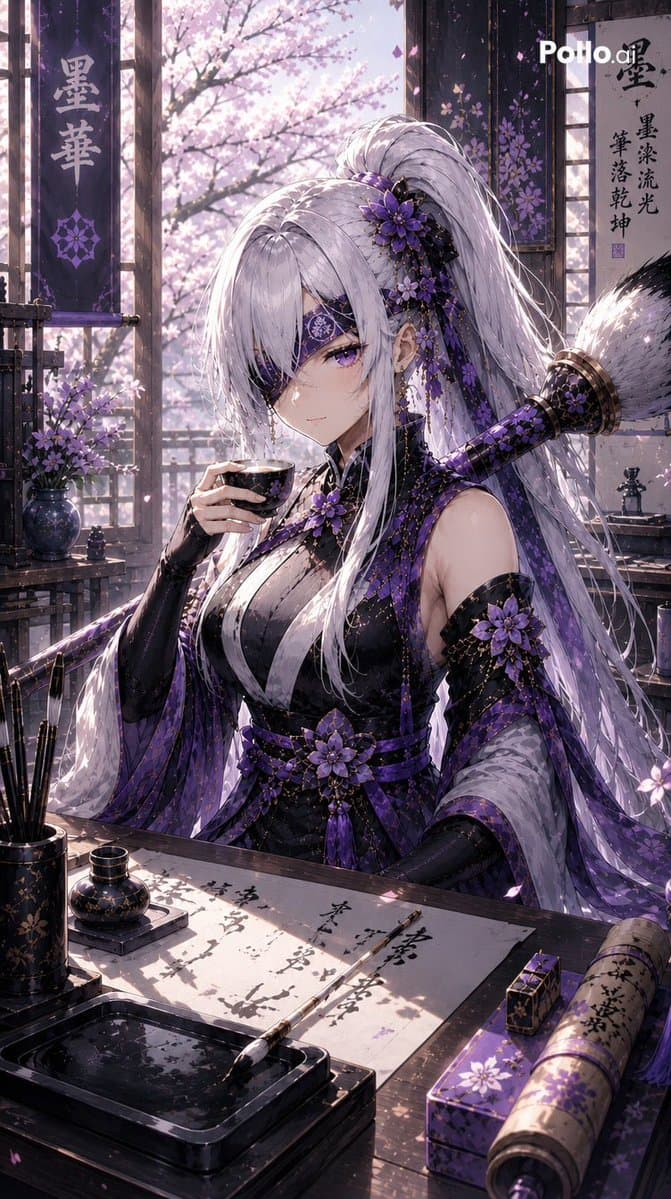
Create a highly detailed vertical anime illustration of a beautiful kunoichi character named {argument name="character name" default="Sumi Hana"} seated in a traditional Japanese calligraphy room during cherry blossom season. She has very long flowing {argument name="hair color" default="silver-white"} hair in a high ponytail, soft pale skin, violet eyes, and a decorative black-and-purple eyepatch over one eye with a floral crest. Dress her in an elegant black and deep purple ninja-kimono outfit with sheer layered sleeves, armor-like black gloves, a purple obi, tassels, and many violet flower ornaments in her hair, shoulder, arm, and waist; the outfit should feel like a refined shinobi ceremonial costume. She calmly holds a small black tea cup in one hand while sitting at a wooden desk covered with calligraphy paper. Include exactly 8 prominent desk items: 1 large sheet of calligraphy paper with black brush writing, 1 calligraphy brush lying diagonally on the paper, 1 glossy black inkstone tray in the foreground, 1 small round ink bottle, 1 upright brush holder with brushes, 1 purple rectangular decorated box, 1 rolled scroll with writing, and 1 small tea cup in her hand. Behind her, show an open shoji-window view filled with blooming pale pink cherry blossoms and drifting petals, with warm backlight and sparkling dust motes. Add exactly 2 hanging vertical banners: the left banner displays {argument name="left banner text" default="墨華"} in pale characters with a purple floral emblem below, and the right wall scroll displays {argument name="right scroll text" default="墨染流光 筆落乾坤"} in black calligraphy. The color palette is {argument name="accent color" default="deep violet and black with pale pink blossom light"}; use cinematic lighting, intricate textile patterns, lacquered surfaces, soft bloom, high contrast, ultra-detailed linework, and a polished gpt-image-2 anime art style. Place a small white “Pollo.ai” watermark near the top right. Vertical 9:16 composition, close three-quarter view, elegant, serene, luxurious, no extra characters, no modern objects besides the watermark.
Choose the primary action to open PicX Studio with the available template settings. Review the model and format, personalize the creative direction, and generate when ready.
Yes. You can change the subject, setting, lighting, mood, format, and available model controls before creating your image.
This template is free to open and customize. Generation usage is shown in PicX Studio before you create.
Start with GPT Image 2, which is the model associated with this template. You can compare another compatible model for a different finish.
© 2026 PicX Studio. All rights reserved.

Follow a topic to a crawlable collection of related PicX Studio templates.
43,474 public templates available. Verified via the PicX Studio public templates API; refreshed hourly.












![Minimalist Flat Vector Travel Poster — Premium minimalist flat-vector travel poster for {argument name="city name" default="[CITY_NAME]"}, 3:4 vertical format.](https://cms-assets.youmind.com/media/1787917359711_3ug846_HQX205cbMAA6F6S-300x400.jpg)

























![Dual Portrait Generation: Realistic and Cartoon Self-Portrait — 帮我生成图片:[主体]:照片中,一位**[从上传图片提取:年龄、性别、外貌特征]**(与上传图片中的人物相同)坐在静谧的城市街道路边。人物随意地坐在水泥人行道边缘,一只手托着下巴,姿态略显百无](https://pbs.twimg.com/media/HFD5Rd4akAAwpVJ.jpg)


![Instagram Feed Generation Prompt (Aesthetic Cohesion Test) — Create a 9-image Instagram feed for this product in [the same aesthetic]. Use different locations,](https://pbs.twimg.com/media/HCHGfWAXcAAtwmD.jpg)