How do I use the Surrealist Architectural Vintage Collage template?
Choose the primary action to open PicX Studio with the available template settings. Review the model and format, personalize the creative direction, and generate when ready.
Generates a vertical mixed-media collage featuring brutalist architecture, classical fragments, birds, drafting lines, and torn paper textures for poster-style artwork. Change the subject, setting, or lighting one variable at a time.
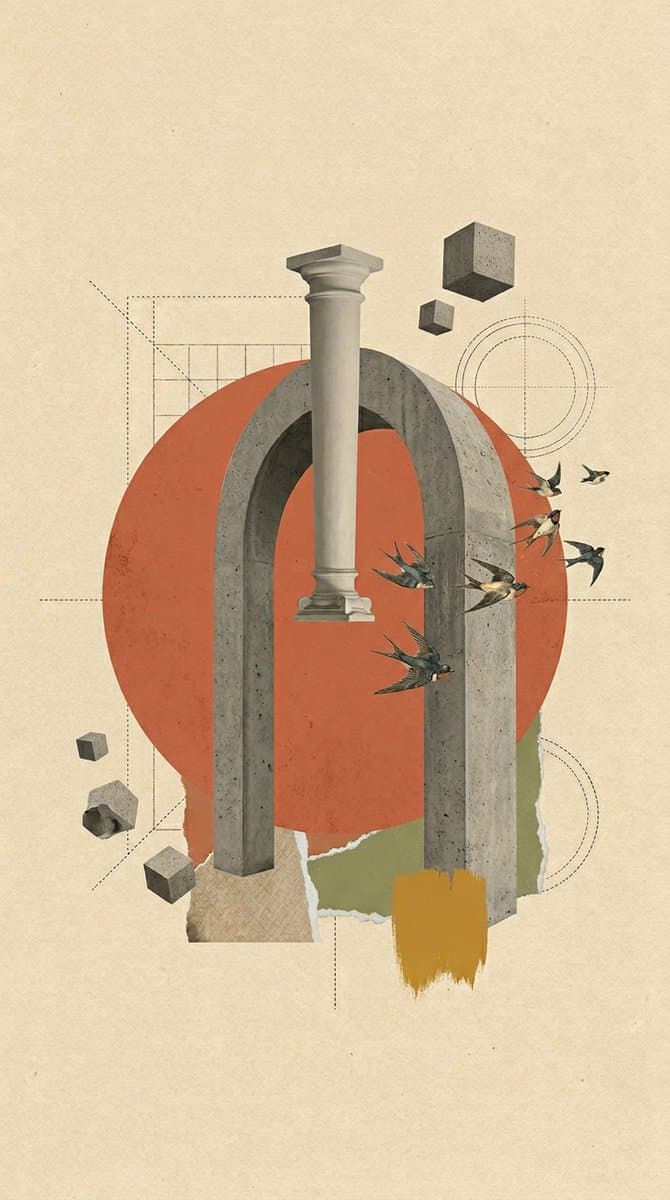
Create a vertical 9:16 digital surrealist architectural vintage collage on a warm cream textured paper background with subtle grain, stains, and aged print speckles. Center the composition around a monumental gray concrete arch with two thick vertical legs and a rounded top, realistic brutalist texture with pores and chipped edges. Behind it place one large muted red-orange circle, partially obscured by the arch, like a flat sun or painted paper disk. Suspend a single classical plaster column fragment vertically in front of the arch, slightly left of center, with a capital and base, floating without support. Add exactly 4 floating concrete cubes: one large cube near the upper right, one small cube below-left of it, one tiny cube at lower left, and one medium cube near the lower-left bottom edge. Add exactly 1 irregular broken concrete rock fragment at the lower left. Add exactly 6 birds flying from the right side of the arch toward the upper-right area, rendered like vintage cutout swallows with dark wings and cream bellies. Include abstract drafting marks: dotted construction lines, a rectangular grid behind the upper-left of the arch, thin circular target lines on the right, a dotted diagonal guide on the left, and faint horizontal and vertical alignment lines crossing the collage. At the bottom, layer torn paper shapes: one beige textured scrap under the left arch leg, one olive-green torn paper patch behind the right leg, and one ochre-yellow vertical paint swatch with rough brush edges in front of the lower right leg. Use a restrained palette of {argument name="background paper color" default="warm cream"}, {argument name="main circle color" default="muted red-orange"}, {argument name="architecture material" default="gray concrete"}, olive green, ochre yellow, and charcoal drafting lines. Keep the style as mixed-media vintage editorial collage, surreal but elegant, with generous empty space around the central object, no typography, no frame, no watermark.
Choose the primary action to open PicX Studio with the available template settings. Review the model and format, personalize the creative direction, and generate when ready.
Yes. You can change the subject, setting, lighting, mood, format, and available model controls before creating your image.
This template is free to open and customize. Generation usage is shown in PicX Studio before you create.
Start with GPT Image 2, which is the model associated with this template. You can compare another compatible model for a different finish.
© 2026 PicX Studio. All rights reserved.

Follow a topic to a crawlable collection of related PicX Studio templates.
43,474 public templates available. Verified via the PicX Studio public templates API; refreshed hourly.









![Minimalist Flat Vector Travel Poster — Premium minimalist flat-vector travel poster for {argument name="city name" default="[CITY_NAME]"}, 3:4 vertical format.](https://cms-assets.youmind.com/media/1787917359711_3ug846_HQX205cbMAA6F6S-300x400.jpg)