How do I use the Nostalgic Train-Side Hotel Room template?
Choose the primary action to open PicX Studio with the available template settings. Review the model and format, personalize the creative direction, and generate when ready.
A cinematic vertical wallpaper prompt for creating a warm, melancholic vintage hotel room scene overlooking a passing train. Change the subject, setting, or lighting one variable at a time.
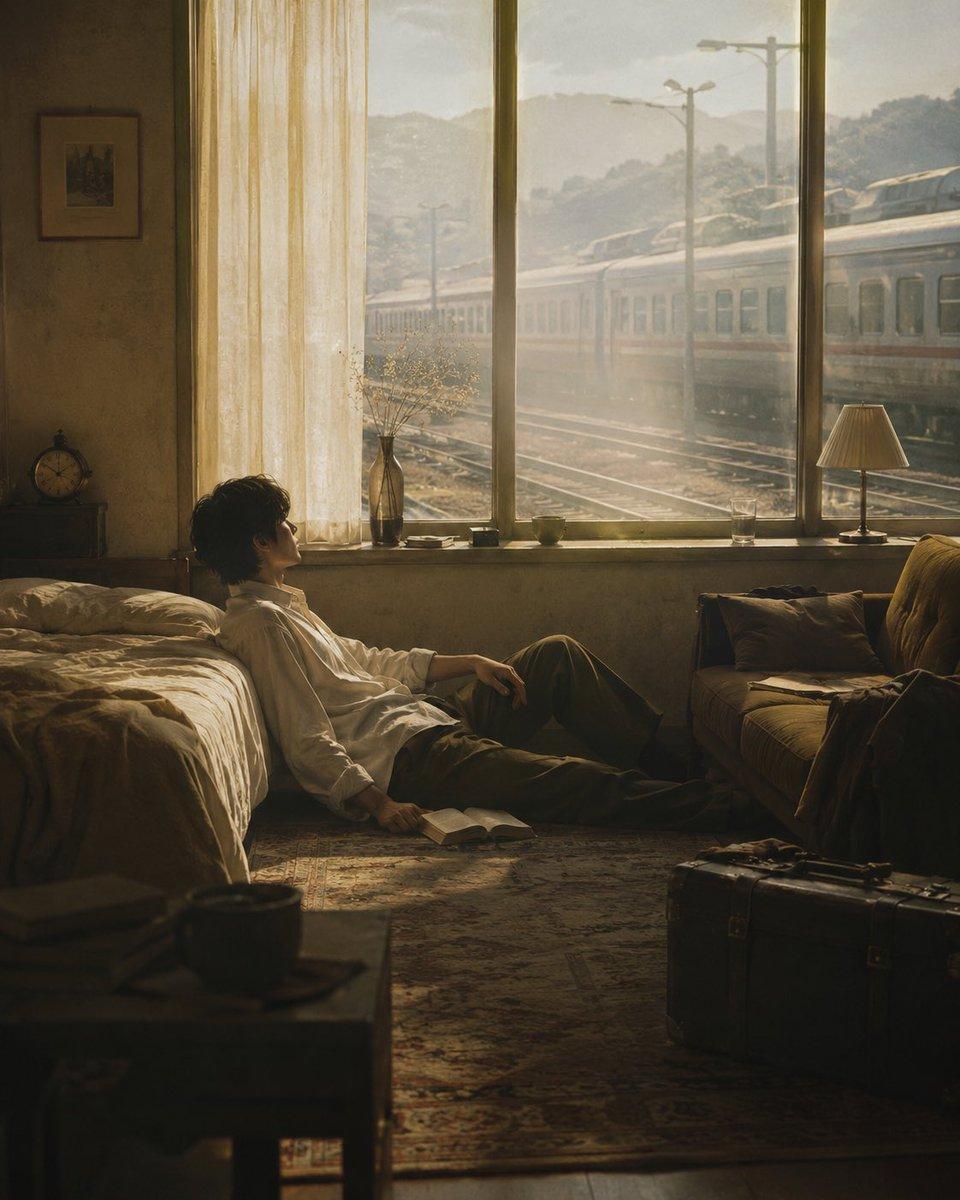
Create a cinematic vertical wallpaper scene in a quiet vintage hotel room beside a railway station, warm golden-hour sunlight streaming through a huge window. A young East Asian man with tousled dark hair, wearing a loose white button-up shirt and dark trousers, sits on the floor leaning against the side of an unmade bed, legs stretched out, looking contemplatively toward the window; an open book lies near his hand on the patterned rug. Outside the window, show exactly one long silver passenger train passing left to right on multiple tracks, with utility poles, misty hills, and hazy morning light in the distance. Inside the room include exactly two main furniture pieces: an unmade bed on the left with beige wrinkled sheets and an old sofa on the right with pillows and a draped coat or bag; also include a low foreground table with a dark mug, a vintage suitcase on the floor at bottom right, a small bedside clock on the left cabinet, a framed picture on the wall, a tall narrow vase with dried branches on the windowsill, a small table lamp on the right side of the windowsill, a drinking glass, and a sheer cream curtain hanging over the left part of the window. Use muted sepia and olive-brown tones, dusty air, soft volumetric sunlight, realistic film photography, shallow shadows, nostalgic Wong Kar-wai inspired mood, highly detailed textures, 4:5 vertical composition, no visible text, no watermark. Key customizable details: {argument name="character age" default="young adult"}, {argument name="character outfit" default="loose white button-up shirt and dark trousers"}, {argument name="time of day" default="golden-hour morning"}, {argument name="outside vehicle" default="one long silver passenger train"}, {argument name="room mood" default="quiet nostalgic melancholy"}.
Choose the primary action to open PicX Studio with the available template settings. Review the model and format, personalize the creative direction, and generate when ready.
Yes. You can change the subject, setting, lighting, mood, format, and available model controls before creating your image.
This template is free to open and customize. Generation usage is shown in PicX Studio before you create.
Start with GPT Image 2, which is the model associated with this template. You can compare another compatible model for a different finish.
Follow a topic to a crawlable collection of related PicX Studio templates.
43,474 public templates available. Verified via the PicX Studio public templates API; refreshed hourly.

![vintage-lithograph-retro-world-cup-poster — A vintage lithograph poster of a [Subject], printed with textured [Color One] and [Color Two] inks,…](/_next/image?url=https%3A%2F%2Fcdn.picxstudio.com%2Fuploads%2Fmeigen_fa8d27d0258f_0e65c622-b45f-4228-99dd-3fe01ad8ffbf.jpg&w=828&q=100)









![Minimalist Flat Vector Travel Poster — Premium minimalist flat-vector travel poster for {argument name="city name" default="[CITY_NAME]"}, 3:4 vertical format.](https://cms-assets.youmind.com/media/1787917359711_3ug846_HQX205cbMAA6F6S-300x400.jpg)