
Anime RPG Tokyo Street HUD
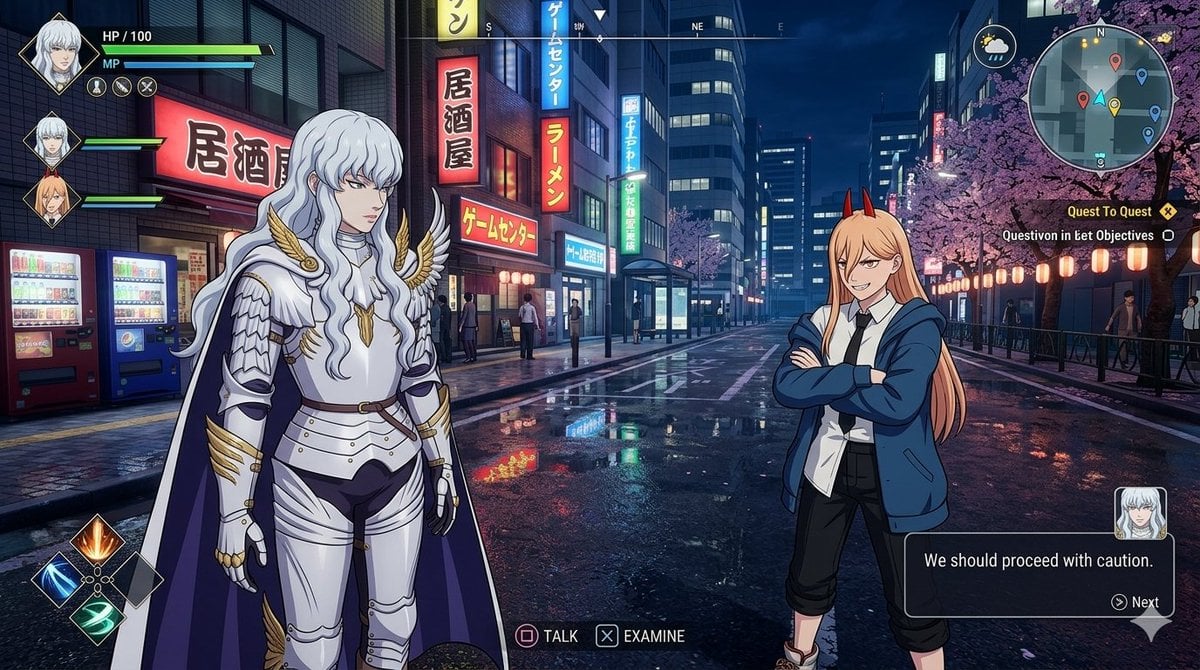
Generates a cinematic anime-style RPG screenshot with two crossover companions, rainy Tokyo nightlife, and a detailed playable game HUD.
- Prompt included
- Model and format preset
- Free template
The prompt behind this image
Copy the exact prompt behind Anime RPG Tokyo Street HUD, or open it in the studio and make it yours.
Goal: Create a cinematic open-world RPG screenshot set in a rainy neon Tokyo nightlife district, styled like a high-budget anime game UI crossover. The scene shows the player facing two anime companions in the middle of a wet crosswalk under cherry blossoms, with immersive HUD elements overlaid. Canvas: 16:9 horizontal game screenshot, 1170×675 or similar wide aspect ratio, nighttime, sharp foreground characters and detailed city background, glossy rain reflections on pavement. Environment: A dense Japanese city street in Hanamicho at night, inspired by Kabukicho. Include glowing storefront signs, vending machines on the right, bicycles near the curb, pedestrians in the distance, zebra crossing lines, wet asphalt reflecting pink, blue, yellow, and red neon. A large cherry blossom tree with pink flowers spreads across the upper left. Add food-stall lanterns and warm signage on the left, plus tall buildings and a distant illuminated tower in the center background. Main characters: Place exactly 2 full-body anime NPCs in front of the player. Left character is {argument name="left character name" default="Griffith"}, a tall elegant silver-haired fantasy knight with very long wavy pale hair, ornate shining silver plate armor, gold wing-like collar details, white cape with dark purple lining, black undersuit, belt, and poised serious stance. Right character is {argument name="right character name" default="Power"}, an anime girl with very long peach-orange hair, small red horns, white shirt, black tie, oversized blue hoodie, cropped black pants, and red sneakers, standing casually with one hand on her hip. Faces should appear softly blurred or featureless as if anonymized, while preserving hair and outfit details. Player perspective: First-person view with exactly 2 visible hands reaching forward from the bottom foreground, wearing dark suit sleeves. The left hand points toward the knight and the right hand points toward the horned girl, creating an interactive dialogue moment. HUD and UI elements: Add exactly 7 main interface groups. 1) Top-left location text: “Hanamicho” and the time “22:47”. 2) A circular grayscale minimap below it with small colored route markers. 3) A left quest tracker with exactly 2 quests: “The Vanishing Band” with objective “Search for the missing musicians at LiveHouse Heaven’s Door”, and “Snack Attack” with objective “Try the takoyaki at Gindaco” plus progress “0/1”. 4) Top-right shortcut icons labeled exactly F1, F2, F3, F4, using small white icons for inventory, map/card, social/character, and menu. 5) Center interaction prompt near the right character: a boxed key “F” followed by “Talk”. 6) Bottom dialogue subtitle box showing speaker name {argument name="speaker name" default="Power"} in yellow and dialogue {argument name="dialogue line" default="Hah! You look way too serious. Chill!"}. 7) Bottom combat HUD with player level 28, HP “3154/3154”, secondary bar “1030/1030”, EXP “2350 / 6240”, three ability buttons labeled Q, E, R, and three movement/action icons labeled Z, X, Space. Party list: On the right side, include exactly 3 party member cards with portrait thumbnails, names, levels, and HP values: “Griffith Lv.28 3154/3154”, “Power Lv.27 2418/2418”, and “Makima Lv.26 1846/1846”. Visual style: Seamlessly combine realistic rainy urban photography background with crisp anime character art and polished fantasy RPG HUD. Use dramatic neon lighting, cinematic depth, high detail, clean readable UI typography, no watermark, no extra characters in the foreground, no additional quests or party members.
How to use Anime RPG Tokyo Street HUD in 3 steps
- 1Upload ImagePNG, JPG or paste
Add your photo
Upload the photo the template builds on. The prompt, model and format are already set.
- 2…a portrait of your subject in softgolden-hour light, 85mm…
Personalize
Edit the subject and creative details for your destination.
- 3Generate
Generate
Press Generate — your image is created in PicX Studio, so you can compare it with the original and refine one variable at a time.
More like this
Templates with the same subject, style or setup. Open one to see its prompt.









Make it yours
Anime RPG Tokyo Street HUD works as-is. These are the safest ways to change it without losing the look.
Change one field
Copy a single group, rewrite it, and generate again so you can see what that field is doing.
Keep the frame, change the subject
Hold the composition and light of Anime RPG Tokyo Street HUD, then swap wardrobe, props or the person for a new take.
| If the result… | Why | Fix |
|---|---|---|
| The result drifts from the preview | Too many fields changed at once. | Reuse Anime RPG Tokyo Street HUD as-is first, then change one group — subject, light, or setting. |
| The model over-stylizes the scene | The prose prompt leaves finish and camera underspecified. | Add one camera or lighting sentence and stay on GPT Image 2. |
More GPT Image 2 templates
Other prompts made for GPT Image 2.

Six VTuber Japanese Logo Sheet

Realistic Portrait of Woman and Deer

The Vista Modular Condo Poster

AI Model Routing Comparison Infographic

2.5D Anime Art Board

Isometric Productivity Desk Scene

New York Double Exposure Poster

Four-Panel AI Landscape Comparison

Japanese Tatami Lifestyle Magazine Cover

NESCAFÉ Coffee Map Poster
More image prompts
Fresh picks from across the catalog.
Luxury Minimalist Fashion Reel
4K Wildlife Habitat Diorama Prompt

Ultra Photorealistic Dinner Selfie Prompt
Macro Photography of Subject in Glass Workspace
Romantic Beastman Anniversary Screenshot
Food thumbnails and product shots
KNIGHT MECHA GIRL Figure Concept
Ethereal Data Portrait for Astronomers
Panel Studio Promo Portrait Grid

Cinematic Automotive Billboard Template
Browse template categories
Anime RPG Tokyo Street HUD questions
How do I use the Anime RPG Tokyo Street HUD template?
Add your photo if the template asks for one, edit the prompt if you like — the template's model and format are already selected — and press Generate. Your version opens in PicX Studio.
Can I customize the Anime RPG Tokyo Street HUD template?
Yes. You can change the subject, setting, lighting, mood, format, and available model controls before creating your image.
Is the Anime RPG Tokyo Street HUD template free?
Opening and editing this template is free. Generating uses credits, shown on the Generate button when you are signed in.
Which AI model should I use?
Start with GPT Image 2, which is the model associated with this template. You can compare another compatible model for a different finish.
Looking for something else? Browse all templates.

Your photo, any look
Thousands of ready templates for every top image and video model, from one credit balance.