
Muted Pastel Acrylic Nail Set
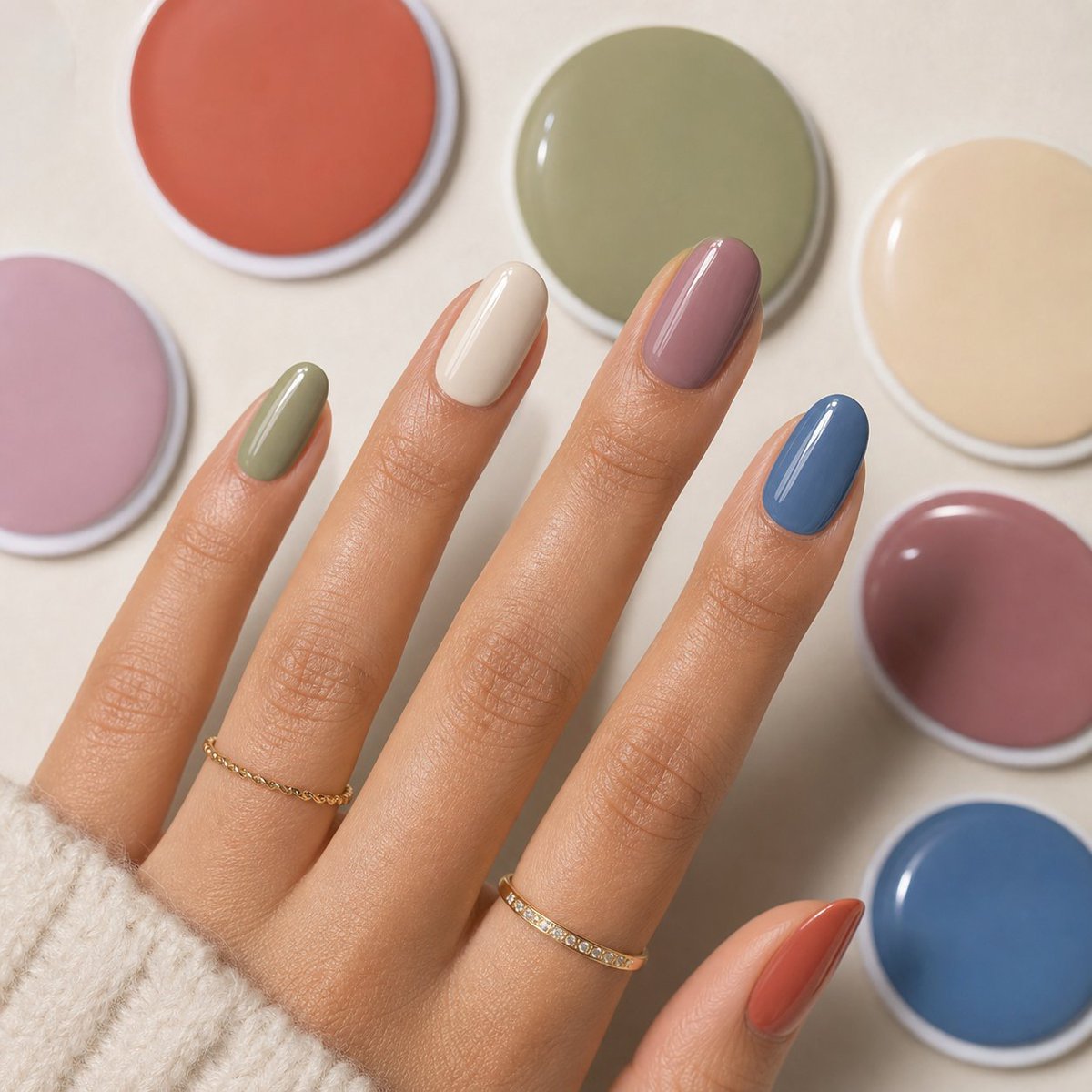
A realistic salon-style close-up photo prompt for a hand modeling glossy multicolor almond acrylic nails with matching polish swatches.
- Prompt included
- Model and format preset
- Premium template
The prompt behind this image
Copy the exact prompt behind Muted Pastel Acrylic Nail Set, or open it in the studio and make it yours.
Create a polished close-up beauty product photo of a feminine hand with glossy almond-shaped acrylic nails, shown diagonally across a warm cream tabletop. The hand should have light-to-medium tan skin, slender fingers, natural skin texture, and a cozy off-white knit sweater cuff partially covering the wrist. Use exactly five visible fingernails on the hand, each painted a different muted creamy color: pinky in sage green, ring finger in ivory cream, middle finger in dusty mauve, index finger in muted denim blue, and thumb in warm terracotta coral. Add two delicate gold rings: one thin chain ring on the lower ring finger and one slim gold band with tiny clear stones on the lower middle finger. Surround the hand with exactly seven round nail-polish color pots or swatches with white rims, softly out of focus: dusty coral at the top left, olive sage at the top center, pale beige at the top right, blush pink on the left edge, muted mauve on the right middle, deep denim blue at the bottom right, and keep one partially cropped pastel swatch near the left side. Lighting should be soft salon studio lighting with glossy specular highlights on every nail and swatch, shallow depth of field, realistic skin detail, clean beige background, elegant minimal composition, no text, no logo, no watermark. The overall palette should feel like {argument name="nail palette" default="muted earthy pastels"}, with {argument name="nail shape" default="medium-length almond acrylic nails"} and a luxurious salon-ready finish.
How to use Muted Pastel Acrylic Nail Set in 3 steps
- 1Upload ImagePNG, JPG or paste
Add your photo
Upload the photo the template builds on. The prompt, model and format are already set.
- 2…a portrait of your subject in softgolden-hour light, 85mm…
Personalize
Edit the subject and creative details for your destination.
- 3Generate
Generate
Press Generate — your image is created in PicX Studio, so you can compare it with the original and refine one variable at a time.
More like this
Templates with the same subject, style or setup. Open one to see its prompt.
Pastel Anime Nail Artist at Desk

Eid al-Adha Cute Chaos — Fisheye Selfie with Farm Selfie, Mosque & Animals

Cute Layered Paper Cut Chibi Girl

Layered Paper Cut Illustration Template

Premium Vintage Travel Poster Landscape

Japanese Café Sketch Duo Illustration

Delicate Japanese Café Lifestyle Illustration

Blue Hour Editorial Fashion Portrait

Quiet Minimalist Anime Style Guide
Premium Vintage Travel Poster Landscape

Pastel Fantasy Pagoda Mountain Landscape

Korean Cafe Courtyard Gold Frame Mirror Selfie
Make it yours
Muted Pastel Acrylic Nail Set works as-is. These are the safest ways to change it without losing the look.
Change one field
Copy a single group, rewrite it, and generate again so you can see what that field is doing.
Keep the frame, change the subject
Hold the composition and light of Muted Pastel Acrylic Nail Set, then swap wardrobe, props or the person for a new take.
| If the result… | Why | Fix |
|---|---|---|
| The result drifts from the preview | Too many fields changed at once. | Reuse Muted Pastel Acrylic Nail Set as-is first, then change one group — subject, light, or setting. |
| The model over-stylizes the scene | The prose prompt leaves finish and camera underspecified. | Add one camera or lighting sentence and stay on GPT Image 2. |
More GPT Image 2 templates
Other prompts made for GPT Image 2.

Six VTuber Japanese Logo Sheet

Realistic Portrait of Woman and Deer

The Vista Modular Condo Poster

AI Model Routing Comparison Infographic

2.5D Anime Art Board

Isometric Productivity Desk Scene

New York Double Exposure Poster

Four-Panel AI Landscape Comparison

Japanese Tatami Lifestyle Magazine Cover

NESCAFÉ Coffee Map Poster
More image prompts
Fresh picks from across the catalog.
Infographic image of Mustang GTD with technical annotations
Anime Schoolgirl Selfie in Classroom

Pixar-Style 3D Animated Child Portrait with Animal
Bad Doodle Gold Ninja Ghost
2D Flat Packaging Generation

Intimate Studio Portrait with Fairy Lights Prompt
Japanese Classroom Chalkboard Notes
Pop Swan Lake Birthday Poster
Architectural Interior Style Transformation with Depth Map Constraint

Traveling Alchemist at Misty Ruins
Browse template categories
Muted Pastel Acrylic Nail Set questions
How do I use the Muted Pastel Acrylic Nail Set template?
Add your photo if the template asks for one, edit the prompt if you like — the template's model and format are already selected — and press Generate. Your version opens in PicX Studio.
Can I customize the Muted Pastel Acrylic Nail Set template?
Yes. You can change the subject, setting, lighting, mood, format, and available model controls before creating your image.
Is the Muted Pastel Acrylic Nail Set template free?
Opening and editing this template is free. Generating uses credits, shown on the Generate button when you are signed in.
Which AI model should I use?
Start with GPT Image 2, which is the model associated with this template. You can compare another compatible model for a different finish.
Looking for something else? Browse all templates.

Your photo, any look
Thousands of ready templates for every top image and video model, from one credit balance.