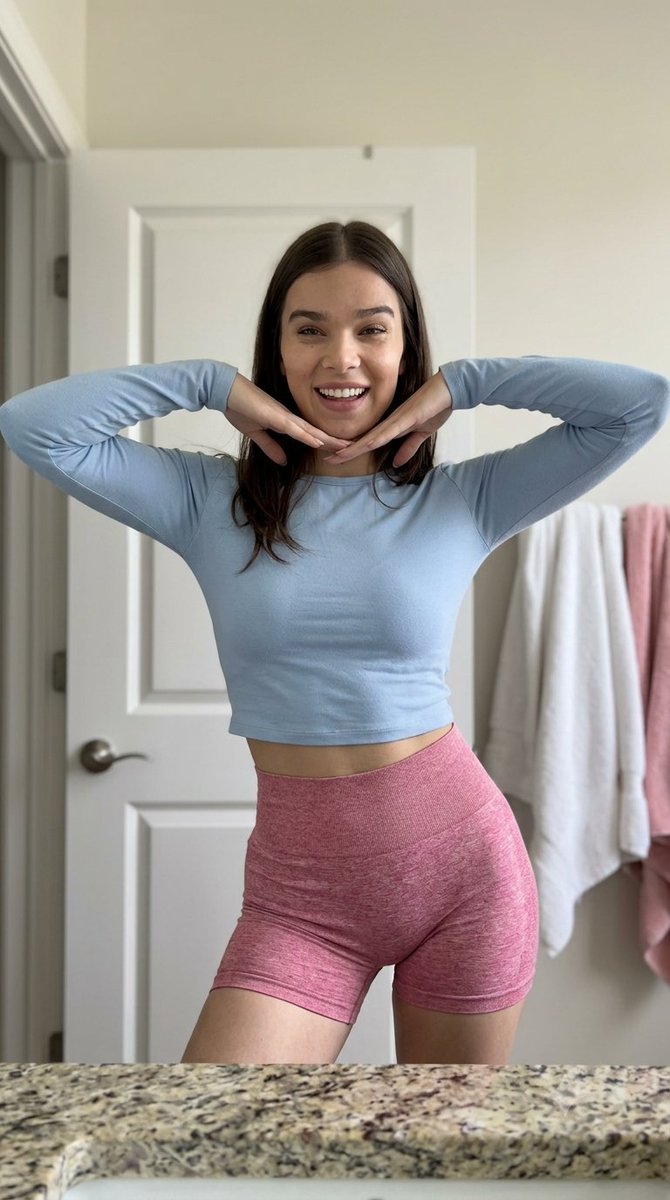


How do I use the Candid Smartphone Celebrity Portrait template?
Choose the primary action to open PicX Studio with the available template settings. Review the model and format, personalize the creative direction, and generate when ready.
A detailed prompt for creating high-fidelity, candid-style smartphone photos of celebrities with realistic skin textures and natural lighting. (free to use) — Free AI image template on PicX Studio.
A medium shot, eye-level candid smartphone photo of {argument name="celebrity" default="Hailee Steinfeld"} smiling directly into the camera. She is centered in the frame with her hair parted down the middle, falling softly below her shoulders. She has a joyful expression with a radiant, open-mouthed smile showing her teeth, wearing light, natural makeup with authentic skin microtexture, fine pores, subtle imperfections, and realistic skin tones. She is wearing a {argument name="top color" default="light-red"} long-sleeved crop top and high-waisted, tight-fitting {argument name="shorts style" default="marled white knit"} shorts. Her posture is relaxed and dynamic, with a slight hip dip to the left, both arms raised, and her hands placed under her chin to form a 'V' shape around her face. The setting is a bathroom interior featuring a closed black paneled door with a silver handle in the background. To the right, two plush towels-one yellow and one red-toned-hang on a rack. In the immediate foreground, the sharp edge of a polished granite countertop displays detailed mineral textures. The scene is illuminated by indirect natural window light blended with soft ambient lighting. Captured on a 24mm equivalent smartphone lens with modern computational HDR processing, a shallow depth of field (f/1.8), ISO 100 clarity, and extreme optical sharpness. Ultra-high-definition 8K quality focusing on realistic fabric microtextures, crisp eyes, and zero digital noise. Aspect ratio 9:16.
Use Candid Smartphone Celebrity Portrait to plan an AI image around nano-banana-2 generation. Match the preview's composition first, then personalize the subject, setting, and mood for your own project.
Use the primary action to load the template settings in PicX Studio.
Adjust the subject and creative details for your destination.
Create the image, compare the result with the preview, and refine one variable at a time.
A continuous mix — similar concepts first, woven with same-model prompts and fresh picks from the catalog.
Choose the primary action to open PicX Studio with the available template settings. Review the model and format, personalize the creative direction, and generate when ready.
Yes. You can change the subject, setting, lighting, mood, format, and available model controls before creating your image.
This template is free to open and customize. Generation usage is shown in PicX Studio before you create.
Start with nano-banana-2, which is the model associated with this template. You can compare another compatible model for a different finish.
A continuous mix — similar concepts first, woven with same-model prompts and fresh picks from the catalog.
Follow a topic to a crawlable collection of related PicX Studio templates.
32,032 public templates available. Verified via the PicX Studio public templates API; refreshed hourly.


