

How do I use the Urban Summer Streetwear Fashion Portrait template?
Choose the primary action to open PicX Studio with the available template settings. Review the model and format, personalize the creative direction, and generate when ready.
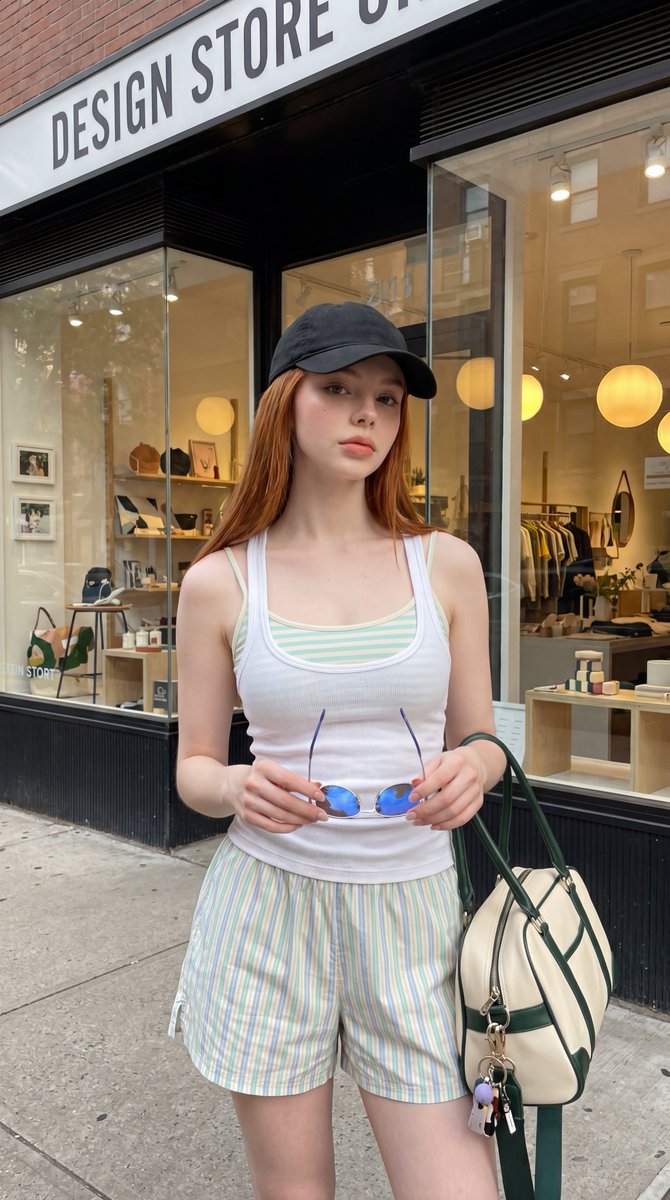
A highly detailed prompt for creating professional street style fashion photography featuring a young woman with copper-red hair in an urban boutique setting. (free to use) — Free AI image template on PicX Studio.
Ultra-realistic street fashion portrait of a young woman with {argument name="hair color" default="long straight copper-red hair"} standing on a city sidewalk in front of a modern boutique storefront. She wears {argument name="summer outfit" default="a black baseball cap, a fitted white ribbed tank top layered over a pastel mint-and-cream striped camisole, and relaxed striped summer shorts in soft pastel tones"}. Holding a pair of blue-tinted sunglasses in both hands while carrying a {argument name="bag description" default="cream-and-forest-green designer duffel bag"}. Natural makeup, luminous skin, soft pink lips, and a calm confident expression. Contemporary lifestyle aesthetic, casual summer fashion, clean girl style, premium streetwear lookbook. Behind her is a stylish design store with large glass windows, warm interior lighting, minimalist home decor displays, clothing racks, and modern retail architecture. Soft natural daylight, realistic reflections on glass, authentic urban atmosphere, photorealistic skin texture, editorial fashion photography, premium lifestyle campaign, highly detailed, luxury shopping district aesthetic, 8K quality.
Use Urban Summer Streetwear Fashion Portrait to plan an AI image around nano-banana-2 generation. Match the preview's composition first, then personalize the subject, setting, and mood for your own project.
Use the primary action to load the template settings in PicX Studio.
Adjust the subject and creative details for your destination.
Create the image, compare the result with the preview, and refine one variable at a time.
A continuous mix — similar concepts first, woven with same-model prompts and fresh picks from the catalog.
Choose the primary action to open PicX Studio with the available template settings. Review the model and format, personalize the creative direction, and generate when ready.
Yes. You can change the subject, setting, lighting, mood, format, and available model controls before creating your image.
This template is free to open and customize. Generation usage is shown in PicX Studio before you create.
Start with nano-banana-2, which is the model associated with this template. You can compare another compatible model for a different finish.
A continuous mix — similar concepts first, woven with same-model prompts and fresh picks from the catalog.
Follow a topic to a crawlable collection of related PicX Studio templates.
32,032 public templates available. Verified via the PicX Studio public templates API; refreshed hourly.


