How do I use the Minimalist Profile Line Art template?
Choose the primary action to open PicX Studio with the available template settings. Review the model and format, personalize the creative direction, and generate when ready.
An artistic prompt for generating side-profile illustrations inspired by grayscale photography with high-contrast jewelry details.
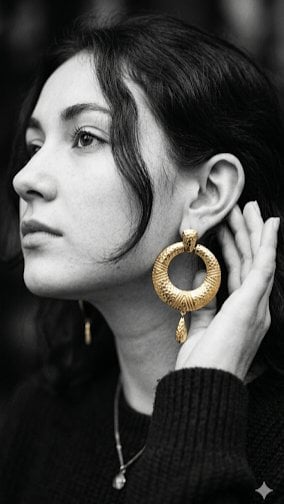
A side-profile illustration inspired by a {argument name="style" default="black-and-white photograph"} of a woman with dark wavy hair framing her face. In both versions, she looks slightly upward and away from the viewer, touching her ear with her hand to emphasize a prominent, {argument name="jewelry" default="textured gold hoop earring with a small teardrop dangle"}. The original photograph utilizes selective coloring to highlight only the gold jewelry against a grayscale palette, while the illustrated version translates this scene into a {argument name="illustration style" default="clean, minimalist line art style"} with a warm white background, adding subtle pops of color through dark pink lipstick, soft pink blush, a solid black ribbed sweater, and a matching gold pendant necklace.
Choose the primary action to open PicX Studio with the available template settings. Review the model and format, personalize the creative direction, and generate when ready.
Yes. You can change the subject, setting, lighting, mood, format, and available model controls before creating your image.
This template is free to open and customize. Generation usage is shown in PicX Studio before you create.
Start with Nano Banana 2, which is the model associated with this template. You can compare another compatible model for a different finish.
Follow a topic to a crawlable collection of related PicX Studio templates.