
Rayleigh Scattering Infographic
A vertical classroom-style infographic explaining why the sky is blue and sunsets are red through Rayleigh scattering diagrams, formulas, and fact cards.
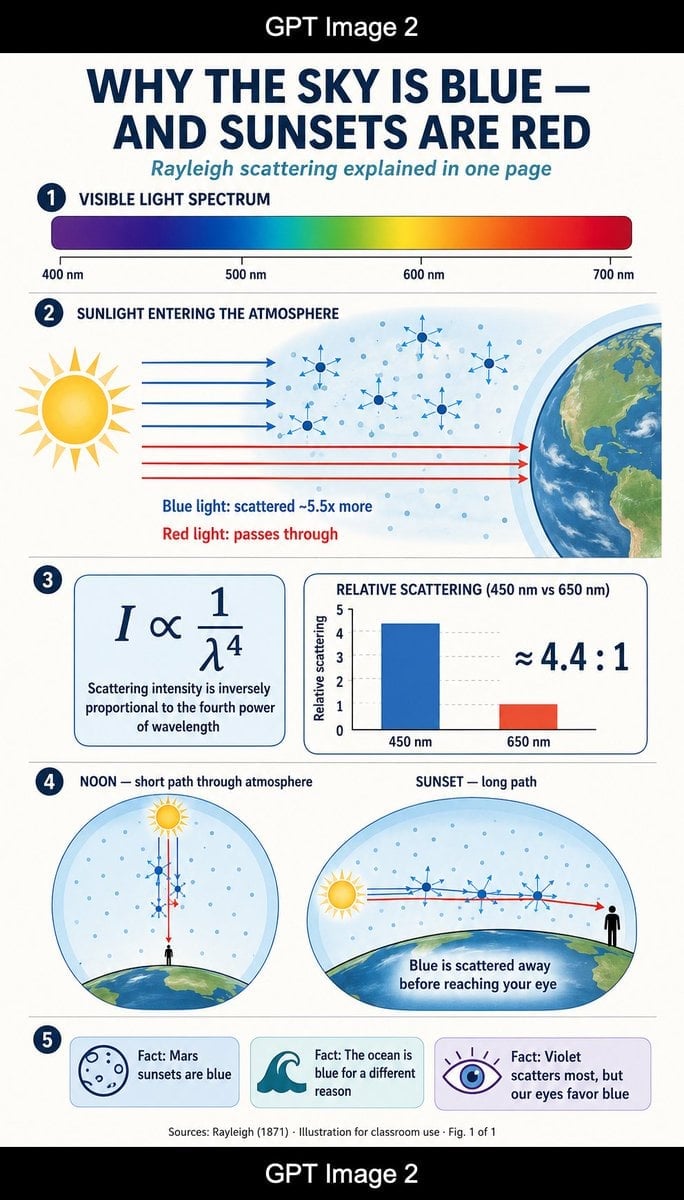
- Prompt included
- Model and format preset
- Premium template
The prompt behind this image
Copy the exact prompt behind Rayleigh Scattering Infographic, or open it in the studio and make it yours.
Goal: Create a tall single-page educational science infographic explaining {argument name="headline text" default="WHY THE SKY IS BLUE — AND SUNSETS ARE RED"} with the subtitle {argument name="subtitle text" default="Rayleigh scattering explained in one page"}. Use a clean flat-design science-magazine look, suitable for a classroom handout. Canvas: Vertical 9:16 poster on an off-white background, framed by black horizontal bars at the very top and bottom. Center the white text “GPT Image 2” inside each black bar. Main infographic area has generous margins, thin navy divider lines, rounded cards, and a navy/teal/coral/yellow palette. Layout: Use exactly 5 numbered sections, each marked by a dark navy circular badge with white numbers 1 through 5 on the left. Keep all typography geometric sans-serif, with bold uppercase navy headings and teal italic subtitle. Section 1 — Visible Light Spectrum: Heading reads “VISIBLE LIGHT SPECTRUM”. Show one long rounded horizontal rainbow gradient bar from violet/blue at left through cyan, green, yellow, orange, and red at right. Add exactly 4 wavelength labels beneath it: “400 nm”, “500 nm”, “600 nm”, and “700 nm”, with small tick marks. Section 2 — Sunlight Entering the Atmosphere: Heading reads “SUNLIGHT ENTERING THE ATMOSPHERE”. Draw a large stylized yellow sun on the left, Earth’s curved edge on the right, and a pale blue atmospheric band between them filled with many small blue air-molecule dots. Show exactly 4 blue horizontal light rays entering and scattering with small blue arrows, plus exactly 3 red horizontal rays passing straight through toward Earth. Include exactly 6 larger molecule/star scattering icons in the atmosphere. Add two explanatory captions below the rays: “Blue light: scattered ~5.5x more” in blue and “Red light: passes through” in red. Section 3 — Formula and Bar Chart: Create two rounded rectangular cards side by side. Left card shows the large equation “I ∝ 1/λ⁴” and the caption “Scattering intensity is inversely proportional to the fourth power of wavelength”. Right card title reads “RELATIVE SCATTERING (450 nm vs 650 nm)”. Include a simple bar chart with exactly 2 bars: a tall blue bar labeled “450 nm” and a shorter red-orange bar labeled “650 nm”, y-axis labeled “Relative scattering”, and large text “≈ 4.4 : 1” on the right. Section 4 — Noon vs Sunset: Make two large circular/oval diagrams side by side. Left diagram title: “NOON — short path through atmosphere”. It shows a small sun above a curved Earth horizon, a tiny black human silhouette at ground level, blue dots in the sky, and vertical red and blue rays passing through a short atmospheric path with blue scattering arrows. Right diagram title: “SUNSET — long path”. It shows a low sun near the horizon on the left, a long horizontal path through a pale blue atmosphere over curved Earth, blue light scattering away along the path, a red ray continuing to a black human silhouette at the right, and the caption “Blue is scattered away before reaching your eye”. Section 5 — Facts: Create exactly 3 rounded fact cards in a row. Card 1 has a simple outlined Mars-like planet icon and text “Fact: Mars sunsets are blue”. Card 2 has a teal ocean wave icon and text “Fact: The ocean is blue for a different reason”. Card 3 has a purple eye icon with rays and text “Fact: Violet scatters most, but our eyes favor blue”. Footer: Add small centered source text: “Sources: Rayleigh (1871) · Illustration for classroom use · Fig. 1 of 1”. Visual style: Flat vector illustration, thin navy outlines, soft gradients only where needed, crisp readable labels, science textbook clarity, no photorealism except the Earth texture may be lightly detailed. Keep spacing balanced and ensure every label is legible.
How to use Rayleigh Scattering Infographic in 3 steps
- 1Upload ImagePNG, JPG or paste
Add your photo
Upload the photo the template builds on. The prompt, model and format are already set.
- 2…a portrait of your subject in softgolden-hour light, 85mm…
Personalize
Edit the subject and creative details for your destination.
- 3Generate
Generate
Press Generate — your image is created in PicX Studio, so you can compare it with the original and refine one variable at a time.
More like this
Templates with the same subject, style or setup. Open one to see its prompt.

Japan Travel Brochure Poster

Isometric Process Educational Diorama

Isometric Vehicle Teardown Infographic Template

Gpt2 E Commerce Main Image Earbuds E Commerce Infographic

Gpt2 Infographic Edu Visual Alishan One Day Travel Poster

Gpt2 Infographic Edu Visual Ethnographic Plate for Tibetan Ceremonial Hat

Gpt2 Infographic Edu Visual Earth Signs Zodiac Character Poster

Gpt2 Infographic Edu Visual Water Signs Zodiac Character Poster

Gpt2 Infographic Edu Visual Ink Wash Tribute Poster for Chen Uen

Gpt2 Infographic Edu Visual Vintage Claude Shannon Infographic Poster

Gpt2 Infographic Edu Visual Taoist Three Souls Seven Po Poster

Gpt2 Infographic Edu Visual Biomimetic Skyray Aircraft Poster
Make it yours
Rayleigh Scattering Infographic works as-is. These are the safest ways to change it without losing the look.
Change one field
Copy a single group, rewrite it, and generate again so you can see what that field is doing.
Keep the frame, change the subject
Hold the composition and light of Rayleigh Scattering Infographic, then swap wardrobe, props or the person for a new take.
| If the result… | Why | Fix |
|---|---|---|
| The result drifts from the preview | Too many fields changed at once. | Reuse Rayleigh Scattering Infographic as-is first, then change one group — subject, light, or setting. |
| The model over-stylizes the scene | The prose prompt leaves finish and camera underspecified. | Add one camera or lighting sentence and stay on GPT Image 2. |
More GPT Image 2 templates
Other prompts made for GPT Image 2.

Six VTuber Japanese Logo Sheet

Realistic Portrait of Woman and Deer

The Vista Modular Condo Poster

AI Model Routing Comparison Infographic

2.5D Anime Art Board

Isometric Productivity Desk Scene

New York Double Exposure Poster

Four-Panel AI Landscape Comparison

Japanese Tatami Lifestyle Magazine Cover

NESCAFÉ Coffee Map Poster
More image prompts
Fresh picks from across the catalog.
Dramatic Urban Portrait with Overhead Lighting
Absolute Face Preservation Urban Streetwear
Most weird mundane photo you can imagine
Prompt for Generating 'Hot White Girl in Prom Dress' (Failure Case)
Ultra-Realistic 3D Cinematic Portrait with Tom and Jerry
Cozy Pixel Farm Island Village
Bioluminescent Night Beach Portrait
Burgundy Velvet Literary Magazine Cover
Exploding Pringles Can Advertising Prompt
Photoreal Anime Mannequin Display
Browse template categories
Rayleigh Scattering Infographic questions
How do I use the Rayleigh Scattering Infographic template?
Add your photo if the template asks for one, edit the prompt if you like — the template's model and format are already selected — and press Generate. Your version opens in PicX Studio.
Can I customize the Rayleigh Scattering Infographic template?
Yes. You can change the subject, setting, lighting, mood, format, and available model controls before creating your image.
Is the Rayleigh Scattering Infographic template free?
Opening and editing this template is free. Generating uses credits, shown on the Generate button when you are signed in.
Which AI model should I use?
Start with GPT Image 2, which is the model associated with this template. You can compare another compatible model for a different finish.
Looking for something else? Browse all templates.

Your photo, any look
Thousands of ready templates for every top image and video model, from one credit balance.