How do I use the Heterochromatic Nobleman Anime Portrait template?
Choose the primary action to open PicX Studio with the available template settings. Review the model and format, personalize the creative direction, and generate when ready.
A cinematic vertical anime portrait prompt for creating a refined dark-haired nobleman with heterochromatic eyes at a warm European-style doorway.
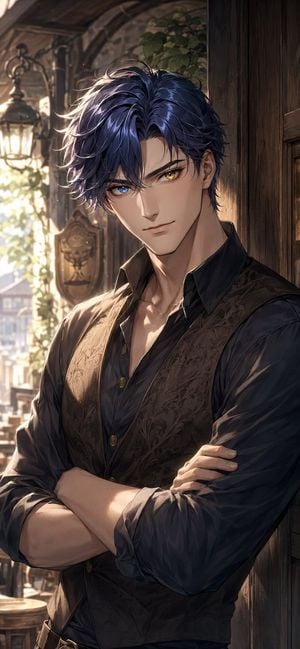
Create a vertical 9:16 high-detail anime-style portrait of a handsome young adult man, {argument name="character name" default="an elegant dark-haired nobleman"}, leaning against a dark wooden doorway with his arms crossed. He has tousled layered {argument name="hair color" default="deep navy blue hair with violet highlights"}, sharp refined facial features, pale skin, a calm confident expression, and heterochromatic eyes: one vivid blue eye and one golden amber eye. Dress him in a dark charcoal button-up shirt with the collar open and sleeves rolled to the forearms, plus a fitted brown-black brocade waistcoat with subtle ornate floral patterns and brass buttons. The pose should show the upper body from about mid-thigh to head, slightly angled toward the viewer, with strong shoulders and crossed forearms in the foreground. Set the scene at {argument name="location" default="a rustic old European-style café or mansion entrance"}, with carved wooden panels on the right, an arched exterior wall, ivy greenery, and exactly one vintage hanging lantern glowing softly on the left. Use warm late-afternoon sunlight streaming from the left/back, creating golden rim light on the hair and face, soft shadows across the clothing, and a romantic cinematic atmosphere. Background should be softly blurred with hints of a balcony, street, and building architecture beyond the doorway. Render with polished fantasy romance light-novel cover quality, intricate linework, painterly shading, luminous eyes, detailed fabric texture, realistic hands, dramatic composition, and no text or watermark.
Choose the primary action to open PicX Studio with the available template settings. Review the model and format, personalize the creative direction, and generate when ready.
Yes. You can change the subject, setting, lighting, mood, format, and available model controls before creating your image.
This template is free to open and customize. Generation usage is shown in PicX Studio before you create.
Start with GPT Image 2, which is the model associated with this template. You can compare another compatible model for a different finish.
Follow a topic to a crawlable collection of related PicX Studio templates.