How do I use the Frozen Time Editorial Portrait template?
Choose the primary action to open PicX Studio with the available template settings. Review the model and format, personalize the creative direction, and generate when ready.
An ultra-realistic cinematic studio portrait of a confident man surrounded by antique objects suspended in midair for a dramatic gallery-style visual.
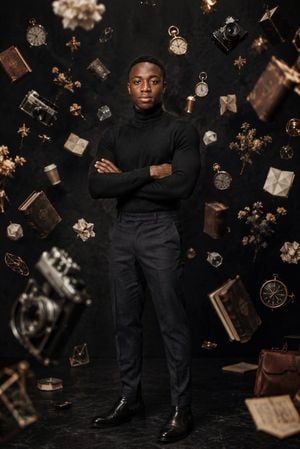
Create an ultra-realistic cinematic editorial portrait of {argument name="character description" default="a confident young Black man in his early 20s with short cropped black hair and smooth skin"} standing full-body in the center of a dark minimalist studio, facing the camera with a calm serious expression and arms crossed. He wears {argument name="outfit" default="a fitted black ribbed turtleneck sweater, charcoal tailored trousers, and polished black leather Chelsea boots"}. The background is a matte black textured wall and dark reflective stone floor, lit with warm dramatic side lighting, soft rim light, shallow depth of field, and subtle golden highlights. Surround him with exactly 30 suspended or foreground objects, frozen in midair as if time has stopped: 6 antique books, 5 gold pocket watches, 4 vintage cameras, 4 dried flower clusters, 4 white folded paper geometric shapes, 3 brass star or compass ornaments, 2 open paper sheets, 1 brown takeaway coffee cup, and 1 brown leather briefcase. Arrange the objects at varied depths around the subject, with some large blurred foreground elements at the bottom left and right, crisp midground objects framing his torso and head, and smaller background objects near the edges. Use a refined gallery-worthy mood, high fashion editorial composition, realistic shadows under every floating item, dust-like atmosphere, black-and-bronze color palette, 85mm lens look, vertical 2:3 aspect ratio, no text, no watermark. The overall theme is {argument name="theme" default="frozen time, memory, knowledge, and ambition"}.
Choose the primary action to open PicX Studio with the available template settings. Review the model and format, personalize the creative direction, and generate when ready.
Yes. You can change the subject, setting, lighting, mood, format, and available model controls before creating your image.
This template is free to open and customize. Generation usage is shown in PicX Studio before you create.
Start with GPT Image 2, which is the model associated with this template. You can compare another compatible model for a different finish.
Follow a topic to a crawlable collection of related PicX Studio templates.