How do I use the Idol Girl with Manga Wall Sketch template?
Choose the primary action to open PicX Studio with the available template settings. Review the model and format, personalize the creative direction, and generate when ready.
Generates a cute studio fashion portrait of a white-dressed idol posing beside a playful manga-style wall illustration of herself.
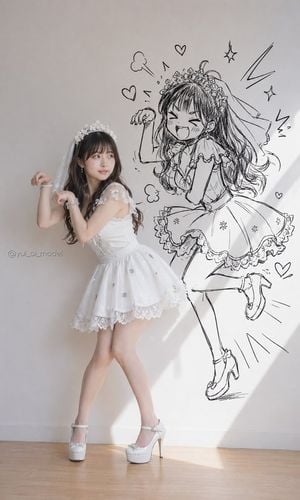
Create a vertical full-body fashion portrait in a bright minimalist studio: a petite young Japanese woman named {argument name="character name" default="Yui"} poses playfully in front of a plain off-white wall, wearing a white lace idol-princess mini dress with a flared skirt, floral appliqué shoulder straps, lace hem, sheer veil, delicate white floral tiara, pearl bracelet, drop earrings, and white platform Mary Jane high heels. She stands on a light wooden floor with one leg crossed forward, hips angled, elbows bent and wrists curled like cute cat paws, looking sideways to her left with a soft shy expression. Behind her on the wall is one large black ink manga-style line drawing of a chibi magical-girl version of the same girl, much larger than the real person, wearing a matching frilly dress, veil, tiara, and high heels, with long flowing hair, one leg kicked up, one fist raised, eyes squeezed shut, and mouth open in an energetic happy shout. Add exactly 10 small surrounding doodle elements around the manga drawing: 4 hearts, 2 puffy cloud marks, 2 sparkle stars, and 2 lightning/action marks. Use soft natural sunlight from the right, including a strong diagonal beam of light across the wall and floor, gentle shadows, realistic photography for the woman, crisp hand-drawn black sketch lines for the wall art, cute Japanese idol aesthetic, high detail, clean composition, no extra props, no extra people, and no added text except a tiny subtle watermark reading {argument name="watermark text" default="@yui_ai_model"} near the lower left wall.
Choose the primary action to open PicX Studio with the available template settings. Review the model and format, personalize the creative direction, and generate when ready.
Yes. You can change the subject, setting, lighting, mood, format, and available model controls before creating your image.
This template is free to open and customize. Generation usage is shown in PicX Studio before you create.
Start with GPT Image 2, which is the model associated with this template. You can compare another compatible model for a different finish.
Follow a topic to a crawlable collection of related PicX Studio templates.