How do I use the Celestial Gothic Library template?
Choose the primary action to open PicX Studio with the available template settings. Review the model and format, personalize the creative direction, and generate when ready.
A wide cinematic fantasy scene of an ornate cosmic library-observatory filled with spiral staircases, glowing orbs, and galaxy-lit architecture.
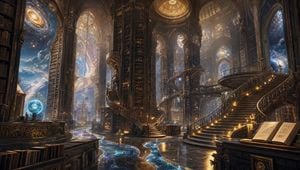
Create an ultra-detailed cinematic fantasy environment: a vast celestial library inside a gothic cathedral-like observatory, with towering dark wood bookshelves rising into immense vaulted arches and ornate bronze-gold filigree. The scene is a wide panoramic interior, viewed from floor level, with a polished black marble floor reflecting warm candlelight and flowing bands of blue starlight like a river of galaxies across the ground. Include exactly three prominent spiral staircases: one grand sweeping staircase on the right with glowing step lights, one central spiral staircase wrapping around a tall cylindrical book tower, and one smaller staircase on the left side. Add enormous arched windows opening directly onto outer space, showing nebula clouds, stars, planets, and a bright spiral galaxy outside the upper left window. Include exactly two glowing blue celestial orbs on pedestals or tables, and exactly two open illuminated books on the right foreground reading desk. The architecture should feel impossibly tall and layered, with balconies, bridges, circular platforms, carved railings, stained-glass domes, gold dust motes, soft volumetric sunbeams, and magical atmosphere. Use a rich palette of deep mahogany, antique gold, midnight blue, and luminous cosmic cyan. Style: epic high-fantasy concept art, hyperrealistic, intricate, atmospheric, sharp details, dramatic wide-angle composition, no people, no readable text, no watermark.
Choose the primary action to open PicX Studio with the available template settings. Review the model and format, personalize the creative direction, and generate when ready.
Yes. You can change the subject, setting, lighting, mood, format, and available model controls before creating your image.
This template is free to open and customize. Generation usage is shown in PicX Studio before you create.
Start with GPT Image 2, which is the model associated with this template. You can compare another compatible model for a different finish.
Follow a topic to a crawlable collection of related PicX Studio templates.