How do I use the Summer Anime Girl by the Sea template?
Choose the primary action to open PicX Studio with the available template settings. Review the model and format, personalize the creative direction, and generate when ready.
A serene anime summer scene of a mint-haired girl relaxing in a breezy tatami room overlooking greenery and the ocean.
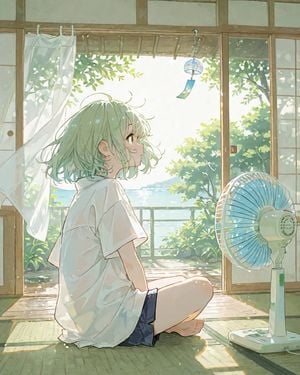
Create a soft, luminous anime-style summer illustration of {argument name="character name" default="a young girl"} sitting barefoot on a tatami floor in a traditional Japanese room, viewed in side profile from slightly behind. She has short, airy bobbed {argument name="hair color" default="pale mint green hair"} with loose wisps catching the breeze, large gentle green eyes, and a calm, dreamy expression as she looks upward toward a small glass wind chime hanging near the open veranda. She wears an oversized plain white short-sleeve T-shirt and dark navy shorts, seated with one knee raised and one leg folded, relaxed and natural. The room has wooden sliding frames, shoji-style panels, an open doorway to a bright garden and distant sparkling sea, a sheer white curtain billowing on the left, and warm sunbeams spilling across the tatami. Include exactly two main foreground objects besides the girl: one translucent blue-bladed standing electric fan on the right, and one hanging glass wind chime with a small dangling paper strip near the top center. Outside, show lush green trees, leafy bushes, a railing, and a hazy blue ocean horizon under intense summer light. Use a delicate watercolor-and-anime aesthetic, pastel colors, soft linework, glowing backlight, floating dust motes, dappled leaf shadows, high-key exposure, nostalgic peaceful mood, vertical 4:5 composition, no text, no watermark, no extra characters.
Choose the primary action to open PicX Studio with the available template settings. Review the model and format, personalize the creative direction, and generate when ready.
Yes. You can change the subject, setting, lighting, mood, format, and available model controls before creating your image.
This template is free to open and customize. Generation usage is shown in PicX Studio before you create.
Start with GPT Image 2, which is the model associated with this template. You can compare another compatible model for a different finish.
Follow a topic to a crawlable collection of related PicX Studio templates.