How do I use the Moody Library Fashion Editorial template?
Choose the primary action to open PicX Studio with the available template settings. Review the model and format, personalize the creative direction, and generate when ready.
A realistic flash-lit fashion editorial scene of a seated woman in a dark vintage library with antique books and luxury styling.
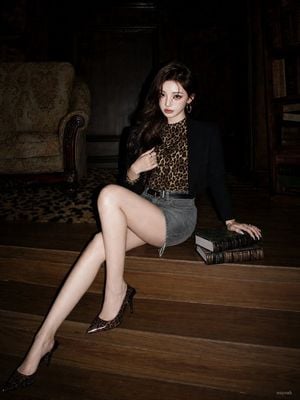
Create a dark editorial fashion photograph in a moody old library interior. A stylish young woman with {argument name="hair color" default="long dark brown wavy hair"} sits on polished wooden steps, posed with one leg crossed and extended toward the camera, wearing a black blazer over a leopard-print high-neck top, a gray denim mini skirt with a black belt, bracelets, and pointed stiletto heels with a leopard pattern and metallic dark toe caps. Her face is intentionally obscured by a soft square blur centered over the face, while her hair remains visible around it. Her left hand lightly touches her hair or collar, and her right hand rests on a stack of exactly 2 antique leather-bound books placed beside her on the step. The setting is a dim, aristocratic study with dark wood wall panels, a patterned upholstered armchair on the left, tall bookshelves filled with old books on the right, and a subtle animal-print rug in the background. Use harsh direct flash photography mixed with deep shadows, high contrast, glossy highlights on skin and wood, a slightly underexposed background, and a luxury magazine / paparazzi fashion aesthetic. Vertical composition, full-body seated pose, low camera angle, warm brown and black color palette, realistic textures, no visible text except a tiny unobtrusive photographer-style watermark in the lower right reading {argument name="watermark text" default="nuyoah"}.
Choose the primary action to open PicX Studio with the available template settings. Review the model and format, personalize the creative direction, and generate when ready.
Yes. You can change the subject, setting, lighting, mood, format, and available model controls before creating your image.
This template is free to open and customize. Generation usage is shown in PicX Studio before you create.
Start with GPT Image 2, which is the model associated with this template. You can compare another compatible model for a different finish.
Follow a topic to a crawlable collection of related PicX Studio templates.