How do I use the Pastel Rainbow Crab template?
Choose the primary action to open PicX Studio with the available template settings. Review the model and format, personalize the creative direction, and generate when ready.
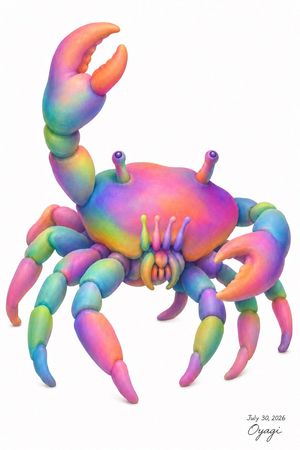
A clean 3D studio render prompt for generating a cute rainbow-colored crab with soft toy-like textures and a minimal white background.
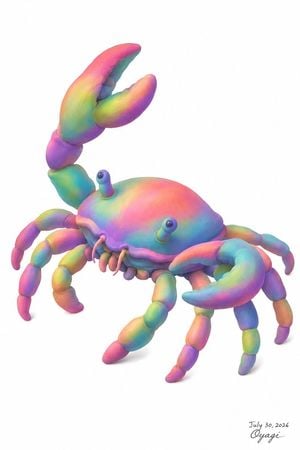
Create a clean studio-style 3D illustration of a whimsical rainbow crab on a pure white background. The subject is a single cute toy-like crab with a smooth rounded shell, soft clay/plush texture, gentle subsurface shading, and pastel iridescent gradients blending {argument name="main color palette" default="cyan, turquoise, pink, purple, yellow, orange, and lime green"}. Pose it in a three-quarter view facing slightly left, with the body centered and lots of empty white space around it. Include exactly 2 raised eyestalks with small dark glossy eyes, exactly 2 large pincers: the left pincer lifted high above the crab and open, the right pincer forward and lower, curved inward. Include exactly 8 segmented walking legs, 4 on each side, made of rounded capsule-like joints with tapered tips, all colored in different rainbow gradients. Add a small row of rounded mouth parts and short feelers under the front shell. Use soft realistic lighting, subtle ambient occlusion, very light contact shadow beneath the legs, high-resolution polished render quality, no scenery, no props, no border. In the lower right corner, add a small handwritten artist signature and date reading {argument name="signature text" default="July 30, 2026 Oyagi"}, in thin black ink, unobtrusive.
Choose the primary action to open PicX Studio with the available template settings. Review the model and format, personalize the creative direction, and generate when ready.
Yes. You can change the subject, setting, lighting, mood, format, and available model controls before creating your image.
This template is free to open and customize. Generation usage is shown in PicX Studio before you create.
Start with GPT Image 2, which is the model associated with this template. You can compare another compatible model for a different finish.
Follow a topic to a crawlable collection of related PicX Studio templates.