How do I use the Urban Fashion Portrait Prompt template?
Edit the prompt in the box under the preview — the template's model and format are already selected — and press Generate. Your version appears right on this page.
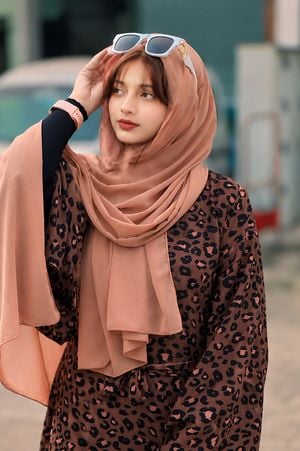
Generates a photorealistic iPhone-style snapshot of a stylish woman in a varsity jacket against a graffiti-covered urban wall, capturing an edgy city atmosphere.

Photorealistic candid iPhone snapshot of a stylish young {argument name="ethnicity" default="East Asian"} woman standing casually in front of a large {argument name="background" default="graffiti-covered urban wall"}. She has {argument name="hair style" default="long straight black hair with soft bangs"}, fair skin, and a calm expression while looking slightly to the side. She is wearing a {argument name="outfit" default="navy and cream varsity jacket over a fitted black crop top, high-waisted tailored gray wide-leg trousers, and chunky black lace-up combat boots"}. A black designer-style tote bag rests beside her on the sidewalk. The background features colorful graffiti tags, street art, brick textures, and an edgy city atmosphere. Natural daylight, realistic skin texture, authentic iPhone photography aesthetic, handheld composition, slightly imperfect framing, documentary street style, soft shadows, subtle depth of field, casual fashion editorial vibe, unedited mobile camera look, ultra-realistic details, vertical 3:4 composition, captured as if taken with an iPhone.
Photorealistic candid iPhone snapshot of a stylish young {argument name="ethnicity" default="East Asian"} woman standing casually in front of a large {argument name="background" default="graffiti-covered urban wall"}. She has {argument name="hair style" default="long straight black hair with soft bangs"}, fair skin, and a calm expression while looking slightly to the side. She is wearing a {argument name="outfit" default="navy and cream varsity jacket over a fitted black crop top, high-waisted tailored gray wide-leg trousers, and chunky black lace-up combat boots"}. A black designer-style tote bag rests beside her on the sidewalk. The background features colorful graffiti tags, street art, brick textures, and an edgy city atmosphere. Natural daylight, realistic skin texture, authentic iPhone photography aesthetic, handheld composition, slightly imperfect framing, documentary street style, soft shadows, subtle depth of field, casual fashion editorial vibe, unedited mobile camera look, ultra-realistic details, vertical 3:4 composition, captured as if taken with an iPhone.
Edit the prompt in the box under the preview — the template's model and format are already selected — and press Generate. Your version appears right on this page.
Yes. You can change the subject, setting, lighting, mood, format, and available model controls before creating your image.
Opening and editing this template is free. Generating uses credits, shown on the Generate button when you are signed in.
Start with GPT Image 2, which is the model associated with this template. You can compare another compatible model for a different finish.
Follow a topic to a crawlable collection of related PicX Studio templates.