
Light of Awakening Event Poster
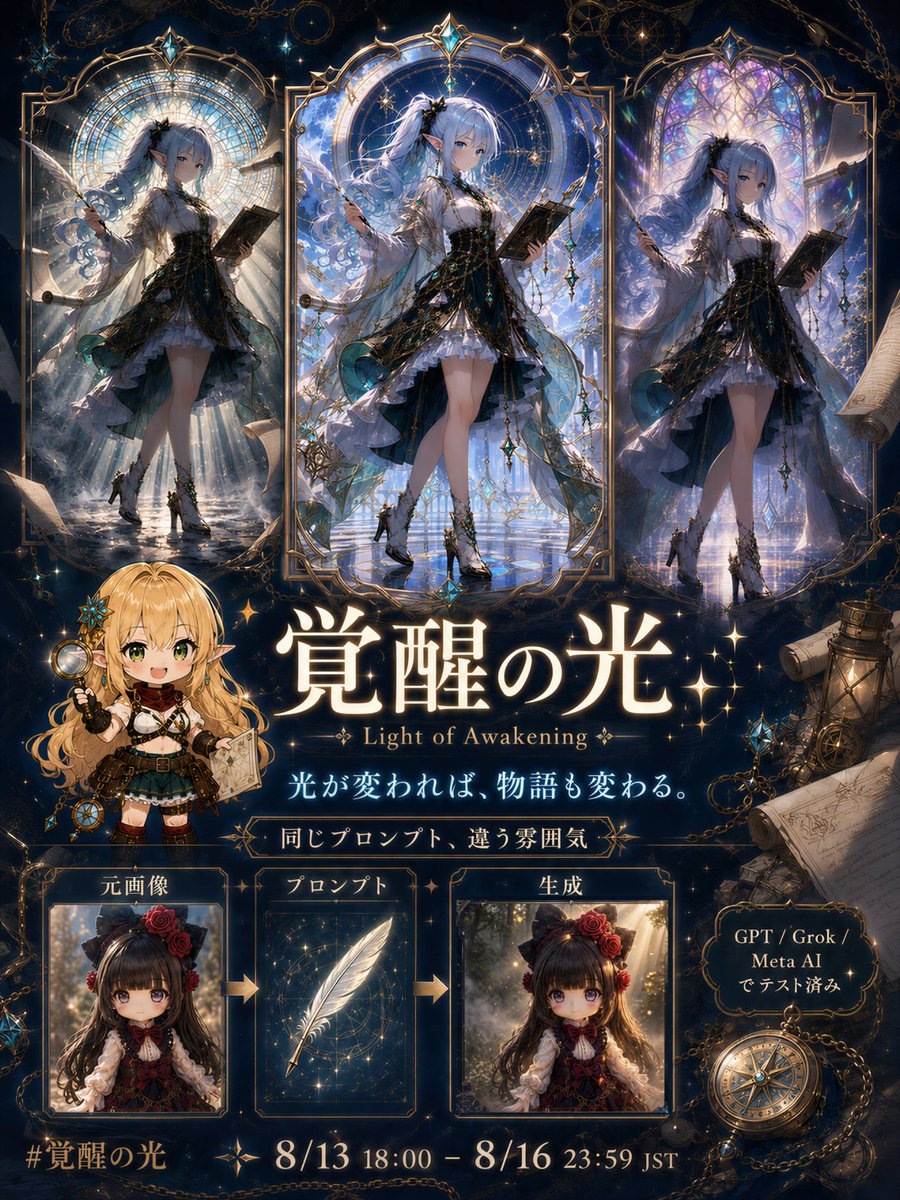
A richly ornamented anime fantasy event announcement poster showing three lighting transformations of the same character with Japanese title text and participation flow cards.
- Prompt included
- Model and format preset
- Free template
The prompt behind this image
Copy the exact prompt behind Light of Awakening Event Poster, or open it in the studio and make it yours.
Goal: Create an ornate dark-fantasy anime event announcement poster for {argument name="event title" default="覚醒の光"}, with the English subtitle “Light of Awakening,” themed around transforming the same original character through a more fitting magical light. Canvas: Vertical 4:5 poster, richly detailed, midnight navy and gold color palette, glowing celestial atmosphere, elegant fantasy UI framing, high-resolution anime illustration style. Layout: Divide the poster into three main zones. Top zone: exactly 3 tall arched stained-glass character panels arranged left, center, right. Middle zone: large title typography and mascot. Bottom zone: participation flow and event date information. Top character panels: Show the same elegant anime girl in all 3 panels, preserving her pose, outfit, hairstyle, and overall identity while changing the lighting mood in each panel. She has long pale silver-blue hair, a dark bow or floral hair ornament, blue eyes, a black-and-white gothic fantasy dress with layered frills, translucent teal-black overskirt, gold chains and star ornaments, thigh-high white stockings, ornate black boots, small feathered wings, and an open book held in one hand. Count exactly 3 versions: left panel with divine pale sunlight streaming through a circular stained-glass halo; center panel with bright blue celestial awakening light, crystalline reflections, strongest glow, and elaborate gold frame; right panel with purple-blue moonlit stained glass and mystical shimmer. Each panel should have an ornate gold arch frame with star motifs and delicate filigree. Middle zone: Place a cute chibi elf mascot at lower left of the title area. The mascot is a blonde female elf with long wavy hair, green eyes, pointed ears, cheerful open-mouth smile, dark adventurer outfit with gold accents, small boots, and explorer accessories. She holds a magnifying glass in one hand and a parchment/map in the other. To her right, place the huge glowing Japanese title {argument name="main Japanese title" default="覚醒の光"} in luminous white-gold serif calligraphy, with small sparkle symbols around it. Under it, place the English subtitle “Light of Awakening.” Below that, place the Japanese tagline {argument name="tagline" default="光が変われば、物語も変わる。"} in glowing pale blue-white. Beneath the tagline, add a small gold-framed ribbon reading “同じプロンプト、違う雰囲気”. Bottom flow section: Create exactly 3 rectangular framed cards in a row with arrows between them. Card 1 label: “元画像”; image: a small square portrait of a brown-haired gothic lolita anime girl with red roses in her hair. Card 2 label: “プロンプト”; image: a glowing white feather over a starry blue background. Card 3 label: “生成”; image: the same brown-haired girl transformed by warmer dramatic light. Add two gold arrows, one between card 1 and card 2, and one between card 2 and card 3. At the bottom left, show the hashtag {argument name="hashtag" default="#覚醒の光"}. At the bottom center, show the event period {argument name="event period" default="8/13 18:00 – 8/16 23:59 JST"} in large gold-white serif text. On the lower right, add a small ornate plaque reading “GPT / Grok / Meta AI でテスト済み”. Decorative elements: Count exactly these major decorative props: 3 large arched stained-glass frames at the top, 3 bottom instruction cards, 1 chibi elf mascot, 1 compass at lower right, 1 lantern near the right edge, 3 rolled parchment scrolls on the right side and lower right, multiple gold chains draped across the top and corners, starbursts, tiny constellations, crystal ornaments, and antique map fragments. Use lavish gold filigree borders around the entire poster. Visual style: Ultra-detailed fantasy anime key visual, luminous magical lighting, polished gacha-game event banner aesthetic, ornate art nouveau frames, stained glass, celestial sparkles, deep shadows, radiant highlights, high contrast, elegant Japanese typography, premium poster design. Constraints: Keep all text crisp and readable. Preserve the exact count of the 3 top character panels and 3 bottom flow cards. Do not add extra characters beyond the main repeated girl and the single chibi elf mascot. Avoid modern UI minimalism; the design should feel antique, magical, and ceremonial.
How to use Light of Awakening Event Poster in 3 steps
- 1Upload ImagePNG, JPG or paste
Add your photo
Upload the photo the template builds on. The prompt, model and format are already set.
- 2…a portrait of your subject in softgolden-hour light, 85mm…
Personalize
Edit the subject and creative details for your destination.
- 3Generate
Generate
Press Generate — your image is created in PicX Studio, so you can compare it with the original and refine one variable at a time.
More like this
Templates with the same subject, style or setup. Open one to see its prompt.
Canada Goalkeeper Twilight Editorial Portrait

Japan Travel Brochure Poster

Cartoon TV Show Poster Pack

Trendy Cafe Drink Promo Poster

Urban Fashion Editorial Collage Streetwear Poster

Premium Fashion Editorial Cover Layout System

Polo Ralph Lauren Luxury American Heritage Fashion Campaign

Monochrome Halftone Editorial Fashion Poster

Retro Mirror Luxury Fashion Campaign Poster

Luxury Fashion Campaign Typography Poster System

Premium Fashion Editorial Campaign Poster System

Ultra-Stylized High-Fashion Streetwear Poster
Make it yours
Light of Awakening Event Poster works as-is. These are the safest ways to change it without losing the look.
Change one field
Copy a single group, rewrite it, and generate again so you can see what that field is doing.
Keep the frame, change the subject
Hold the composition and light of Light of Awakening Event Poster, then swap wardrobe, props or the person for a new take.
| If the result… | Why | Fix |
|---|---|---|
| The result drifts from the preview | Too many fields changed at once. | Reuse Light of Awakening Event Poster as-is first, then change one group — subject, light, or setting. |
| The model over-stylizes the scene | The prose prompt leaves finish and camera underspecified. | Add one camera or lighting sentence and stay on GPT Image 2. |
More GPT Image 2 templates
Other prompts made for GPT Image 2.

Six VTuber Japanese Logo Sheet

Realistic Portrait of Woman and Deer

The Vista Modular Condo Poster

AI Model Routing Comparison Infographic

2.5D Anime Art Board

Isometric Productivity Desk Scene

New York Double Exposure Poster

Four-Panel AI Landscape Comparison

Japanese Tatami Lifestyle Magazine Cover

NESCAFÉ Coffee Map Poster
More image prompts
Fresh picks from across the catalog.
Stylized Tech Illustration Template
Hyperrealistic Ancient Roman Empire Coin
Image generation prompt for a young woman with red hair and sequin dress

Low-angle man with hood scarf and cat on head
Tokyo Gallery Guide Brochure
Hilbert Curve Infographic
Glamour Photo Prompt for Gemini Nano Banana
Melancholic Subway Commuter Portrait
Ascetic Monk Cleaning Neon Tokyo
Cute Chaos Cyberpunk Maid Elf
Browse template categories
Light of Awakening Event Poster questions
How do I use the Light of Awakening Event Poster template?
Add your photo if the template asks for one, edit the prompt if you like — the template's model and format are already selected — and press Generate. Your version opens in PicX Studio.
Can I customize the Light of Awakening Event Poster template?
Yes. You can change the subject, setting, lighting, mood, format, and available model controls before creating your image.
Is the Light of Awakening Event Poster template free?
Opening and editing this template is free. Generating uses credits, shown on the Generate button when you are signed in.
Which AI model should I use?
Start with GPT Image 2, which is the model associated with this template. You can compare another compatible model for a different finish.
Looking for something else? Browse all templates.

Your photo, any look
Thousands of ready templates for every top image and video model, from one credit balance.